
 Join our Discord
Link text purpose
Screen reader users rely on a link’s text to understand where a link leads. The link’s text is the accessible name announced by screen readers. When a link’s text is vague, such as here, read more, or tap here, it’s difficult for users to understand the link’s purpose. This can be especially problematic when a screen reader lists links on their own, stripped of the content around them. This rule checks that the link text alone, or the link text together with its surrounding context, clearly conveys the purpose of each link.
- Rule Category :
Accessibility Labels - WCAG 2.1 & 2.2 SC :
2.4.4 (A),2.5.3 (A) - RAAM 1.1 :
5.1 - Rule Severity :
Moderate - Supported Platforms :
Android,iOS
Success criteria
The rule checks for the following potential violations:
- Link text that is generic or ambiguous, such as here, click here, read more, or more.
- Link text where the purpose of the link is not clear or is misleading when the surrounding context is taken into consideration.
- Link text that is a raw web address, such as a full or shortened URL, which does not describe the purpose of the link.
- Multiple links on the same screen that share the same generic text, making them indistinguishable to screen reader users.
AI-powered testing
BrowserStack provides an AI-powered Issue Detection Agent that evaluates each link’s accessible name together with its surrounding context to determine whether the link’s purpose is clear. When the purpose is unclear, the agent suggests a descriptive accessible name based on the link’s context.
AI-powered results are clearly marked in the report so you can review and apply suggestions as needed.
The Issue Detection Agent performs the following checks:
-
Evaluates link text in context
- Determines the link’s accessible name and assesses whether it conveys the link’s purpose on its own.
- Detects links whose text is misleading relative to the actual destination.
- When the name is ambiguous or non-descriptive, evaluates it against the surrounding context to check whether the purpose becomes clear. This context includes the parent paragraph or text block, the preceding heading, the enclosing list item or card, and neighboring text.
- Flags links that use a raw web address as their text, and links whose text is misleading relative to the surrounding content.
-
Suggests descriptive link text
- Generates an accessible name that conveys the link’s purpose, ideally meaningful even when read on its own.
- For links that repeat the same generic text on a screen, suggests distinct labels based on each link’s context.
For more information, see Issue Detection Agent.
How to fix
You can fix violations manually or by applying the AI-powered fix.
Manual fix
To fix a violation, provide a link text that conveys the link’s purpose, and choose the correction that matches the cause:
- Replace generic text such as here or read more with text that states the destination or action. For example, change Read more to Read more about our privacy policy.
- Ensure the link text does not imply a different destination than the one the link opens.
- Do not use a URL as the link text. Instead, add link text with a short description of where the link goes. For example, change
https://example.com/privacyto View our privacy policy. - Do not use the same generic text for several links on the same page or section. Use a distinct text for each link based on its surrounding context. For example, change the text of multiple Learn more links to Learn more about savings accounts and Learn more about current accounts.
- Keep the visible text and the accessibility label consistent, so the link reads the same way on screen and to assistive technologies.
Platform and framework specific fixes
The element that represents a link, and the attribute that carries its accessible name, vary by platform and framework. Apply the fix for your platform or framework:
- For an inline text link, set the
ClickableSpanorURLSpantext to describe the link’s destination. - For a clickable view used as a link, set a descriptive
contentDescription.
AI-powered fix
You can also use the AI-powered suggestions to implement descriptive names that clearly convey the purpose and destination of your links.
The AI engine only generates the suggestions. You must manually review and implement the suggestions in your codebase using the steps mentioned in the Manual fix section.
Example
The following scan report shows a link text purpose violation in an Android app:
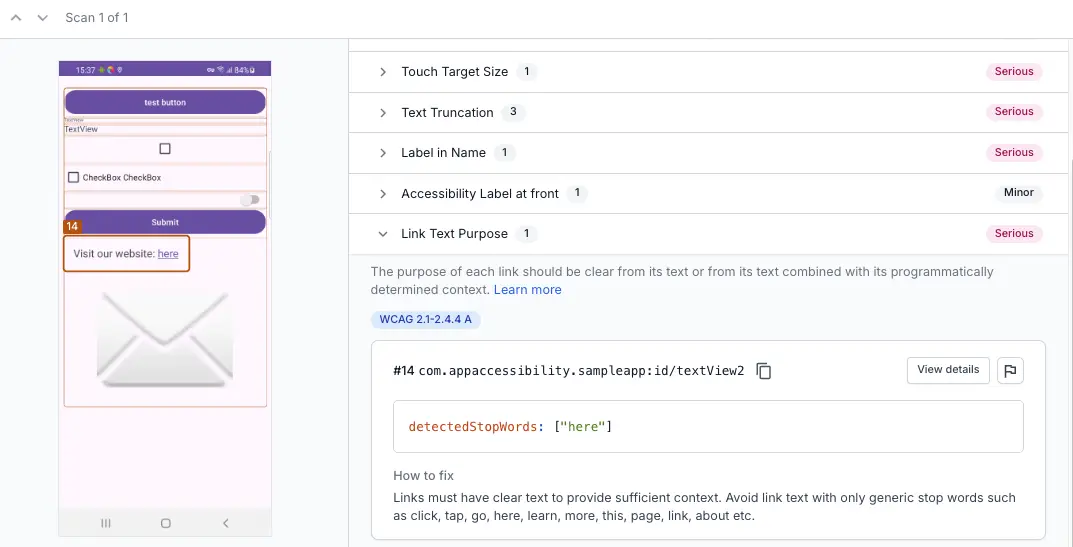
Violation
The report flags the element textView2, which presents the link text here in the sentence Visit our website: here.
The surrounding text Visit our website: does not provide enough context as it does not clarify which website or what content the user will find in the destination. As here is non-descriptive on its own, and the surrounding context does not resolve the ambiguity, this is a violation.
Fix
Replace the generic text with an accessible name that describes the destination, such as Visit company X website.
References
WCAG
- 2.4.4 Link Purpose (In Context) (Level A): WCAG 2.1 · WCAG 2.2
- 2.5.3 Label in Name (Level A): WCAG 2.1 · WCAG 2.2
RAAM 1.1
- 5.1: RAAM 1.1
We're sorry to hear that. Please share your feedback so we can do better
Contact our Support team for immediate help while we work on improving our docs.
We're continuously improving our docs. We'd love to know what you liked
We're sorry to hear that. Please share your feedback so we can do better
Contact our Support team for immediate help while we work on improving our docs.
We're continuously improving our docs. We'd love to know what you liked
Thank you for your valuable feedback!