
 Join our Discord
Readable font size
The readable font size rule checks whether the text in your app is large enough for users to read comfortably. Font size below a minimum size is hard to read for users with low vision, users with reduced contrast sensitivity, and anyone using the app in poor lighting conditions or while in motion, such as while walking or in a vehicle. Small text size also forces users to magnify the screen, which hides the content around it and can also make certain app features non-functional.
The rule evaluates text elements and editable fields that are visible on screen, aren’t covered by another element, and contain text.
- Rule Category :
Text resize - WCAG Guidelines :
Best Practice - Rule Severity :
Minor - Supported Platforms :
Android
Success criteria
The rule checks for the following potential violations:
- A text element that has a font size set below the minimum size of
14sp. - An editable field that has a font size set below the minimum size of
14sp.
Equivalent units
If your app declares a font size in a unit other than sp, the rule checks for the following values:
| Unit | Minimum size |
|---|---|
sp |
14sp |
dp |
14dp |
pt |
6pt |
mm |
2.222mm |
in |
0.087in |
px |
No fixed value. The minimum scales with the pixel density of the screen, so text that passes on one device can fail on a device with a higher pixel density. |
If your text is declared in a unit not listed in the table, then the rule doesn’t evaluate the text.
How to fix
To prevent readable font size violations:
- Set the font size of every text element and editable field to at least
14sp.
Platform-specific fixes
- Set
android:textSizeto14spor higher on everyTextViewandEditTextin your layout XML. - In Kotlin or Java, set the size with
setTextSize(TypedValue.COMPLEX_UNIT_SP, 14f)so the value is read as scale-independent pixels.
Example
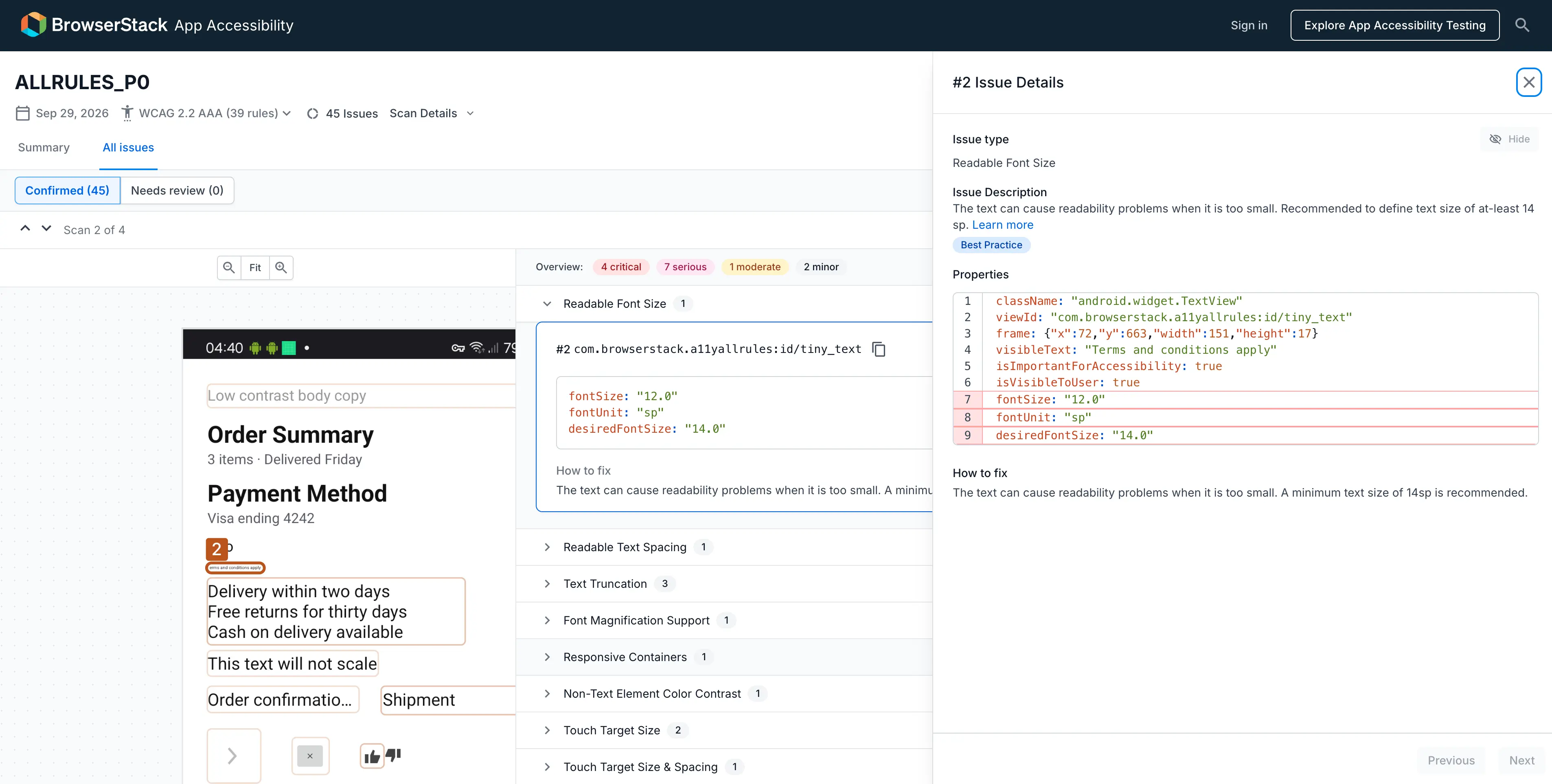
The following screenshot highlights a readable font size violation in an Android app:
Errors
- The
TextViewthat displays Terms and conditions apply has thefontSizeset as12sp, which is below the14sprecommended minimum.
Fix
- Set the font size of the Terms and conditions apply
TextViewto14spor higher.
We're sorry to hear that. Please share your feedback so we can do better
Contact our Support team for immediate help while we work on improving our docs.
We're continuously improving our docs. We'd love to know what you liked
We're sorry to hear that. Please share your feedback so we can do better
Contact our Support team for immediate help while we work on improving our docs.
We're continuously improving our docs. We'd love to know what you liked
Thank you for your valuable feedback!