Get your setup working faster. Join our Discord for optimisation tips from elite testers.Join our Discord
Test Reporting & Analytics on NUnit
Quick start guide to integrate BrowserStack Test Reporting & Analytics with NUnit
Pre-requisites
You have a C# NUnit test suite.
Ensure you have .Net v6.0+ and NUnit v3.0.0+.
You may run your tests on BrowserStack Automate or even on any other cloud provider or even locally.
Your tests can be unit / integration / functional or of any nature.
Integrate with Test Reporting & Analytics
You can use BrowserStack Test Reporting & Analytics both when you’re using BrowserStack’s devices and browsers to run your functional end-to-end tests and also if you’re running tests locally on your laptop/CI system or even when you’re using some other cloud provider.
Not only that, Test Reporting & Analytics is agnostic to the type of testing and hence you could also integrate it with your unit or integration test suite written using NUnit.
Please select your setup below to get started with an awesome debugging experience with Test Reporting & Analytics:
To start using BrowserStack Test Reporting & Analytics with your existing setup of NUnit tests running on BrowserStack Automate or App Automate, you’d need to integrate with the BrowserStack SDK. Follow one of the methods below to integrate the SDK and start using Test Reporting & Analytics:
If you’re an existing BrowserStack SDK user, you can skip the steps below. However, ensure that you’ve specified static names (names should not change across build runs) for projectName and buildName in the browserstack.yml file in your project. Also, restrict the characters in your projectName and buildName to alphanumeric characters (A-Z, a-z, 0-9), underscores (_), colons (:), and hyphens (-). Any other character will be replaced with a space.
Steps to install BrowserStack SDK as a NuGet package:
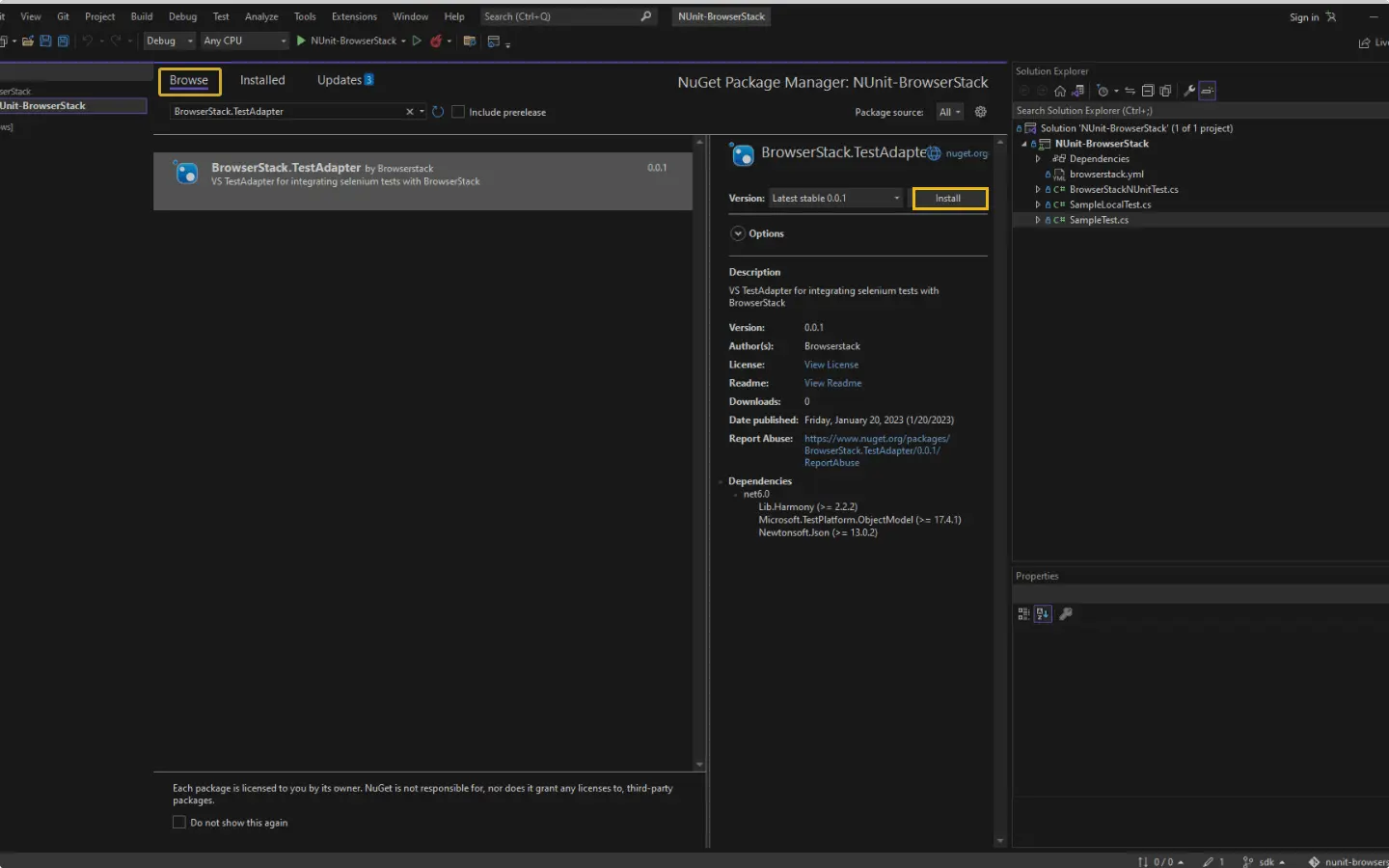
On the Visual Studio toolbar, select Project → Manage NuGet Packages.
A NuGet Package Manager Window opens.
In the Browse tab, search for BrowserStack.TestAdapter, and click Install.
Create the browserstack.yml file
Ensure you create browserstack.yml file at the root of your directory with the following structure.
```yml
userName: YOUR_USERNAME
accessKey: YOUR_ACCESS_KEY
buildName: "Your static build/job name goes here"
projectName: "Your static project name goes here"
CUSTOM_TAG_1: "You can set a custom Build Tag here"
# Use CUSTOM_TAG_<N> and set more build tags as you need.
testObservability: true
browserstackAutomation: false # Set to true for tests on BrowserStack products.
```
The projectName and buildName config must be static and not change across different runs of the same build. This is a deviation in approach as specified by BrowserStack Automate or App Automate as Test Reporting & Analytics will automatically identify different build runs.
Restrict the characters in your projectName and buildName to alphanumeric characters (A-Z, a-z, 0-9), underscores (_), colons (:), and hyphens (-). Any other character will be replaced with a space.
Enable Test Reporting & Analytics
Run the following commands to set Test Reporting & Analytics on in an environment variable. This is a onetime setup that you will need to do before running tests.
Once you have installed the SDK, a browserstack.yml config file will be created at the root level of your project. This file holds all the required capabilities to run tests on BrowserStack.
Make sure you copy the contents of the below config file and set it in your project’s browserstack.yml file:
```yml
userName: YOUR_USERNAME
accessKey: YOUR_ACCESS_KEY
buildName: "Your static build/job name goes here"
projectName: "Your static project name goes here"
CUSTOM_TAG_1: "You can set a custom Build Tag here"
# Use CUSTOM_TAG_<N> and set more build tags as you need.
testObservability: true
browserstackAutomation: false # Set to true for tests on BrowserStack products.
```
The projectName and buildName config must be static and not change across different runs of the same build. This is a deviation in approach as specified by BrowserStack Automate or App Automate as Test Reporting & Analytics will automatically identify different build runs.
Restrict the characters in your projectName and buildName to alphanumeric characters (A-Z, a-z, 0-9), underscores (_), colons (:), and hyphens (-). Any other character will be replaced with a space.
Run your test suite with Test Reporting & Analytics
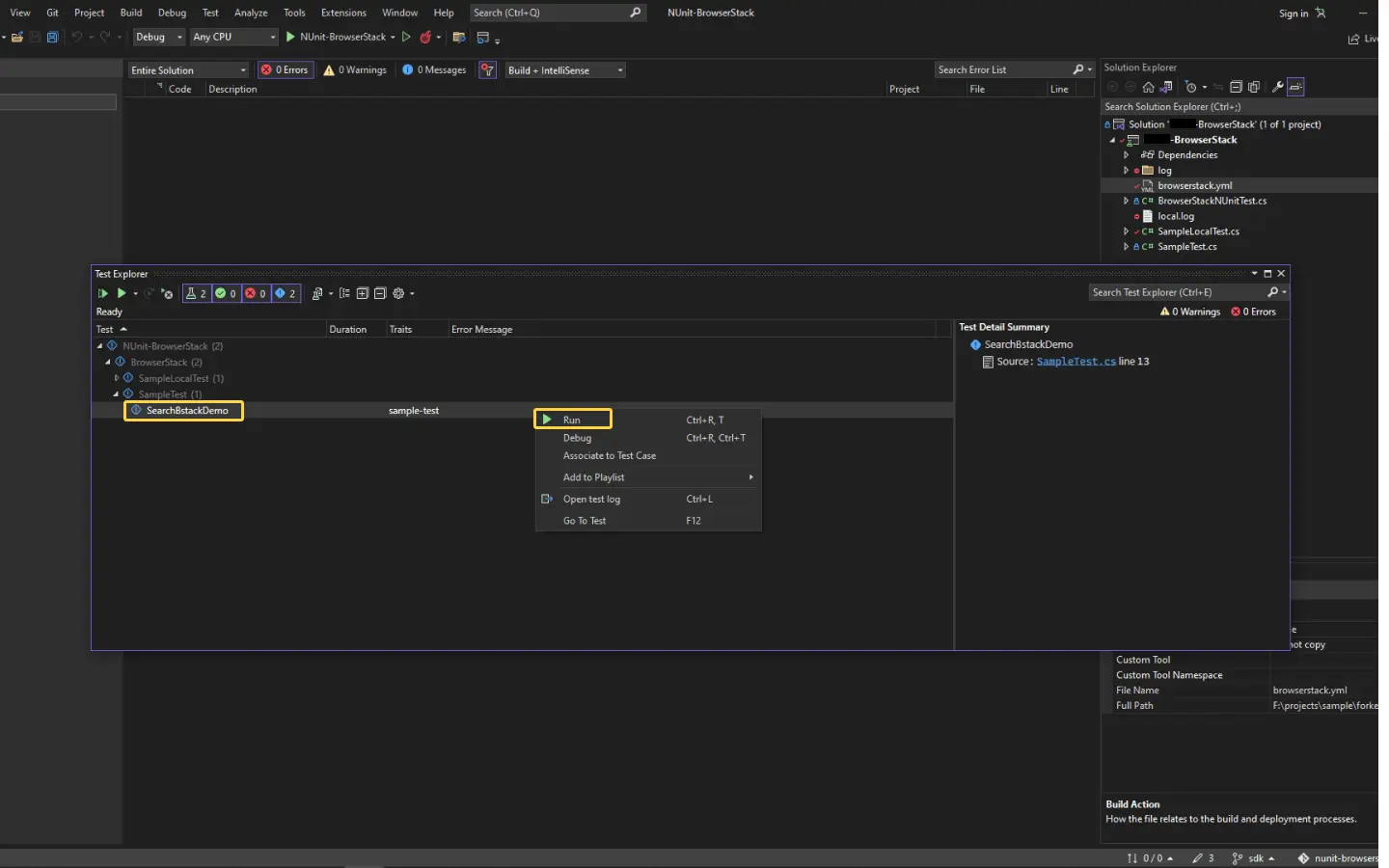
Continue running your tests as you have been running previously. The command to run your tests using the BrowserStack SDK remains unchanged. For your reference, here’s a sample command:
```bash
dotnet test --filter <EXPRESSION> [other_args]
```
Verify you have BrowserStack.TestAdapter installed
As you’re an existing BrowserStack SDK user, you must already be having a browserstack.yml config file at the root level of your project, as well as BrowserStack.TestAdapter as a dependency.
Check if you have the following entry in your .csproj file of your project.
Alternatively, you can run dotnet list package and ensure BrowserStack.TestAdapter is present.
Test Reporting & Analytics mandatorily needs the following four configurations in the file. You need not change anything but you have to ensure that the values of the buildName and projectName variables are not changing across different build runs.
```yml
userName: YOUR_USERNAME
accessKey: YOUR_ACCESS_KEY
buildName: "Your static build/job name of CI goes here"
projectName: "Your static project name goes here"
CUSTOM_TAG_1: "You can set a custom Build Tag here"
# Use CUSTOM_TAG_<N> and set more build tags as you need.
testObservability: true
...
```
The projectName and buildName config must be static and not change across different runs of the same build. This is a deviation in approach as specified by BrowserStack Automate or App Automate as Test Reporting & Analytics will automatically identify different build runs.
Restrict the characters in your projectName and buildName to alphanumeric characters (A-Z, a-z, 0-9), underscores (_), colons (:), and hyphens (-). Any other character will be replaced with a space.
Enable Test Reporting & Analytics
Run the following commands to set Test Reporting & Analytics on in an environment variable. This is a onetime setup that you will need to do before running tests.
Continue running your tests as you have been running previously. The command to run your tests using the BrowserStack SDK remains unchanged. For your reference, here’s a sample command:
Post build run completion, you’ll be able to see the build run report along with all necessary debugging information right on this dashboard.
To start using BrowserStack Test Reporting & Analytics with your existing setup of NUnit tests running on your local laptop or CI or even on any other cloud provider, you’d need to integrate using the BrowserStack SDK. Follow one of the methods below to integrate the SDK and start using Test Reporting & Analytics:
BrowserStack Test Reporting & Analytics works with any kind of automation tests. Use it with your unit or integration test suites and also your end-to-end functional test suite.
Steps to install BrowserStack SDK as a NuGet package:
On the Visual Studio toolbar, select Project → Manage NuGet Packages.
A NuGet Package Manager Window opens.
In the Browse tab, search for BrowserStack.TestAdapter, and click Install.
Create the browserstack.yml file in your project root
Ensure you create browserstack.yml file at the root of your directory with the following structure.
```yml
userName: YOUR_USERNAME
accessKey: YOUR_ACCESS_KEY
buildName: "Your static build/job name of CI goes here"
projectName: "Your static project name goes here"
CUSTOM_TAG_1: "You can set a custom Build Tag here"
# Use CUSTOM_TAG_<N> and set more build tags as you need.
testObservability: true
...
```
The projectName and buildName config must be static and not change across different runs of the same build. This is a deviation in approach as specified by BrowserStack Automate or App Automate as Test Reporting & Analytics will automatically identify different build runs.
Restrict the characters in your projectName and buildName to alphanumeric characters (A-Z, a-z, 0-9), underscores (_), colons (:), and hyphens (-). Any other character will be replaced with a space.
Enable Test Reporting & Analytics
Run the following commands to set Test Reporting & Analytics on in an environment variable. This is a onetime setup that you will need to do before running tests.
Once you have installed the SDK, a browserstack.yml config file will be created at the root level of your project. This file holds all the required capabilities to run tests on BrowserStack.
Make sure you copy the contents of the below config file and set it in your project’s browserstack.yml file:
```yml
userName: YOUR_USERNAME
accessKey: YOUR_ACCESS_KEY
buildName: "Your static build/job name goes here"
projectName: "Your static project name goes here"
CUSTOM_TAG_1: "You can set a custom Build Tag here"
# Use CUSTOM_TAG_<N> and set more build tags as you need.
testObservability: true
browserstackAutomation: false # Set to true for tests on BrowserStack products.
```
The projectName and buildName config must be static and not change across different runs of the same build. This is a deviation in approach as specified by BrowserStack Automate or App Automate as Test Reporting & Analytics will automatically identify different build runs.
Restrict the characters in your projectName and buildName to alphanumeric characters (A-Z, a-z, 0-9), underscores (_), colons (:), and hyphens (-). Any other character will be replaced with a space.
Run your test suite with Test Reporting & Analytics
Continue running your tests as you have been running previously. The command to run your tests using the BrowserStack SDK remains unchanged. For your reference, here’s a sample command:
```bash
dotnet test --filter <EXPRESSION> [other_args]
```

 Join our Discord