
 Join our Discord
Run accessibility checks using the CLI
Use the Accessibility DevTools Command Line Interface (CLI) to automate accessibility checks in your development workflow.
The Accessibility DevTools CLI enables you to scan your codebase for accessibility issues directly from the terminal. This is useful for integrating accessibility testing into CI/CD pipelines or running checks locally without a UI.
With the CLI, you can scan multiple files or entire directories at once, and add accessibility as a quality check to your Git commits or CI/CD builds. This helps you catch issues early and maintain accessibility standards throughout your development workflow.
Install the CLI
Navigate to your project’s root directory and install the CLI using the following command:
curl -L "https://api.browserstack.com/sdk/v1/download_cli?os=macos&os_arch=arm64" | bsdtar -xvf- -O > browserstack-cli && chmod 0775 browserstack-cli
Authenticate with your BrowserStack account
- Log in to your BrowserStack account or sign up if you don’t have an account.
-
Obtain your Username and Access Key from the Account & Profile section section on the dashboard.
- Set the following environment variables using the Username and Access Key you obtained in step 2. This allows the CLI to authenticate with your BrowserStack account:
BROWSERSTACK_USERNAMEBROWSERSTACK_ACCESS_KEY
Add the export commands to the configuration file, depending on your shell:
-
Zsh: Add the following lines to your
~/.zshrcfile:export BROWSERSTACK_USERNAME=YOUR_USERNAME export BROWSERSTACK_ACCESS_KEY=YOUR_ACCESS_KEY -
Bash: Add the following lines to your
~/.bashrcor~/.bash_profilefile:export BROWSERSTACK_USERNAME=YOUR_USERNAME export BROWSERSTACK_ACCESS_KEY=YOUR_ACCESS_KEY -
Fish Shell: Add the following lines to your
~/.config/fish/config.fishfile:set -x BROWSERSTACK_USERNAME YOUR_USERNAME set -x BROWSERSTACK_ACCESS_KEY YOUR_ACCESS_KEY
After updating your configuration file, restart your terminal or run
sourceon the file to apply the changes.
Run accessibility checks
To scan your files or directories for accessibility issues, use the following command:
./browserstack-cli accessibility --include src/**.jsx
This command scans all .jsx files in the src directory and its subdirectories for accessibility issues.
CLI options
You can use the following options with the CLI:
| CLI command | Description |
|---|---|
--include or -i
|
Specify one or more glob patterns to include files to check. |
--exclude or -e
|
Specify one or more glob patterns to exclude files from checks. |
--scope <diff\|all> |
Set the scope of the accessibility scan. all (default) scans every file matched by --include or --exclude. diff scans only the lines you’ve changed. Requires the project to be a git repository. |
--base <ref> |
Use with --scope=diff to compare against a specific branch or commit, for example --base=main, instead of your local staged or unstaged changes. Typically used in CI. |
--username or -u
|
Set your BrowserStack username. If you do not specify this option, the CLI uses the BROWSERSTACK_USERNAME environment variable. |
--access-key or -k
|
Set your BrowserStack access key. If you do not specify this option, the CLI uses the BROWSERSTACK_ACCESS_KEY environment variable. |
--non-strict or -n
|
Only print violations, exit with success code. |
--help |
Display help and usage information. |
--format |
Change the format of the CLI output:json: JSON format. See sample output schema for JSON and sonar.sonar: SonarQube Generic Issue format. See sample output schema for JSON and sonar.html: Downloadable HTML report. See generate a downloadable HTML report. |
--output or -o
|
Set the file path for the report generated with --format html. Defaults to accessibility-devtools-report.html in the current directory. |
Scope checks to changed code only
By default, the CLI scans every file matched by --include and --exclude. If you want to check only the code you’ve actually changed, for example in a pre-commit hook or a PR check, use --scope=diff:
--scope=diff requires your project to be a git repository. If no .git directory is found, the CLI exits with code 2 and an error message.
Local mode without the --base flag
When you run the command without --base, --scope=diff checks your staged changes, the same content that would be included if you ran git commit right now. Behavior depends on your working tree state:
| Working tree state | What happens |
|---|---|
| Staged changes only | Lints the staged content. |
| Staged and unstaged changes, in different files | Lints the staged content. Prints a note that unstaged files were not included. |
| Staged and unstaged changes, in the same file | Lints the staged content. Translates reported line numbers to match what you see in your editor, not the raw staged diff. Prints a note. |
| Unstaged changes only, nothing staged | Doesn’t run a scan. Suggests running git add to stage your changes first. |
| Clean working tree, no changes at all | Doesn’t run a scan, since there’s nothing to check. |
If you have unstaged changes you want included, stage them with git add before you run the check.
CI mode with the --base flag
In CI, use --base to scope the scan to everything changed relative to a branch or commit, rather than your local staged changes:
This is useful for PR checks where you want to flag only the issues introduced by the PR, not pre-existing issues elsewhere in the codebase.
How pre-existing issues on changed lines are handled
If you edit a line that already had an accessibility issue, the CLI reports that issue. You’re responsible for lines you touch, even if you didn’t introduce the original issue. However, the command still exits 0 as long as your change didn’t introduce any new issues. It doesn’t fail your commit or PR purely because of pre-existing issues on lines you touched, only for issues that are new.
Exit codes
The CLI returns the following exit codes:
| Exit Code | Meaning |
|---|---|
| 0 | No accessibility issues. |
| 1 | New open accessibility issues. |
| 2 | BrowserStack connection issues. When you use --scope=diff, the CLI also returns this code if it finds no git repository, no staged changes to lint, or a clean working tree with nothing to scan. |
Sample pre-commit hook to run accessibility checks
You can use the following script to run accessibility checks automatically before each commit. Add this script to your repository’s .git/hooks/pre-commit file:
Sample script using --scope=diff
For faster pre-commit checks, scope the scan to only the changes you’re about to commit instead of your entire codebase:
This checks only the files and lines you’ve staged, so the hook stays fast even on large codebases.
Sample output schema in JSON and SonarQube Generic Issue format
You can change the format of the CLI output using --format json to JSON and --format sonar for SonarQube Generic Issue format.
Sample output schema using --format json
You can use the --format parameter to get CLI output in JSON format.
The following is a sample output schema in JSON format:
Sample output schema using --format sonar
You can use the --format parameter to get CLI output in SonarQube Generic Issue format.
The following is a sample output schema in SonarQube Generic Issue format:
Generate a downloadable HTML report
Use --format html to generate a self-contained HTML report of a scan. The report is a single file that opens offline, so you can share it over email or attach it to a pull request without giving reviewers access to your dashboard or codebase.
By default, the CLI writes the report to accessibility-devtools-report.html in the current directory. Use --output to set a different path.
The report contains:
- A header with run metadata: timestamp, CLI version, target path, and flags used.
- A summary scorecard with the total issue count, counts by severity (
error,warn,info), and the number of files scanned. - Issues grouped by severity, then by rule. Each rule shows its ID, title, description, and how to fix.
- Per-file and per-location detail, including file path, line and column, and code context.
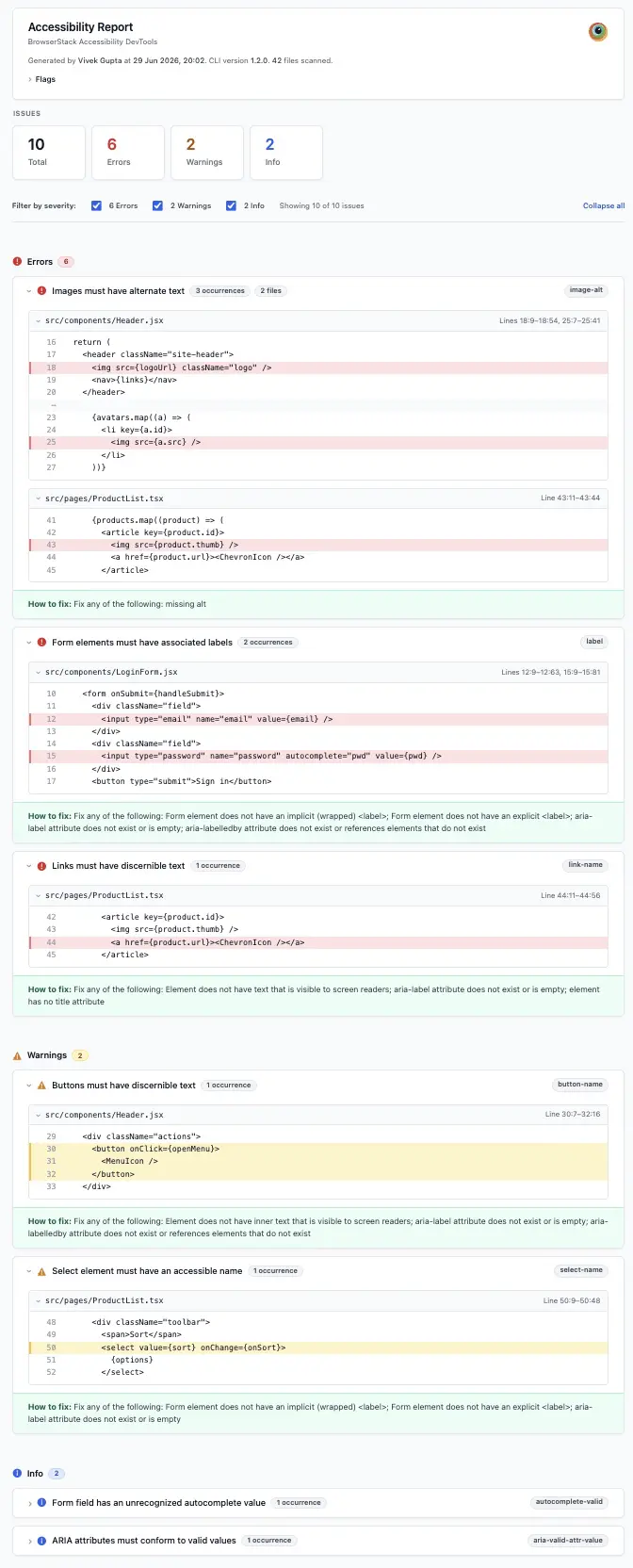
If the scan finds no issues, the CLI still generates a report with a clean “no violations found” state.
Upload the HTML report from GitHub Actions
Add --format html to the accessibility check step in your workflow, then upload the report as a build artifact using actions/upload-artifact:
Set if: always() on the upload step so the report still uploads even when the check step exits with code 1 for new issues. This doesn’t replace the CLI’s inline PR comments. It gives reviewers a downloadable file alongside them.
We're sorry to hear that. Please share your feedback so we can do better
Contact our Support team for immediate help while we work on improving our docs.
We're continuously improving our docs. We'd love to know what you liked
We're sorry to hear that. Please share your feedback so we can do better
Contact our Support team for immediate help while we work on improving our docs.
We're continuously improving our docs. We'd love to know what you liked
Thank you for your valuable feedback!