
 Join our Discord
App Percy report generator
Generate comprehensive visual testing reports from Percy builds with detailed snapshots, visual diffs, and project summaries.
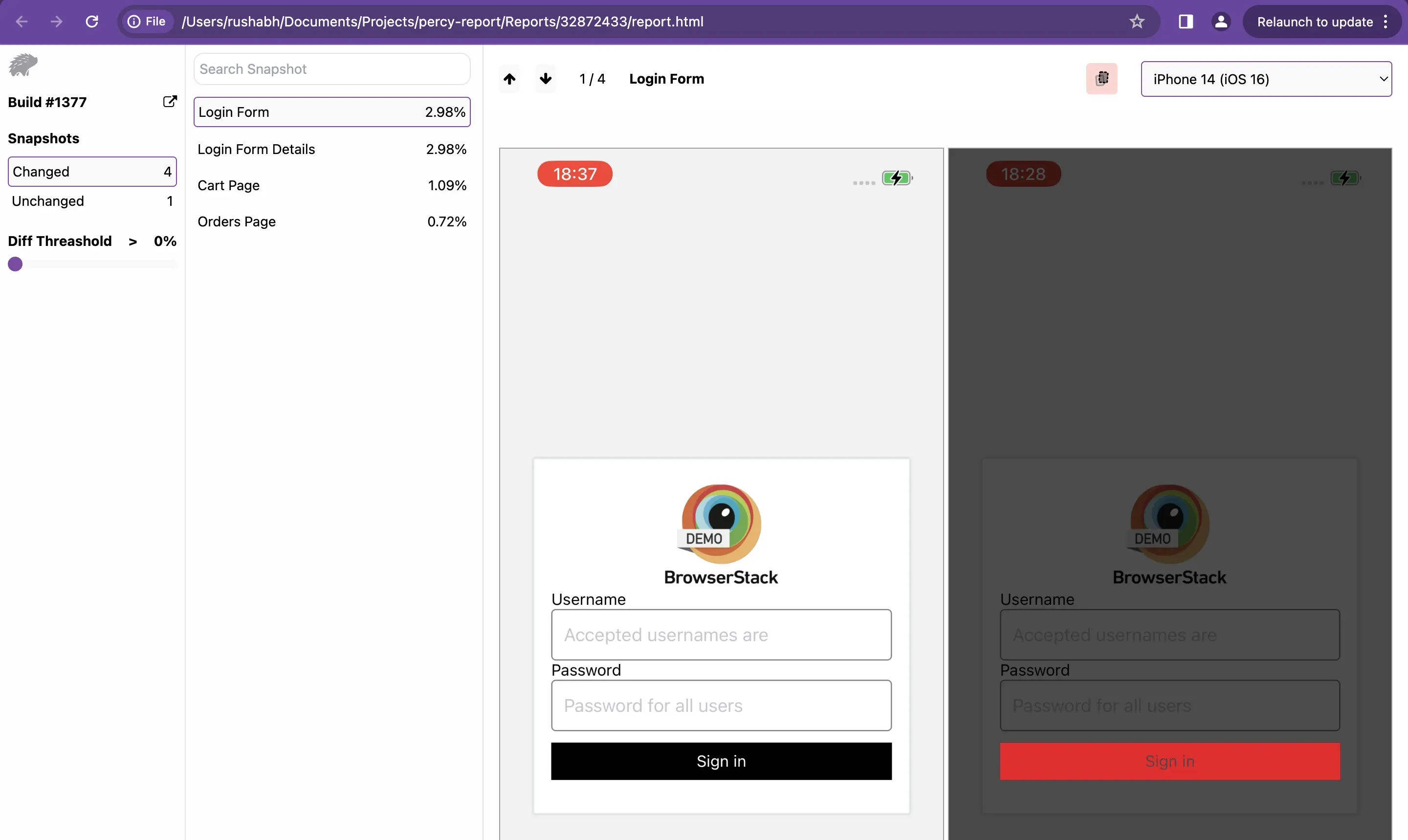
Percy report generator is a command-line tool that generates comprehensive visual testing reports from your Percy builds. It retrieves snapshot data from Percy’s API and creates detailed reports that highlight visual changes, differences, and test results. You can generate reports for individual builds or create project summaries across multiple builds within a specified date range.
Key features
- Generate detailed reports for specific Percy build
- Download snapshot images and visual diff
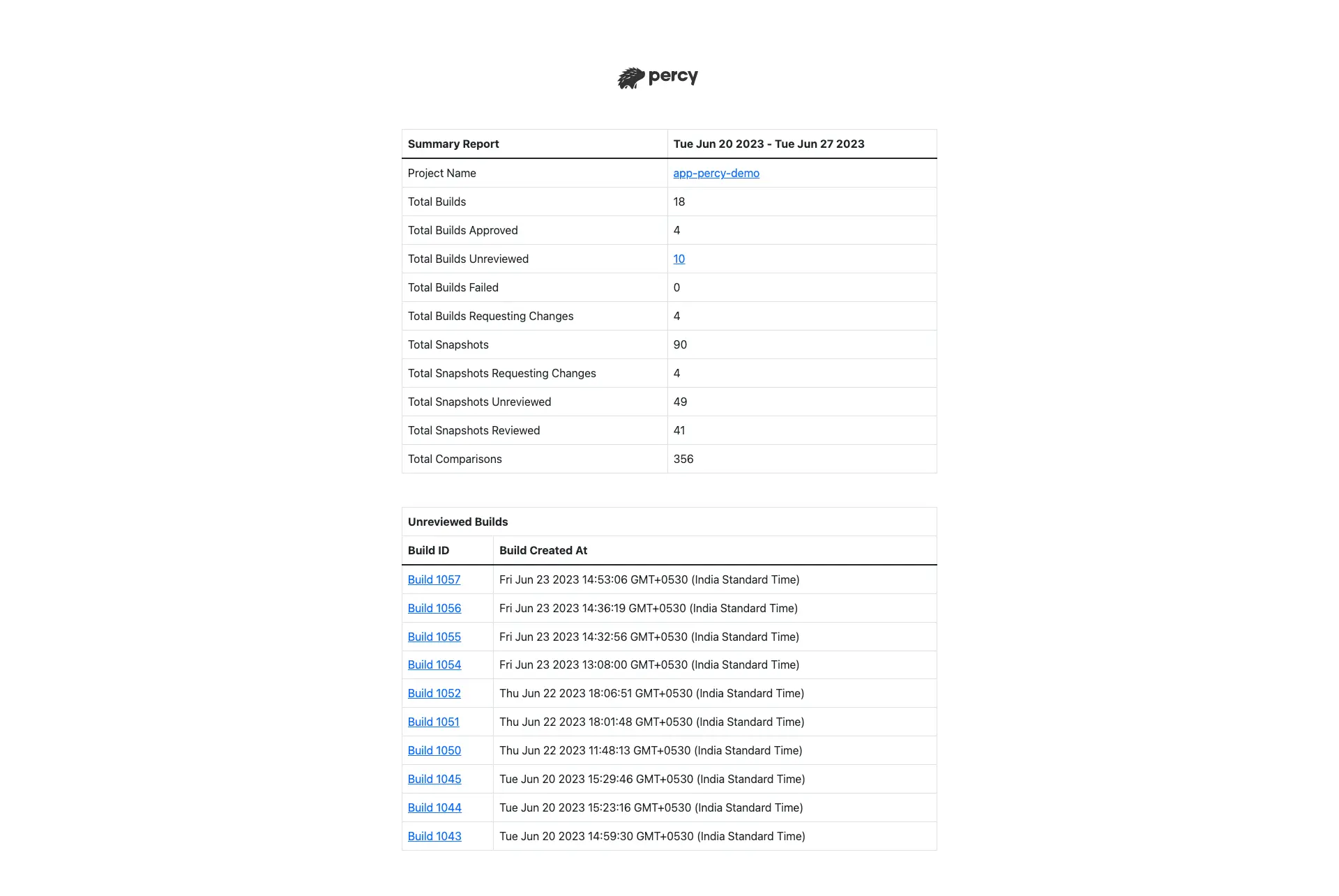
- Create project summaries across date range
- Customize diff thresholds and report locations
- Export reports in multiple format
Installation
Install Percy Report Generator using npm.
npm install @percy/report
Export Percy token
Get your Percy Read Only or Full Access token from your Percy project settings and export it:
export PERCY_TOKEN=<read-only | full-access>
Usage
Percy Report Generator offers two primary commands:
- generate reports for individual builds
- create project summaries across multiple builds
Generate report per build
Generate a detailed report for a specific Percy build using the build ID.
npx percy-report generate <buildId> [options]
You can find the Build ID in the Percy Dashboard URL and the REST API data.
Example Build URL: https://percy.io/<projectId>/PercyReporting/builds/<buildId>
Options for percy-report generate:
| Option | Description |
|---|---|
--percy-token <percyToken> |
Percy Read Only or Full Access Token (default: PERCY_TOKEN environment variable) |
--download-path <downloadPath> |
Directory path where the report generates (default: “./Reports”) |
--download-images |
Downloads images when set to true (default: false) |
--diff-threshold |
Threshold for percentage change in snapshots (default: 1) |
-h, --help |
Displays help for command |
Generate report along with Percy runs
Follow these steps:
- Run the Percy build
- Extract the Percy build ID from the Percy run
- Execute the Percy report generation step
Example:
export PERCY_TOKEN=<your-percy-token>
BUILD_ID=$(npx percy exec -- {Test Command} | grep https:\/\/percy.io\/.*\/builds | awk -F "/" '{print $NF}')
npx percy-report generate $BUILD_ID
Generate project summary
Generate a comprehensive summary report for all builds within a specified date range.
npx percy-report summary <project-slug> [options]
Note: The project slug equals the project name on your Percy dashboard.
Options for summary functionality
| Option | Description |
|---|---|
--percy-token <percyToken> |
Percy Read Only or Full Access Token |
--start-date <start-date> |
Considers builds created on or after start date (mm/dd/yyyy) (Default: Today) |
--end-date <end-date> |
Considers builds created on or before end date (mm/dd/yyyy) (Default: Today) |
-h, --help |
Displays help for command |
The interval between start date and end date must not exceed 30 days.
We're sorry to hear that. Please share your feedback so we can do better
Contact our Support team for immediate help while we work on improving our docs.
We're continuously improving our docs. We'd love to know what you liked
We're sorry to hear that. Please share your feedback so we can do better
Contact our Support team for immediate help while we work on improving our docs.
We're continuously improving our docs. We'd love to know what you liked
Thank you for your valuable feedback!