
 Join our Discord
Text format validation
Handle dynamic data like dates, phone numbers, and IDs by defining format-based rules in plain English.
The Visual Review Agent allows you to distinguish between routine data updates and critical formatting regressions. Instead of writing complex Regular Expressions (Regex), you can use natural language prompts to tell the AI which changes are acceptable and which should be flagged as bugs.
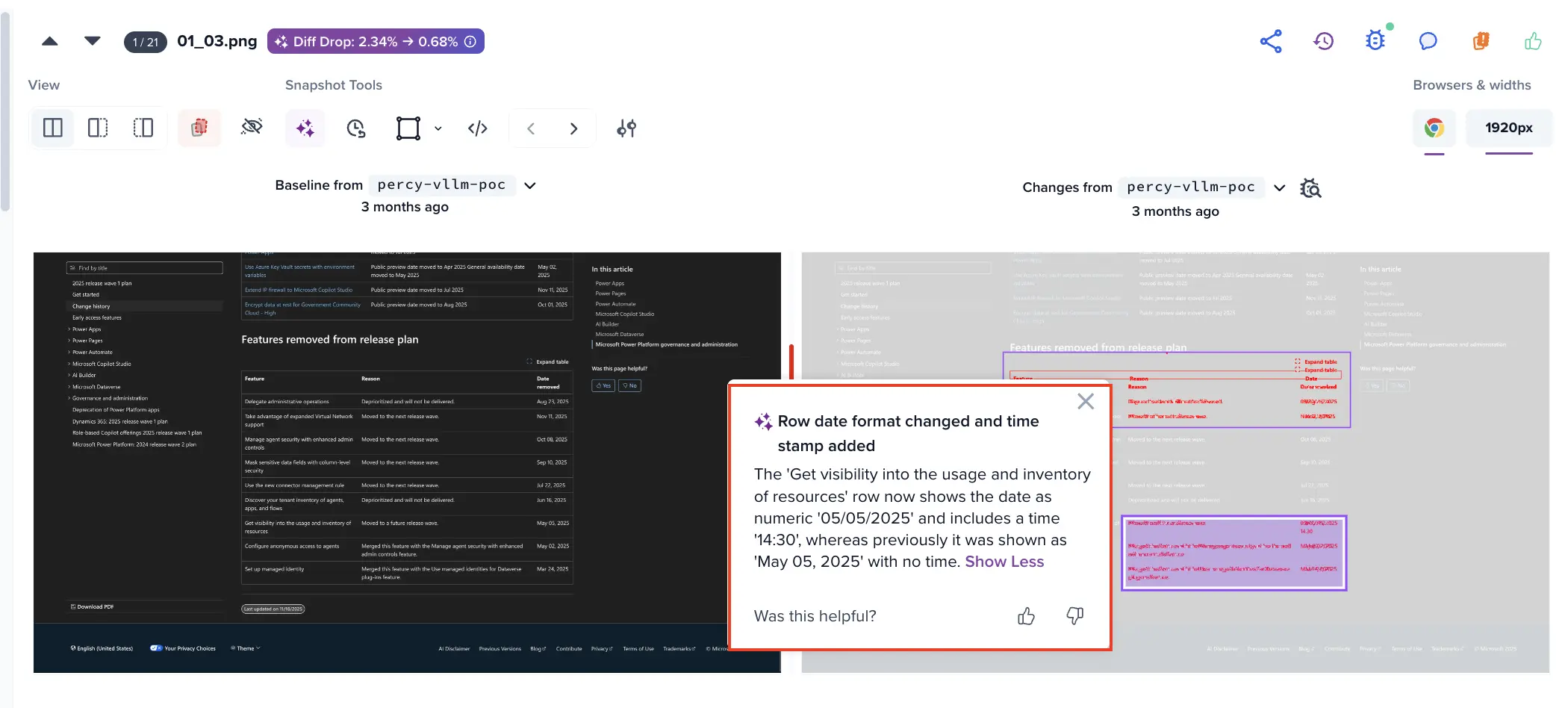
Benefits
- Beyond pattern matching: Unlike traditional Regex that ignores any text matching a pattern, our agent understands the semantic format. If a currency symbol is missing, it gets flagged even if the numbers are valid.
- Reduce false positives: Automatically ignore daily date updates or randomized build IDs while keeping the test green.
- No maintenance: You don’t need to update code when a format changes slightly; the AI adapts to your natural language instructions.
- Readable rules: Anyone on the team can understand the validation logic without needing to decode Regex strings.
Example prompts
Use the following prompts to manage dynamic elements. For the most reliable results, we recommend this standardized phrasing: “Changes to [X] can be ignored, unless they break format.”
| Use Case | ❌ Less effective prompt | ✅ Effective prompt | Why it’s better |
|---|---|---|---|
| Date updates | Ignore date changes | Changes to date can be ignored, unless they break format | Ignores value changes (May 5 to May 6) but flags layout shifts (e.g. adding a timestamp). |
| Phone Numbers | Ignore numbers | Changes to phone number can be ignored, unless they break format | Recognizes the structure of a phone number and flags if country codes or separators are missing. |
| System/Build IDs | Ignore rev id | Changes to rev id can be ignored, unless they break format | Handles alphanumeric strings that change every deployment without triggering a diff. |
| Security/CAPTCHAs | Ignore CAPTCHAs | Changes to CAPTCHAs can be ignored, unless they break format | Validates that security strings maintain their expected length and complexity. |
How to apply format validation
You can define these rules directly within the Prompt Manager while reviewing a build:
-
Access the Prompt Manager: Click the AI Prompt icon in the Percy toolbar.
-
Define the rule: Enter your instruction in plain English. Example: “Changes to transaction ID can be ignored unless they break format.”
-
Set the scope:
-
Project level: Applies the rule to all snapshots in the project (recommended for common elements like footers).
-
Snapshot level: Applies the rule only to the current snapshot.
-
-
Confirm & regenerate: Click Submit. The agent re-processes the diffs and applies your formatting logic across all enabled browsers.
For more information, check Visual Review Agent - Customization documentation page.
Key capabilities
- Intelligent format awareness: The Visual Review Agent doesn’t just look for character types; it understands visual structure. If your price format changes from $10.00 to 10.00, the agent flags the missing $ as a format break. This ensures your UI remains compliant with design standards.
- Persistent learning: Once you save a project-level prompt, it applies to all future builds. The agent “learns” the expected format from your baseline snapshots. You do not need to provide specific rules like “must be 10 digits” or “must be alphanumeric”, the AI handles this complexity for you.
Best practices
- Be category-specific: Instead of a generic “Ignore text,” specify the category (e.g., “Changes to invoice number can be ignored…”).
- Use standard phrasing: The agent is optimized for the phrase “…can be ignored unless they break format.”
- Review at scale: Use Project-level rules to handle dynamic data that appears across your entire application, such as timestamps in a global navigation bar.
We're sorry to hear that. Please share your feedback so we can do better
Contact our Support team for immediate help while we work on improving our docs.
We're continuously improving our docs. We'd love to know what you liked
We're sorry to hear that. Please share your feedback so we can do better
Contact our Support team for immediate help while we work on improving our docs.
We're continuously improving our docs. We'd love to know what you liked
Thank you for your valuable feedback!