
 Join our Discord
Understand the selected baseline
Understand specific baseline reasoning for your visual comparisons.
This page helps you understand the baseline build selected for your build, so you can verify that your visual tests compare against the correct reference point.
It is available for Projects using Git or Visual Git baseline management strategies and shows why the selected baseline is used, making it easier to review and validate your visual testing workflow.
View selected baseline details
To view details about the selected baseline:
- Navigate to your Percy project dashboard.
- Select the build you want to review.
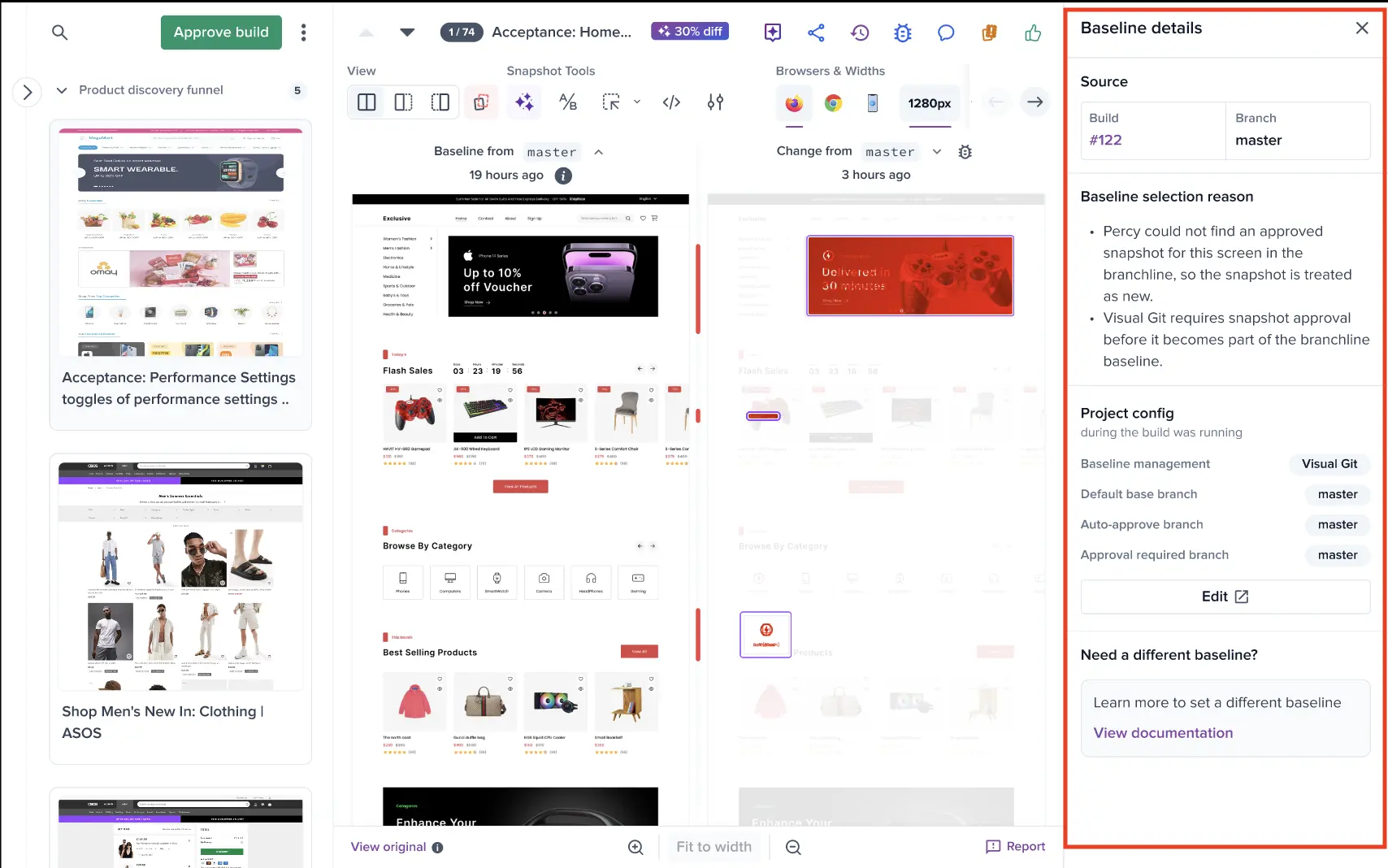
- Click the information icon below Baseline from to open the Baseline details panel.

The Baseline details panel displays:
- Selected baseline details: The build number and branch used for comparison.
- Baseline selection reason: The specific logic path that leads to the snapshot status.
- Project config: The configuration settings that impacted the baseline when the build ran.
- Alternative baseline information: Other potential baselines that you can select.
Use cases for Git, Visual Git, and common workflows
Git
Same branch previous build (Linear flow)
Percy selects the immediately previous build {build_number} on the same branch {base_branch_name} as the baseline. This ensures comparisons follow the natural progression of changes on the branch.
Approval required with approved build
When the branch {branch_name} requires approvals, Percy selects the most recent approved build as the baseline. This ensures comparisons use a reviewed and accepted state.
Forked branch baseline
Percy selects the build {build_number} from the base branch {base_branch} as the baseline. This ensures comparisons reflect changes introduced after branching.
Approval branch with no approved builds
Percy does not select a baseline because no approved builds exist on {base_branch_name}. As a result, Percy cannot perform comparisons.
Default base branch fork
Percy selects the build {build_number} from the default base branch {default_branch} as the baseline. This ensures comparisons use the standard reference branch.
Pull request target branch
Percy selects the latest build from the pull request target branch {target_branch} as the baseline. This ensures comparisons align with the intended merge destination.
First build
Percy does not select a baseline because this is the first build on {branch_name}. No comparisons run since no previous builds exist.
Target branch override
When PERCY_TARGET_BRANCH is set, Percy selects the latest build on {target_branch} as the baseline. This overrides default branch selection logic.
Target commit override
When PERCY_TARGET_COMMIT is set, Percy selects the build for commit {target_commit_hash} as the baseline. This anchors comparisons to a specific commit.
PR takes priority over target branch
Percy selects the baseline from the pull request target branch {target_branch}. Pull request context takes priority over PERCY_TARGET_BRANCH, ensuring comparisons reflect the PR flow.
Partial build comparison
Percy selects the baseline using standard logic. It compares only the uploaded snapshots because the current build is partial.
Auto-approval branch
Percy selects the last approved build {build_number} as the baseline. Auto-approval then approves the current build without manual review.
Configured base branch
Percy selects the build at the fork point from the configured base branch {default_branch} as the baseline. This ensures comparisons use the configured reference branch.
No eligible baseline
Percy does not select a baseline because no eligible build is found after evaluating all strategies. As a result, Percy cannot run comparisons.
Target branch without PR
When PERCY_TARGET_BRANCH is set and no pull request is detected, Percy selects the build from {target_branch} as the baseline. This ensures comparisons use the explicitly specified branch.
Target commit overrides branch logic
When PERCY_TARGET_COMMIT is set, Percy selects the build for commit {commit_hash} as the baseline. This overrides all branch-based baseline selection logic.
Invalid target commit fallback
Percy cannot find a build for the specified commit {commit_hash}. It falls back to the default baseline selection strategy.
Previous full build
Percy selects the previous full build {build_number} as the baseline. This ensures comparisons use the most recent complete build.
Previous build was partial
Percy skips the previous partial build and selects the last full build {build_number} as the baseline. This ensures comparisons use a complete reference.
Only partial builds exist
Percy does not select a baseline because only partial builds exist and no full build is available. As a result, Percy cannot run comparisons.
Invalid Target branch (Non-existent)
When PERCY_TARGET_BRANCH is set to {branch_name} that does not exist, Percy cannot use it as a baseline source. Percy falls back to the default selection strategy.
Invalid Target branch (No builds)
When PERCY_TARGET_BRANCH is set to {branch_name} with no builds, Percy cannot find a baseline. Percy falls back to the default selection strategy.
Re-running exact commit
When a CI rebuild runs for commit {commit_hash} that Percy has already built, Percy reuses the same baseline logic for that commit. This ensures consistent comparisons across rebuilds.
Visual Git
Branchline snapshot baseline
Percy selects the latest approved snapshot {snapshot_id} from the branchline {branchline_name} as the baseline. Visual Git compares your snapshots against approved snapshots within the same branchline.
First build on a new branchline
Percy does not find approved snapshots in {branchline_name}. If approved snapshots exist in the baseline branchline, Percy uses them as the baseline. This ensures comparisons still run using an available reference.
Branchline synced from master
Percy uses snapshots synced from the baseline {baseline_name} as the baseline. This ensures your comparisons reflect the latest synced state.
Snapshot merged to master
Percy uses snapshots merged into the baseline {baseline_name} from {branchline_name}. This ensures comparisons include changes already promoted to the baseline.
Selective sync baseline
Percy uses selectively synced snapshots from the baseline branchline {baseline_branchline} as the baseline. This ensures comparisons reflect only the snapshots you choose to sync.
Common
Wait for base build
With wait_for_base_build enabled, Percy waits for the in-progress build on the base branch {base_branch} to finish (instead of skipping it) and then selects that build as the baseline.
Base build waiting on failed base build
Percy waits for an in-progress build on {base_branch}. If that build fails while Percy is waiting, Percy re-runs baseline selection and selects the next eligible completed build as the baseline.
PR from Approval-Required branch
When a PR is raised from an approval-required branch ({branch_name}) to a different target branch, Percy bypasses the latest-approved baseline strategy and uses the standard PR merge-base to select the baseline. This ensures comparisons reflect the actual code changes between branches.
Figma Build/Snapshot
Percy does not select a baseline for Figma or design builds. It sets base_build or base_snapshot to nil because comparisons run against design files instead of a previous Percy build.
Manual diff base
When diff_base: :manual is configured, Percy selects the most recent approved build on the target branch {branch_name} as the baseline.
Temporary merge commit
When the target commit is a temporary merge commit (temporary_merge_commit), Percy anchors baseline selection to that commit using a target commit override. This ensures accurate comparisons for the generated merge state.
Expired / Purged builds
Percy cannot use the build at the merge-base ({build_number}) because it exceeds the data retention policy. Percy selects the next available eligible build as the baseline.
We're sorry to hear that. Please share your feedback so we can do better
Contact our Support team for immediate help while we work on improving our docs.
We're continuously improving our docs. We'd love to know what you liked
We're sorry to hear that. Please share your feedback so we can do better
Contact our Support team for immediate help while we work on improving our docs.
We're continuously improving our docs. We'd love to know what you liked
Thank you for your valuable feedback!