
 Join our Discord
Triage regression runs with the Visual Testing Plugin
Review nightly and regression Percy builds from your AI coding agent.
The Visual Testing Plugin is in beta. Features and commands can change in future releases.
Review your regression builds and report the bugs they catch in a few minutes, without leaving your AI coding agent or IDE. If your team runs a visual regression suite on a schedule, such as nightly or on a pre-production branch, the Visual Testing Plugin turns the morning review into one conversation:
- Review from your coding agent: Triage a Percy build from Claude Code, GitHub Copilot, Cursor, or any other supported agent, instead of reviewing each snapshot in the dashboard.
- Explained changes: The plugin explains each visual change from what shipped since your last approved run, and recommends approving the changes it can explain.
- Bug reports in your team’s tracker: The plugin flags the broken snapshots and files bugs the way your team does, in Jira, GitHub, or a draft for another tracker.
- You stay in control: Nothing is approved, flagged, or filed until you confirm.
The triage works whether or not your team can read the app’s code. Central QA teams that test apps built by other teams or vendors can explain changes from release notes, a Jira release, or the Visual Review Agent alone.
Prerequisites
- A Percy project on a paid Percy plan, which includes the Visual Review Agent.
- The project’s full access token, which has read and write access, set as
PERCY_TOKENin your environment. Find the token under Project settings > Token. - Your BrowserStack username and access key, which the plugin uses to act on builds. Set them as
BROWSERSTACK_USERNAMEandBROWSERSTACK_ACCESS_KEYin your environment or in.percy/.env. Find them on your account profile. If you have more than one account, use the one in the project’s Percy organization. - A visual regression suite that builds into a Percy web project or a Percy on Automate project on a recurring branch, such as
nightly. If you need support for App Percy, contact us. - A supported AI coding agent: Claude Code, OpenAI Codex, Cursor, GitHub Copilot, Antigravity, or Gemini CLI.
- Optional: the GitHub CLI, signed in with read access to the app repositories, to explain changes from merged pull requests.
Never paste your PERCY_TOKEN or BrowserStack credentials into the chat. Set them in your environment instead.
Install the plugin in your QA repository
Choose the path for your agent.
Claude Code
Add the plugin marketplace and install the plugin from your Claude Code session:
/plugin marketplace add percy/percy-visual-testing-agent
/plugin install percy-visual-testing
Cursor, Codex, Antigravity, or Gemini CLI
In your regression-suite repository, run the installer with the --qa flag:
curl -fsSL https://raw.githubusercontent.com/percy/percy-visual-testing-agent/main/install.sh | bash -s -- --qa
GitHub Copilot
In your regression-suite repository, run the installer with both the --copilot and --qa flags:
curl -fsSL https://raw.githubusercontent.com/percy/percy-visual-testing-agent/main/install.sh | bash -s -- --copilot --qa
Commit the files the installer adds so your whole team gets the same commands.
Set up the plugin for regression runs
Run /percy-setup in your QA repository. If the repository already runs Percy, setup doesn’t change your tests. Setup asks the following questions:
- Whether to set up the repository as a regression suite. If your repository contains only tests, setup proposes this, with the branch your recurring builds use, such as
nightly, as the regression branch. Accept the recommended option. Otherwise, setup treats the repository as the app. - Where the app’s code lives and whether you can read it. Enter the GitHub repositories, or choose the option for no code access.
- If you have no code access, which sources explain each deploy: release notes, a Jira release, or neither.
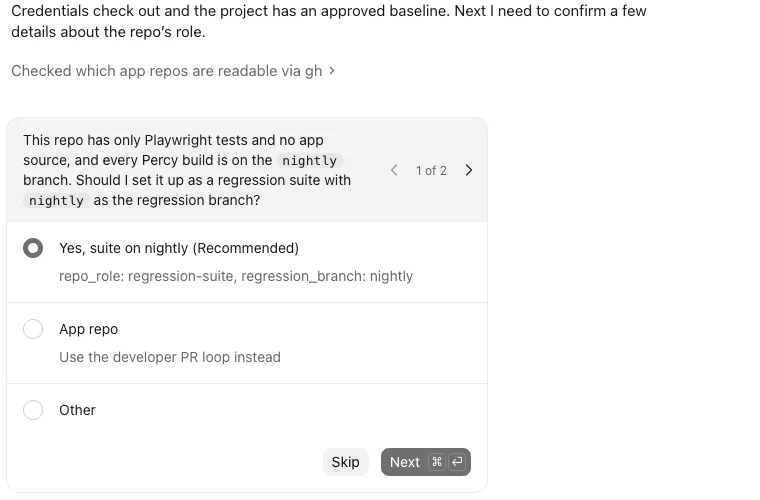
Setup writes your answers to .percy/config.yml. Commit this file so your team shares the same setup.
Triage a regression run
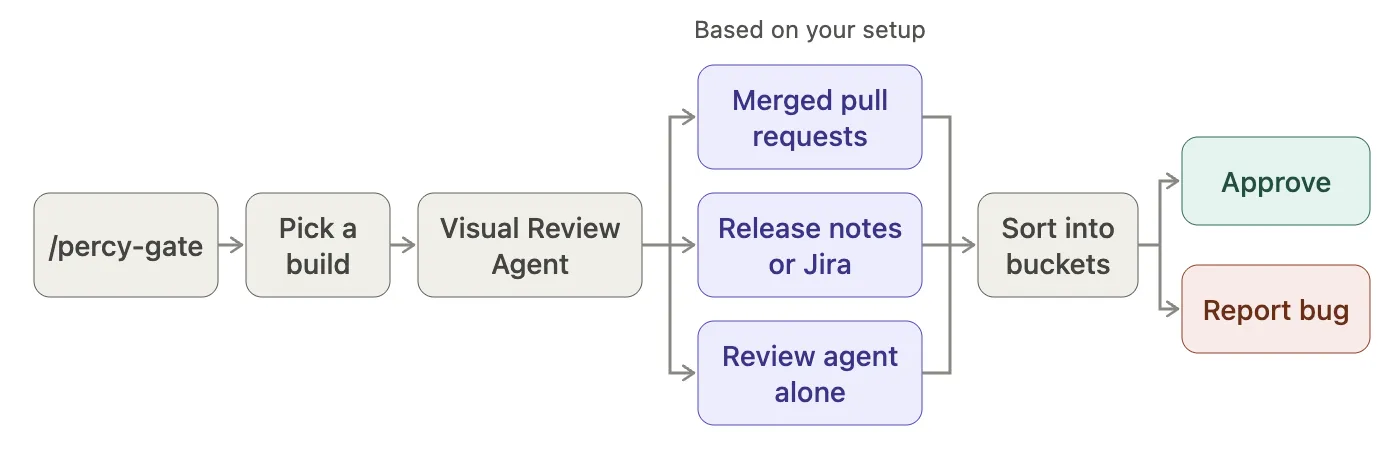
Run /percy-gate, or ask your agent in plain language, for example triage last night's Percy run. The plugin then does the following:
- Picks the build you most likely want to review, usually the latest run on your regression branch, and compares it with its Percy baseline, which is your last approved run. If several runs are unreviewed, it lists the others. To review a different build, ask your agent for it.
- Reads the Visual Review Agent’s analysis of every changed snapshot, not only the build summary.
- Explains each change from what shipped between the two runs. With code access, it uses the app pull requests merged in that window. Without code access, it uses release notes, a Jira release, or the Visual Review Agent alone.
- Shows a triage table with one row per snapshot, a link to the snapshot, and the reason for its bucket.
The plugin sorts each changed snapshot into one of the following buckets:
| Bucket | What it means | Suggested action |
|---|---|---|
| Explained | The change matches a merged pull request or a release-note item, which the plugin cites. | Approve. |
| Noise | The snapshot’s history shows dynamic content that changes from run to run, such as dates or rotating banners. | Approve. |
| Looks deliberate | You have no code access or release notes, but the Visual Review Agent marks the change as deliberate and it repeats consistently across pages. | Approve it if the change was part of the release. The plugin doesn’t preselect an option. |
| Unexplained | The Visual Review Agent marks the change as valid, but nothing that shipped explains it, for example a deploy, rollback, or configuration change. | Flag and report. The plugin never approves these snapshots. |
| Anomaly | The Visual Review Agent flags a potential bug. | Flag and report. |
| Needs your eyes | The plugin doesn’t have enough signal to decide. | Open the snapshot in Percy and review it. |
| Still unresolved | You flagged the snapshot in an earlier run and it hasn’t changed. Percy auto-approves it because it shows no difference. | Comment on the existing ticket. |
| Fixed | You flagged the snapshot in an earlier run, and it now looks correct again. | Approve. |
The plugin then asks you to confirm each action, one question at a time:
- Approve the snapshots in the Explained, Noise, and Fixed buckets, and any snapshots in the Looks deliberate bucket that you confirm.
- Flag each snapshot in the Anomaly and Unexplained buckets. Flagging requests changes on that snapshot only, not on the whole build.
- Report the flagged snapshots.
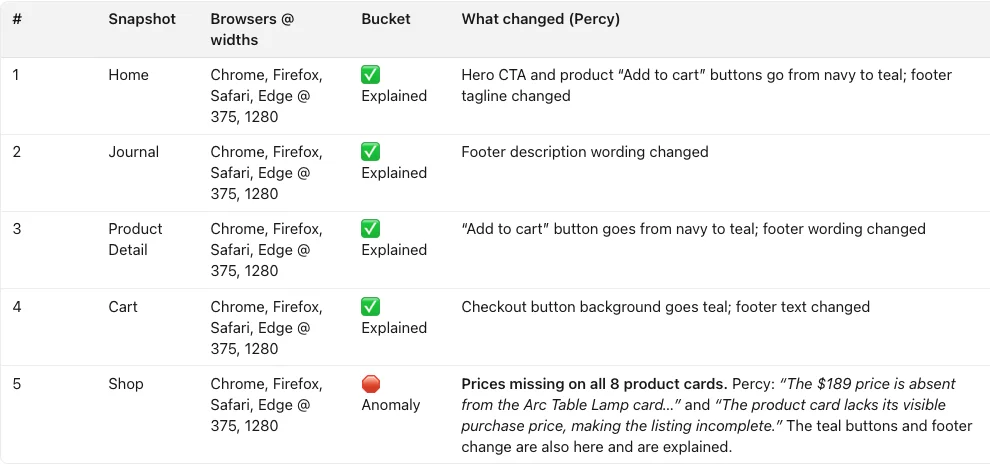
For example, between two nightly runs, one merged pull request turns the primary buttons teal and another updates the footer text. In the same period, product prices disappear from the Shop page, and no pull request explains the change. The triage marks the Home, Journal, Product Detail, and Cart snapshots as Explained, each citing the pull requests that changed them. It marks the Shop snapshot as an Anomaly and quotes the Visual Review Agent: “The product card lacks its visible purchase price, making the listing incomplete.”
The following triage table shows this example:
Report bugs the way your team files them
On the first run, the plugin looks for how your team files bugs, such as Jira keys in pull request titles, a Jira connection, or GitHub issue labels. It then asks you to choose one of the following reporting routes:
- A new Jira ticket for each flagged snapshot, or one ticket for the whole run.
- A comment on the existing ticket of the suspected pull request.
- A GitHub issue in the app repository.
- A draft to paste into Slack or another tracker.
- No report.
For Jira, the plugin reads the project’s issue types and required fields, and asks you for each value once.
Save the route in .percy/config.yml to share it with your team, or in .percy/config.local.yml to apply it only to you. On later runs, the plugin proposes the saved route and still asks before it files anything.
Triage without access to the app’s code
When you set up the triage without code access, it explains changes from the following sources:
- Release notes that you point the plugin to, as a file or pasted text. The plugin matches each change to a release-note line.
- A Jira release, also called a fix version, if your team tracks releases in Jira.
- The Visual Review Agent and the snapshot history alone, if you have neither. The plugin still reports bugs that the Visual Review Agent flags as anomalies. It groups consistent design changes as Looks deliberate, so you can approve them in one decision.
Review another developer’s pull request
Ask your agent to review the Percy build for a pull request, for example review the Percy build for PR #123. The plugin reviews that pull request’s build against its description and code changes. It then offers to approve the build or request changes, and to leave a comment on the pull request. The plugin doesn’t edit code in this mode.
Configuration reference
The /percy-setup command writes the following keys to .percy/config.yml. Edit them manually only to change your setup:
| Key | Values | What it does |
|---|---|---|
repo_role |
app, regression-suite, or both
|
Turns on the triage for scheduled runs when set to regression-suite or both. |
regression_branch |
A branch name, for example nightly
|
Sets the branch your regression runs build on. For several environments, use regression_branches: [staging, pre_prod] instead. |
app_repos |
A list of repositories, for example [owner/name], or []
|
Sets the GitHub repositories the plugin reads merged pull requests from. An empty list means you have no code access. |
change_context |
repos or percy-only
|
Limits change explanations to Percy data when set to percy-only. Use it when your team can’t read the app’s code. |
change_sources |
[release-notes, jira], or []
|
Sets the sources that explain a release when you have no code access. An empty list means the plugin relies on the Visual Review Agent alone. |
reporting |
A reporting route and its details | Stores the saved bug-reporting route. A reporting value in .percy/config.local.yml applies only to you and overrides the team file. |
Things to know
Keep the following behavior in mind when you triage regression runs:
- You run the triage from your IDE. Scheduled, unattended triage isn’t supported yet.
- The plugin triages one run at a time. It always compares the run with its Percy baseline. It lists older unreviewed runs but doesn’t merge them in.
- A flagged snapshot that stays broken shows no difference in the next run, and Percy auto-approves it. The plugin keeps listing it as Still unresolved until it changes, and moves it to Fixed once it looks correct again.
- The plugin reads merged pull requests from GitHub through the GitHub CLI. If your app code is on GitLab, Bitbucket, or Azure DevOps, set up the triage without code access and use release notes or a Jira release.
- The plugin needs the Visual Review Agent, available on paid Percy plans, to classify changes. Without it, the triage lists every change with links but doesn’t sort or approve them.
Related topics
We're sorry to hear that. Please share your feedback so we can do better
Contact our Support team for immediate help while we work on improving our docs.
We're continuously improving our docs. We'd love to know what you liked
We're sorry to hear that. Please share your feedback so we can do better
Contact our Support team for immediate help while we work on improving our docs.
We're continuously improving our docs. We'd love to know what you liked
Thank you for your valuable feedback!