Get your setup working faster. Join our Discord for optimisation tips from elite testers.Join our Discord
Integrate your Selenium JavaScript tests with Percy
A guide to integrating your Selenium JavaScript automated tests with BrowserStack Percy. Catch visual differences in your web application on time.
Percy integrates with your tests using both Percy and BrowserStack SDK. To establish this integration, choose the appropriate SDK and refer to the following section accordingly:
You can integrate your tests using the BrowserStack SDK and manage browsers through Percy. Percy supports the latest versions of modern browsers, including Chrome, Firefox, Edge, and Safari.
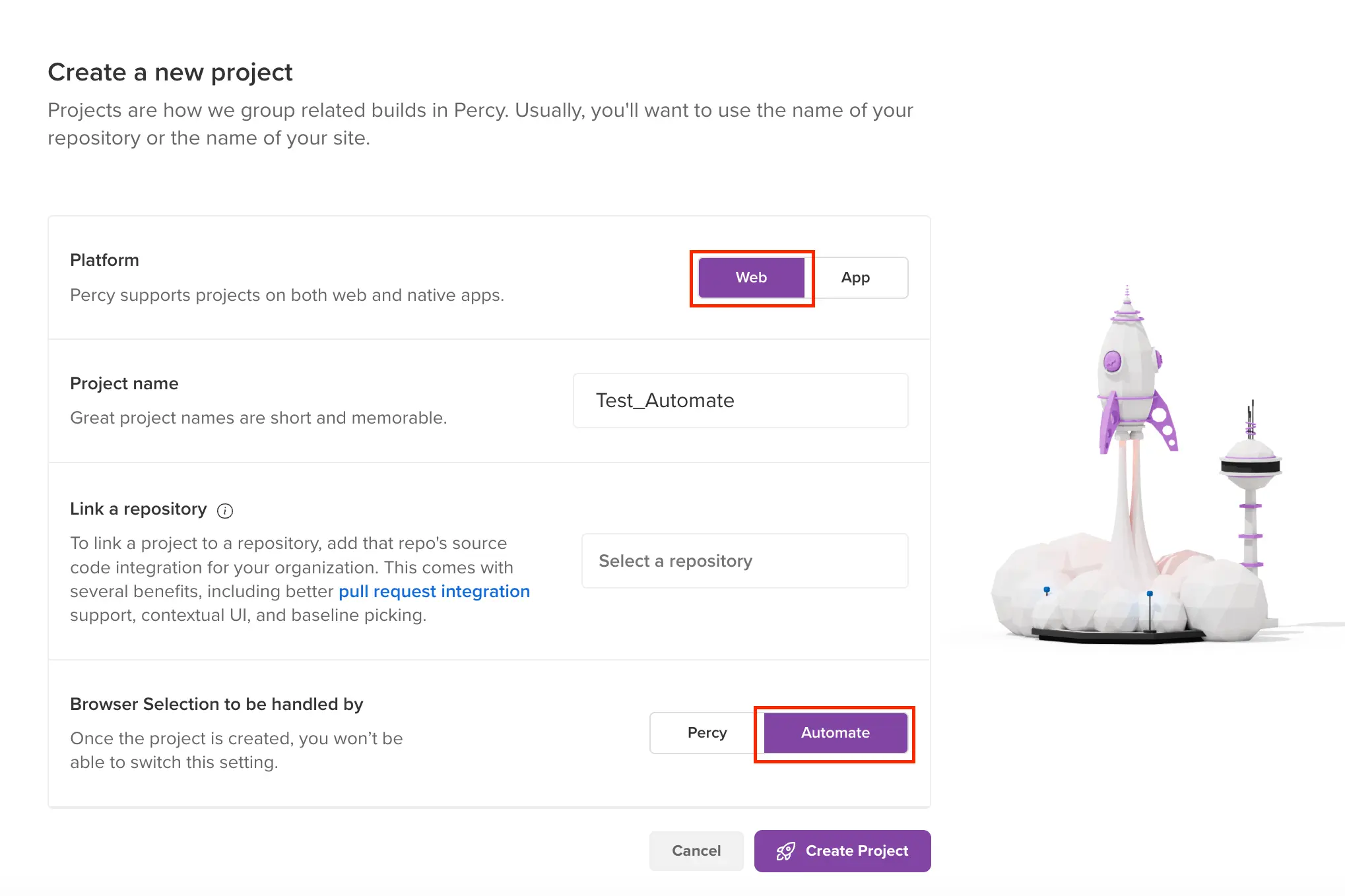
Create Project
Create a Percy Web project using the Percy dashboard. For more information, see Create a project.
Update your BrowserStack config file
In the browserstack.yml file, set percy: true.
Set a projectName.
Use the same projectName specified when creating the Percy Web Project.
Set browserstackAutomation: true if it is currently set to false.
Set percyCaptureMode: manual.
Currently, we do not support percyCaptureMode: auto on Percy web project and using BrowserStack SDK.
Below sample browserstack.yml file shows how to set the percy, the projectName, percyCaptureMode and the browserstackAutomation parameters.
```yaml
userName: "YOUR_USERNAME"
accessKey: "YOUR_ACCESS_KEY"
platforms:
- os: Windows
osVersion: 11
browserName: Chrome
browserVersion: 103.0
- os: Windows
osVersion: 10
browserName: Firefox
browserVersion: 102.0
- os: OS X
osVersion: Big Sur
browserName: Safari
browserVersion: 14.1
parallelsPerPlatform: 1
browserstackLocal: true
buildName: browserstack-build-1
projectName: Percy Web Prj
debug: false
percy: true
percyCaptureMode: manual
browserstackAutomation: true
```
Your script is ready to execute visual tests, and Percy is prepared to receive the build. After the tests runs, the snapshots are added to the same Percy project.
A build with the same project name and platform configuration mentioned in the BrowserStack config file appears on the Automate dashboard.
Percy SDK offers the following integrations for your JavaScript tests:
Percy Web
Percy with Automate
Choose Percy if you want to perform visual tests solely on the newest browsers. Choose Automate if you want to run visual tests on a range of desktop, mobile, and browser combinations.
To establish this integration, choose the appropriate variant and refer to the following section accordingly:
By default, Percy Web supports running Selenium tests with Automate Turboscale.
Integrate Percy with your test suite to run visual tests. To do that, follow these steps:
Create a Percy project Sign in to Percy. In Percy, create a project of the type, Web, and then name the project. After the project is created, Percy generates a token. Make a note of it. You have to use it set your environment variable in the next step.
We pass the required name argument and use a web application hosted at https://example.com. In this case, JavaScript example is the name of the snapshot passed to the percySnapshot method.
Run Percy
Run your tests using percy exec command as shown below:
If you are unable to use the percy:exec command or prefer to run your tests using IDE run options, you can use the percy exec:start and percy exec:stop commands. To learn more, visit Run Percy.
You have successfully created your first build on Percy. To see the build with snapshots of your application, visit your project in Percy.
When you run another build with visual changes to your application, Percy takes new snapshots. You can then see the comparisons between the two runs on the new build.
Advanced topics
Percy Snapshot command
In the preceding steps, we used the Percy Snapshot command for capturing snapshots. Percy provides various configurations to use with Percy snapshot command. To learn more visit, Percy snapshot command.
Base build selection
By default, Percy uses the previous build for comparison however, you always have the option to configure the base build for comparison as needed. To learn more, visit base build selection logic.
Before you begin, ensure your Automate script’s capabilities are using Selenium version 3.11.0 and above.
We recommend using Selenium 4 with Percy on Automate to boost performance and ensure increased stability while capturing screenshots.
Capture a full-page screenshot using the full-page parameter. By default, Percy On Automate captures a single tile, for the full-page screenshot, refer to full page screenshot on Percy with Automate.
Integrate Percy on Automate with your test suite to run visual tests. To do that, follow these steps:
(2) Use the Percy screenshot command to take required screenshots in your Automate session.
For example, in the following Javascript code, the percyScreenshot("name", "options") method is called twice. In the first instance, we are passing only the required argument which is “name”. In the second instance, we are passing both the required and optional “options”.
(3) Add the browser capabilities to your test script
We recommend running your build using a single browser like Chrome or Firefox, to begin with. Once you have achieved stability with Chrome or Firefox, you can set up cross-browser testing.
// Add the following capabilities to your test scriptconstcapabilities={'bstack:options':{os:'Windows',osVersion:'10'},browserName:'Chrome',browserVersion:'latest'};
// Add these capabilities to your test scriptconstcapabilities={os:'Windows',os_version:'10',browserName:'Chrome',browser_version:'latest'};
Step 6 - Run the build
```bash
npx percy exec -- <command to run the automate script file>
```

 Join our Discord