
 Join our Discord
Baseline management
Choose the right baseline management strategy for your visual test workflow.
Every Percy build compares its new screenshots against screenshots from a previous build, called the base build. Baseline management controls how Percy picks that base build, so your builds show only the visual changes you introduced.
Git vs Visual Git
Percy supports two baseline strategies. They differ mainly in what you approve:
- Git: You approve or reject an entire build, in the same way that you merge a pull request. Either every snapshot in that build becomes the new baseline, or none of them do.
- Visual Git: You approve or reject individual snapshots, in the same way that you cherry-pick commits. The snapshots you approve become the new baseline immediately, even if others in the same build are still under review.
The following table compares the two strategies:
| Aspect | Git | Visual Git |
|---|---|---|
| Best for | Teams running Percy in CI on feature branches | Teams testing independently of the development pipeline |
| Compares against | A build from your base branch, such as master, found through Git commit history |
The latest approved snapshots on each branch, with no Git history needed |
| Approvals | Entire build | Individual snapshots |
Most teams should use Git. Choose Visual Git only if you approve snapshots individually or run visual tests independently of your development pipeline.
- This applies to both BrowserStack SDK and Percy SDK.
- When using the BrowserStack SDK, Percy automatically selects the Git baseline management strategy. To use the Visual Git baseline management strategy instead, create a Percy project in the Percy UI, choose Visual Git, and specify the Percy project name in your BrowserStack configuration file.
Select the strategy
To select a baseline management strategy when you create a project:
- Visit the Percy dashboard.
- Click Create new project.
- Select Web as the platform.
- Select Git or Visual Git.
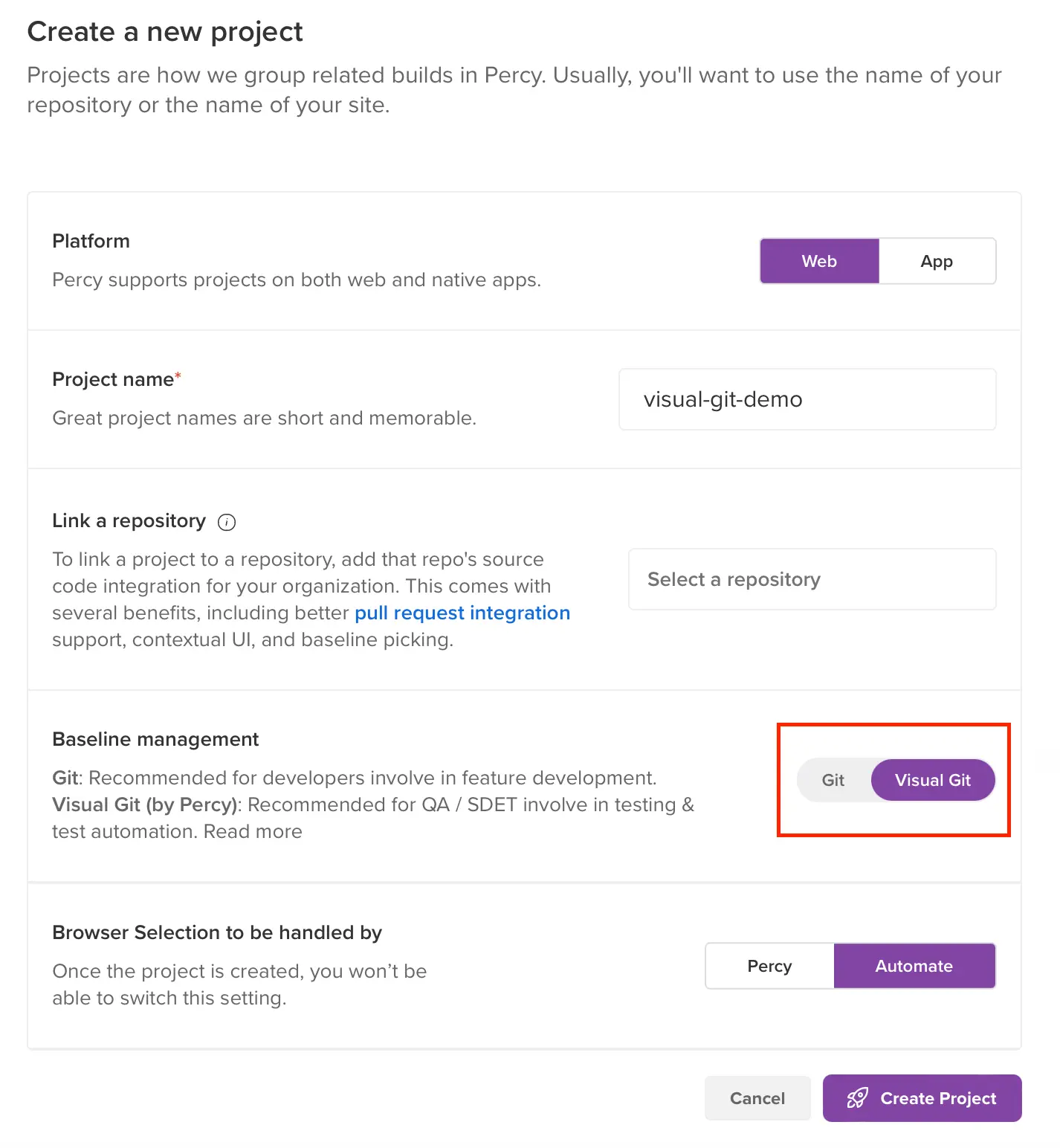
To change the strategy later, go to Project settings > Baseline management.
If you are using Percy CLI, you can manually set the base build by using the PERCY_BRANCH environment variable. For more information, refer to the environment variable options documentation.
Related topics
We're sorry to hear that. Please share your feedback so we can do better
Contact our Support team for immediate help while we work on improving our docs.
We're continuously improving our docs. We'd love to know what you liked
We're sorry to hear that. Please share your feedback so we can do better
Contact our Support team for immediate help while we work on improving our docs.
We're continuously improving our docs. We'd love to know what you liked
Thank you for your valuable feedback!