
 Join our Discord
Base build tutorial for Visual Git
This page explains how snapshot/build approval and baseline management work in visual regression testing workflows. It includes multiple use cases that illustrate how different actions affect baseline selection and regression results. Use these examples to understand and optimize your visual testing process with Visual Git based baseline management.
Use cases
Explore the following scenarios to understand how Percy establishes and uses baselines for visual regression testing with different branch configurations and approval workflows.
Case 1: Baseline behavior when no build is approved
Percy project settings:
- Default branch: master
- Auto-approve: none
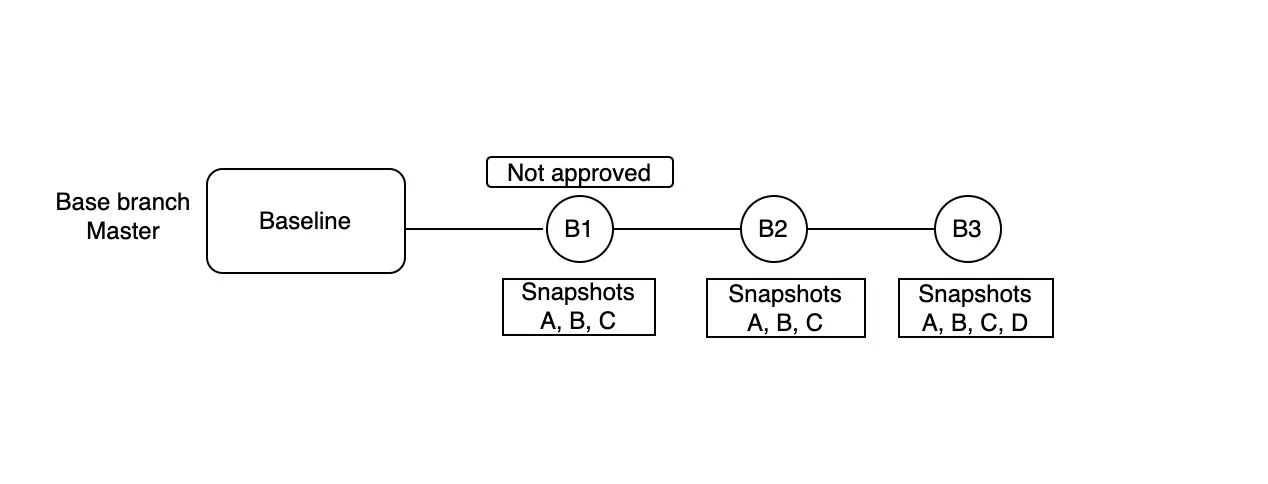
Scenario: Build B1 generates snapshots A, B, and C but is not approved. Builds B2 (snapshots A, B, C) and B3 (snapshots A, B, C, D) run next. Since no build is approved, no baseline exists for comparison.
What is the base for snapshot A in Build B2?
- None.
Reason: Approving a build creates a baseline that stores the approved snapshots. Because you do not approve Build B1, the system does not create a baseline. As a result, Build B2 has no baseline to compare the build/snapshot against.
Case 2: Approved build sets the baseline for subsequent builds
Percy project settings:
- Default branch: master
- Auto-approve: master
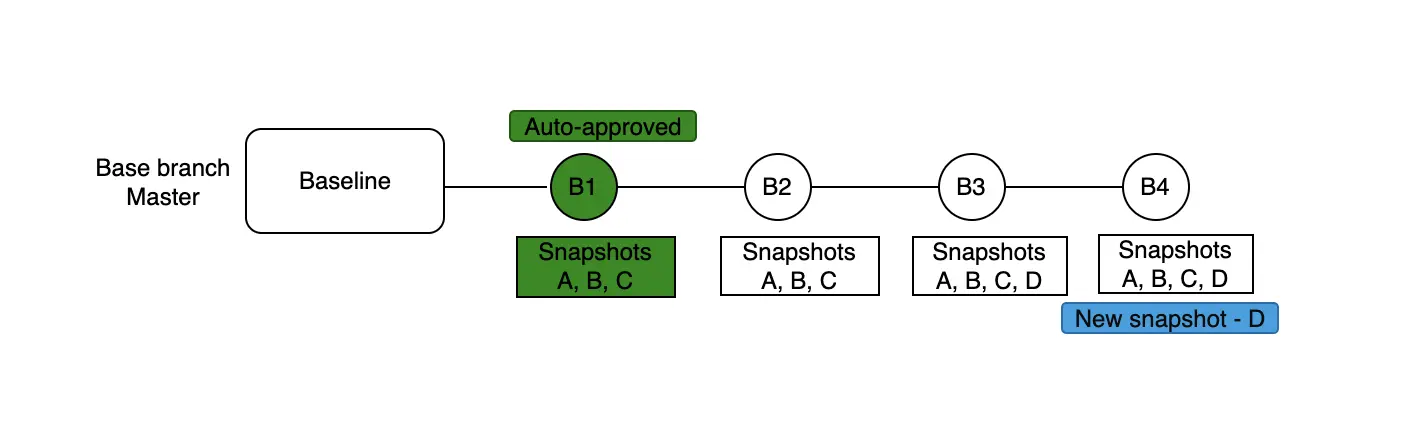
Scenario: Build B1 generates snapshots A, B, and C and is auto-approved. Build B2 (snapshots A, B, C), B3 (snapshots A, B, C, D), and B4 (snapshots A, B, C, D) run next.
What is the base for snapshot A in Build B4?
- Snapshot A from Build B3 (the most recent auto-approved build).
What is the base for snapshot D in Build B4?
- Snapshot D from Build B3 (the most recent auto-approved build that introduced snapshot D).
Reason: Because auto-approve is enabled for the master branch, every build on master (B1, B2, and B3) is automatically approved and updates the baseline. Subsequent builds compare their snapshots against the most recent approved baseline. In Build B4:
- Snapshots A, B, and C compare against the corresponding snapshots from Build B3.
- Snapshot D compares against snapshot D from Build B3, where it was first introduced and auto-approved.
Case 3: Feature branch has no baseline without an approved default branch build
Percy project settings:
- Default branch: master
- Auto-approve: none
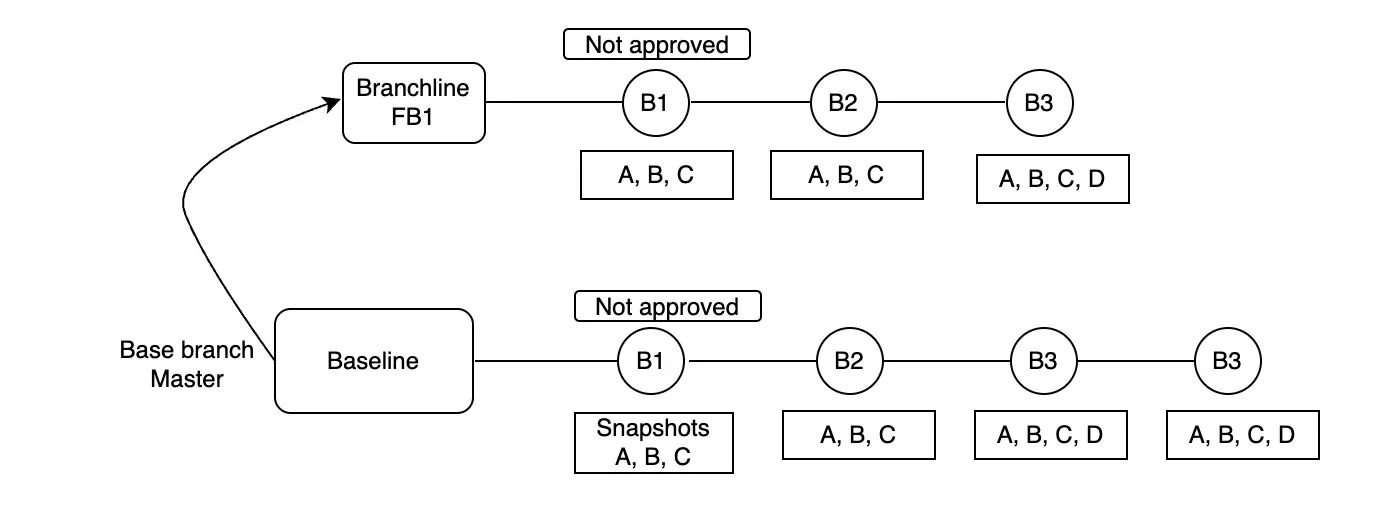
Scenario: The master branch has no approved builds, so no baseline exists. You create a feature branch (FB1) from master and run Build B1, which generates snapshots A, B, and C. You do not approve the build. Builds B2 (snapshots A, B, C) and B3 (snapshots A, B, C, D) run next on the same feature branch.
What is the base for snapshot A in feature branch’s B2 build?
- None
Reason: A baseline exists only when you approve a build on the default branch. Because the master branch has no approved builds, no baseline is available. Builds on a feature branch cannot create their own baseline without approval on the default branch. As a result, snapshot A in Build B2 has no baseline for comparison.
If the master branch has an approved build that includes snapshot A, snapshot A in feature branch’s Build B2 compares against the baseline from the master branch.
Case 4: Feature branch inherits the baseline from an approved default branch build
Percy project settings:
- Default branch: master
- Auto-approve: none
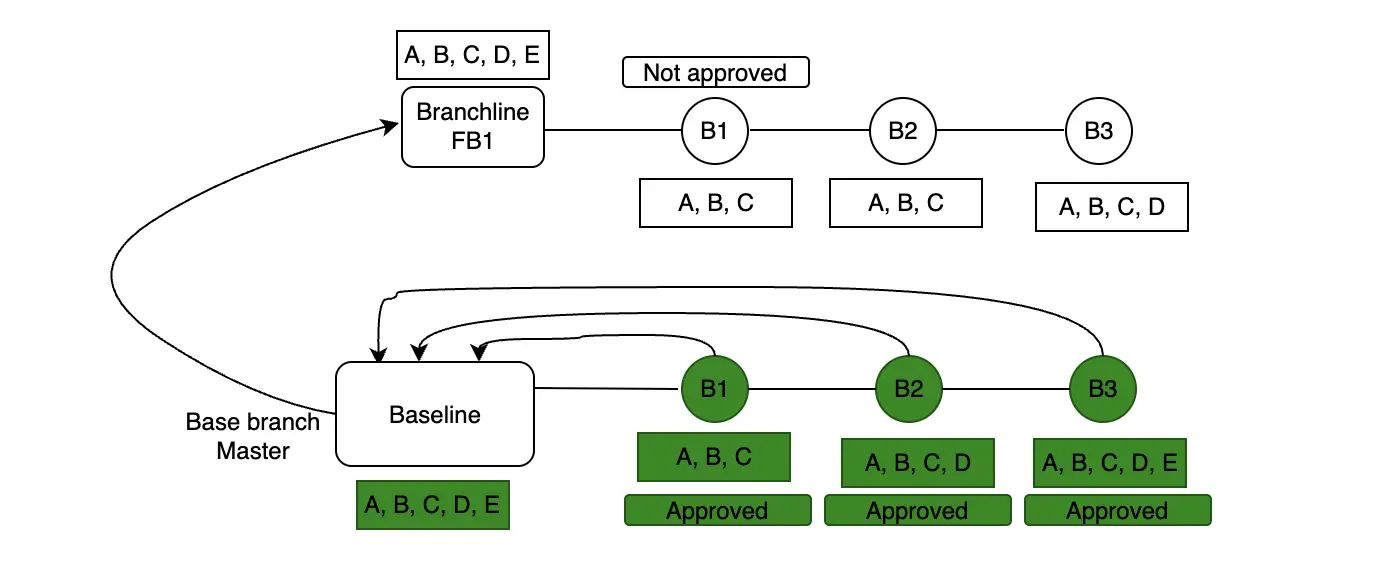
Scenario: On the master branch: Build B1 generates snapshots A, B, and C and is approved. Build B2 generates snapshots A, B, C, and D and is approved. Build B3 generates snapshots A, B, C, D, and E and is approved.
An imaginary baseline now contains snapshots A, B, C, D, and E from B3. A feature branch (FB1) is then created from master, generating Build B4 with snapshots A, B, and C.
What is the base for snapshot A in FB1-B4?
- Snapshot A from Build B3 on the master branch (the approved baseline).
What happens to snapshots D and E, which exist in the baseline but not in FB1-B4?
- They are marked as removed in the feature branch build.
Reason: When you create a feature branch after approving Build B3 on the default branch, the feature branch inherits the approved baseline from master. As a result:
- Snapshots A, B, and C in FB1-B4 compare against the corresponding snapshots from the approved baseline.
- Snapshots D and E exist in the baseline but not in FB1-B4, so the system marks them as removed in the feature branch build.
Note: The timing of feature branch creation matters. If you create FB1 after approving Build B2 instead, the baseline contains only snapshots A, B, C, and D, and does not include snapshot E.
Case 5: Multiple feature branches use different baselines based on approval
Percy project settings:
- Default branch: master
- Auto-approve: none
Scenario: On the master branch:
- Build B1 generates snapshot A (version 1) and you approve the build.
- Build B2 generates snapshot A (version 2) and snapshot B, and you approve the build.
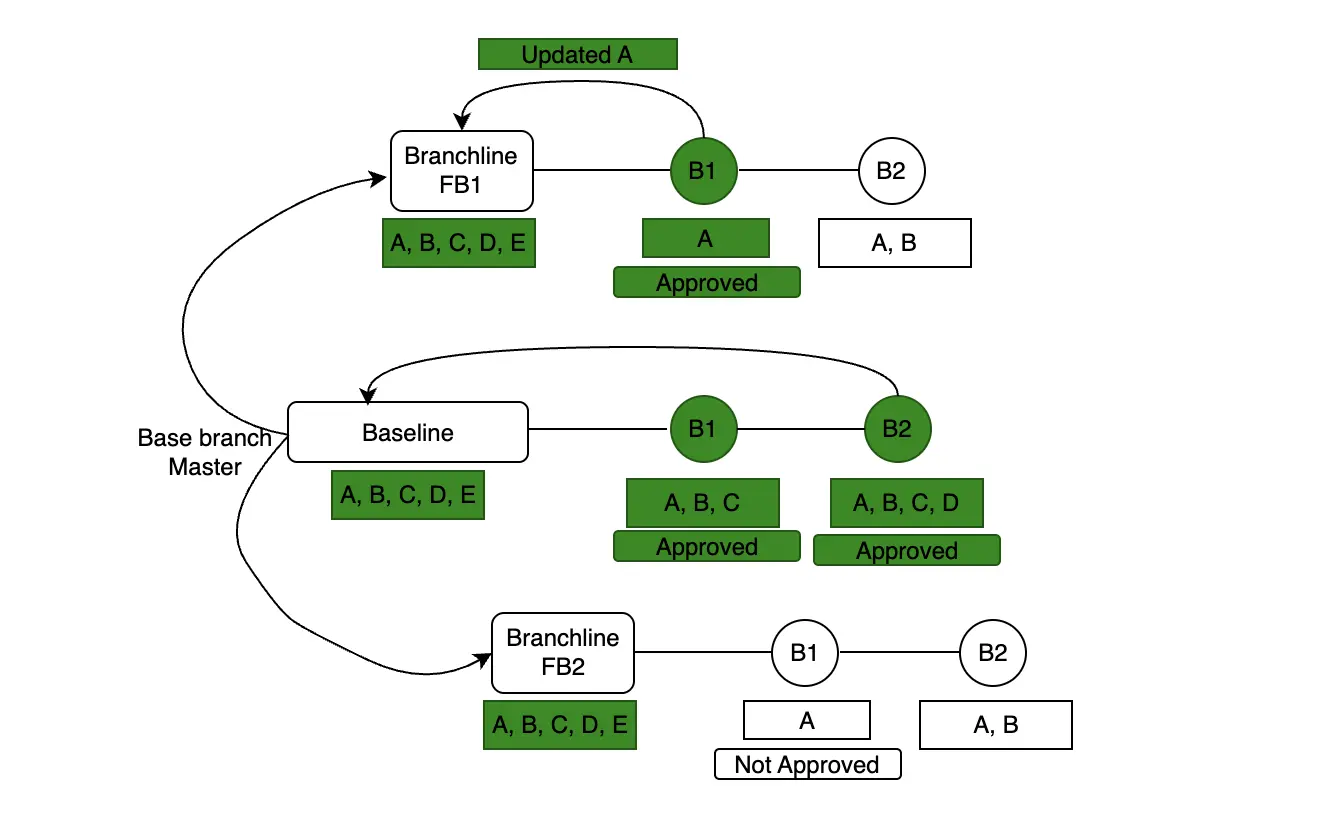
The imaginary baseline now contains snapshot A (version 2) and snapshot B. Two feature branches are created after B2 approval:
Feature branch FB1:
- Build B1 generates snapshot A and you approve the build.
- Build B2 generates snapshots A and B.
Feature branch FB2:
- Build B1 generates snapshot A, but you do not approve the build.
- Build B2 generates snapshots A and B.
What is the base for snapshot A in Feature branch FB1, Build B2?
- Snapshot A from Feature branch FB1, Build B1 (the approved feature-branch baseline).
Reason: Approving Build B1 on Feature branch FB1 creates a baseline for that branch. Subsequent builds on the same feature branch compare their snapshots against this feature-branch baseline.
What is the base for snapshot A in Feature branch FB2, Build B2?
- Snapshot A (version 2) from Build B2 on the master branch (the master baseline).
Reason: Because you do not approve Build B1 on Feature branch FB2, the feature branch does not have its own baseline. As a result, Build B2 compares snapshot A against the approved baseline from the master branch, which contains snapshot A (version 2).
Note: Even if snapshot A changes in Feature branch FB2, Build B1, the system still compares it against snapshot A (version 2) from the master baseline until you approve a build on the feature branch.
Case 6: Merging snapshots from feature branch to baseline
Percy project settings:
- Default branch: master
- Auto-approve: none
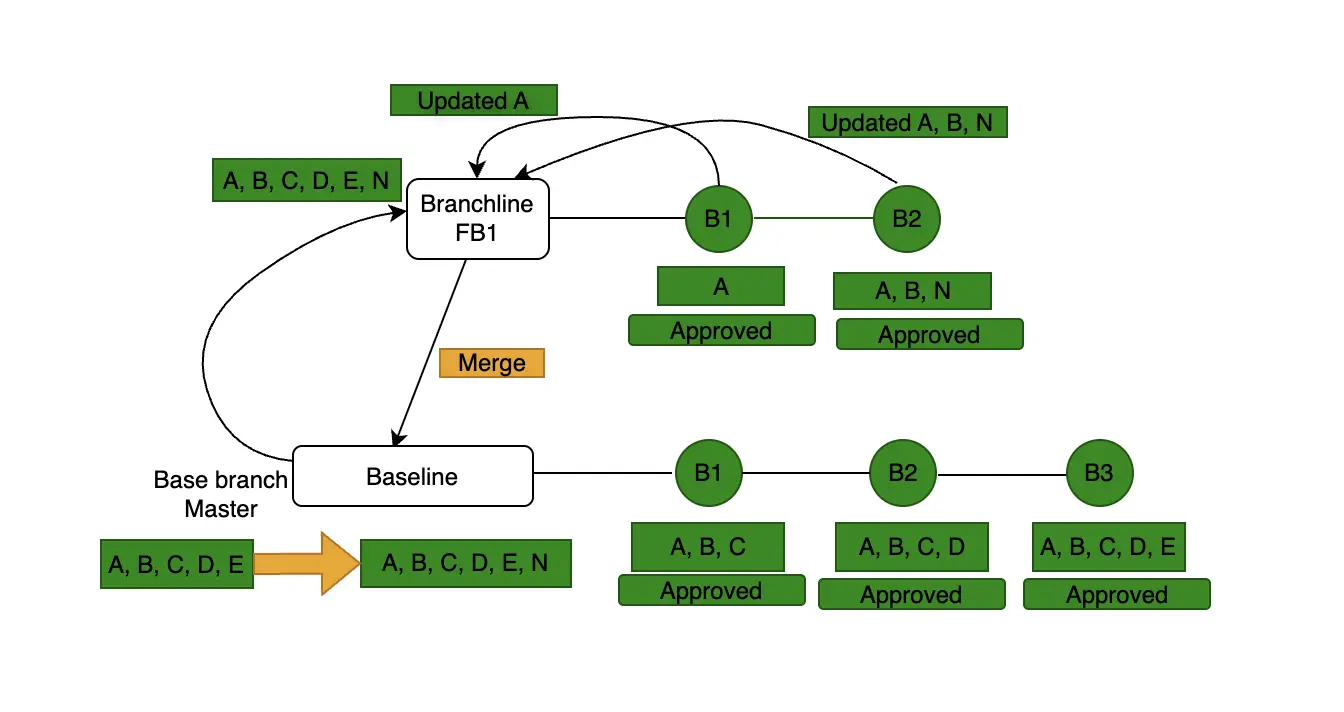
Scenario: The master branch has an approved baseline that contains snapshots A and B. You create a feature branch (FB1) and run the following builds:
- Build B1 generates snapshots A, B, and N (a new snapshot).
- Build B2 generates snapshots A, B, and N and you approve the build.
You then merge FB1 into the master branch and expect snapshot N to become part of the master baseline.
What happens to snapshot N after the merge?
- Snapshot N is added to the master baseline.
Reason: Approving Build B2 on the feature branch creates a baseline that includes snapshot N. When you merge the feature branch into the master branch, the system adds the approved snapshots from the feature branch to the master baseline. After the merge, the master baseline contains snapshots A, B, and N. Subsequent builds on the master branch compare their snapshots against this updated baseline.
This option is available both in the Percy UI and through our API. For implementation details, refer to our Visual Git API documentation.
Case 7: Syncing baselines across multiple feature branches
Percy project settings:
- Default branch: master
- Auto-approve: none
Scenario: The master branch has an approved baseline that contains snapshots A and B. You create two feature branches.
Feature branch 1 (FB1):
- Build B1 generates snapshots A, B, and N (a new snapshot).
- You approve the build.
- You merge FB1 into the master branch.
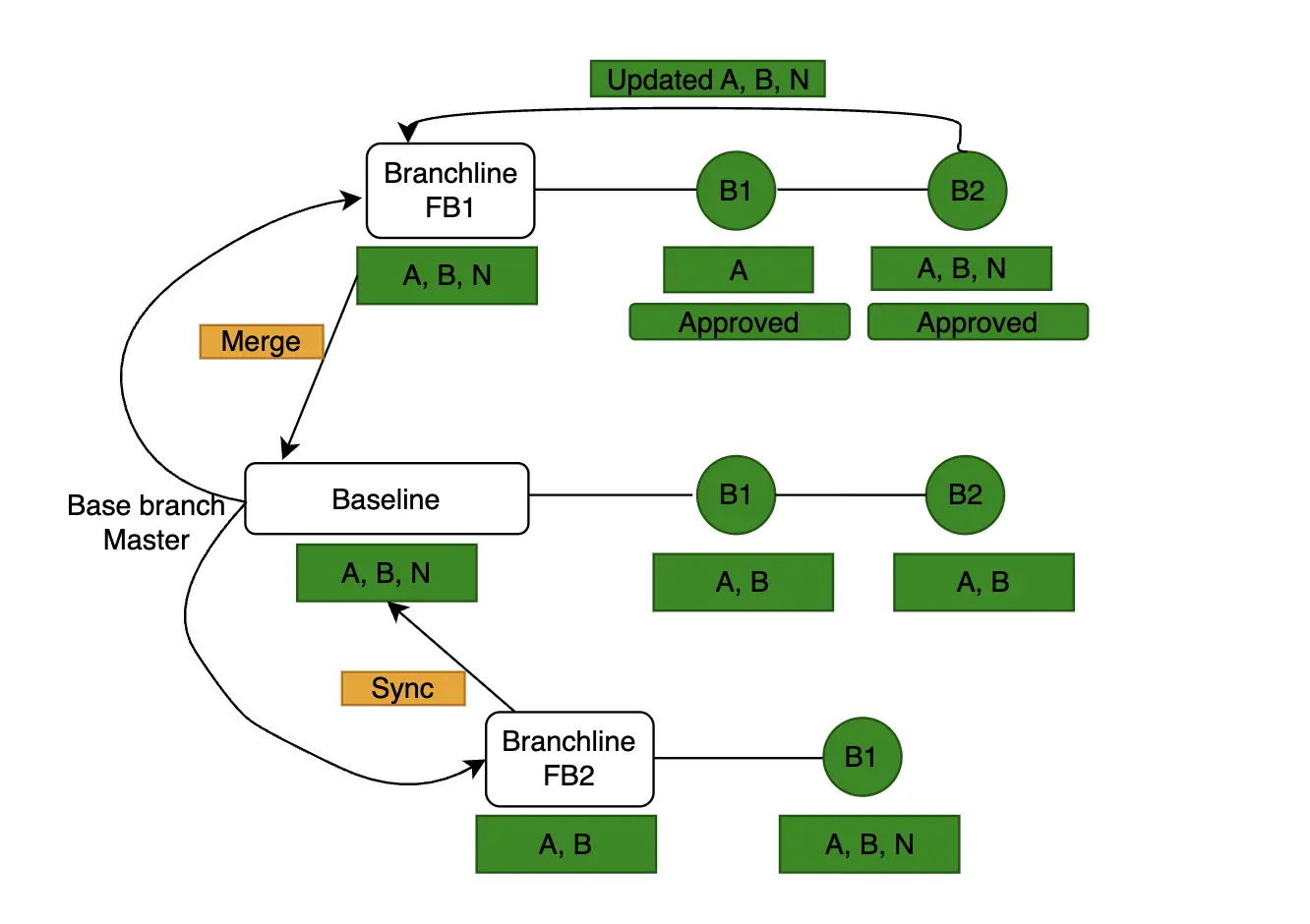
- The master baseline now contains snapshots A, B, and N. If A and B already exist in the master baseline, the approved versions from FB1 override them.
Feature branch 2 (FB2):
- FB2 was created before FB1 was merged.
- Its baseline still contains snapshots A and B.
- New builds on FB2 generate snapshots A, B, and N.
What happens when you sync FB2 with the master branch?
- Snapshot N is added to the FB2 baseline.
Reason: When FB1 is merged, the approved snapshot N becomes part of the master baseline. However, FB2 was created before this merge and continues to reference the earlier baseline (A and B). Syncing FB2 updates its baseline to match the current master baseline. After the sync, the FB2 baseline contains snapshots A, B, and N. Subsequent builds on FB2 compare their snapshots against this updated baseline.
Next steps
Now that you understand how Percy manages baselines with Visual Git, you can optimize your visual regression testing workflow. Configure your project settings to match your team’s branching strategy and approval process. For more information on baseline selection strategies, see Baseline selection.
We're sorry to hear that. Please share your feedback so we can do better
Contact our Support team for immediate help while we work on improving our docs.
We're continuously improving our docs. We'd love to know what you liked
We're sorry to hear that. Please share your feedback so we can do better
Contact our Support team for immediate help while we work on improving our docs.
We're continuously improving our docs. We'd love to know what you liked
Thank you for your valuable feedback!