
 Join our Discord
BrowserStack Auto User Provisioning using Open SCIM
Connect your Identity Provider (IdP) with BrowserStack’s SCIM connector.
BrowserStack’s Open SCIM connector, based on System for Cross-domain Identity Management (SCIM) standard, enables end-users to enable Auto User Provisioning for their account. This document describes how to configure Auto User Provisioning.
If you’re a new BrowserStack customer, to assign roles and products, see Assign roles using Automated User Provisioning and Assign product access using Automated User Provisioning.
Prerequisites
- Enterprise plan on BrowserStack.
- You need to have administrator access to your organization’s IdP.
- Your SSO needs to be enabled before User Provisioning. Follow the instructions to set up SSO.
- A user with Owner permissions can set up user provisioning on BrowserStack.
Owner can also allow user provisioning setup access to one of the Admin(s). For more information, see the Authentication & Security Settings section.
Supported features
The BrowserStack’s User Provisioning integration currently supports the following features:
- User provisioning & de-provisioning
- Attribute assignment for users on BrowserStack:
- Role assignment
- Product access
- Team assignment
- Role, product, or team assignment capability will depend on the supported configurations on your Identity Provider.
- BrowserStack provisions individual users only and does not support group provisioning. Assign each user’s team, role, and product access using the custom attributes on this page.
Open SCIM endpoints
Service Provider Configuration
The Service Provider Config endpoint provides metadata indicating the BrowserStack Server’s authentication scheme and its support for optional or configurable SCIM features. Service Provider Config objects are defined by RFC 7643, section 5.
GET https://www.browserstack.com/scim/v2/ServiceProviderConfig
Sample response:
{
  "schemas": ["urn:ietf:params:scim:schemas:core:2.0:ServiceProviderConfig"],
  "documentationUri": "https://www.browserstack.com/docs/enterprise/auto-user-provisioning",
  "patch": { "supported": true },
  "bulk": { "supported": false, "maxOperations": 0, "maxPayloadSize": 0 },
  "filter": { "supported": true, "maxResults": 500 },
  "changePassword": { "supported": false },
  "sort": { "supported": false },
  "etag": { "supported": false },
  "authenticationSchemes": [
    {
      "name": "OAuth Bearer Token",
      "description": "Authentication scheme using the OAuth Bearer Token Standard",
      "specUri": "http://tools.ietf.org/html/rfc6750",
      "type": "oauthbearertoken"
    }
  ],
  "meta": {
    "resourceType": "ServiceProviderConfig",
    "location": "https://www.browserstack.com/scim/v2/ServiceProviderConfig"
  }
}
Resource types
The Resource Types endpoint lists all the SCIM resource types configured for use on the BrowserStack server. Use the response to find the endpoint, core schema, and extension schemas of each resource type the server supports. This endpoint does not provide resource type information about SCIM sub-resources.
The response is formatted as a list response, with one or more resource type objects in the Resources field. Resource type objects are defined by RFC 7643, section 6.
GET https://www.browserstack.com/scim/v2/ResourceTypes
Sample response:
{
  "schemas": ["urn:ietf:params:scim:api:messages:2.0:ListResponse"],
  "totalResults": 1,
  "Resources": [
    {
      "schemas": ["urn:ietf:params:scim:schemas:core:2.0:ResourceType"],
      "id": "Users",
      "name": "Users",
      "endpoint": "/Users",
      "schema": "urn:ietf:params:scim:schemas:core:2.0:User"
    }
  ]
}
User resource type
The Resource Type endpoint retrieves a specific SCIM resource type, specified by its ID (we only support User resource). Resource type objects are defined by RFC 7643, section 6. This endpoint does not provide resource type information about SCIM sub-resources.
GET https://www.browserstack.com/scim/v2/ResourceTypes/User
Sample response:
{
  "schemas": ["urn:ietf:params:scim:schemas:core:2.0:ResourceType"],
  "id": "Users",
  "name": "Users",
  "endpoint": "/Users",
  "description": "User Account",
  "schema": "urn:ietf:params:scim:schemas:core:2.0:User",
  "meta": {
    "location": "https://www.browserstack.com/scim/v2/ResourceTypes/User",
    "resourceType": "ResourceType"
  }
}
- In order to update an existing user resource, make use of the
PUTendpoint. - If your IdP does not support the
PUTendpoint, you can make use of thePATCH /scim/v2/Users/{id}endpoint.
PATCH request:
{
    "schemas": [
        "urn:ietf:params:scim:schemas:core:2.0:User"
    ],
    "Operations":[{"op": "add", "path" : "urn:ietf:params:scim:schemas:extension:Bstack:2.0:User:bstack_product", "value" : "App-Live-Testing,App-Automate-Testing"}]
}
Schemas
The Schemas endpoint lists the SCIM schemas configured for use on this BrowserStack Server, which define the attributes available to resource types. This endpoint does not provide schema information about SCIM sub-resources.
The response is formatted as a list response, with one or more schema objects in the Resources field. Schema objects are defined by RFC 7643, section 7.
GET https://www.browserstack.com/scim/v2/Schemas
Sample response:
{
  "schemas": ["urn:ietf:params:scim:api:messages:2.0:ListResponse"],
  "totalResults": 1,
  "Resources": [
    {
      "id": "urn:ietf:params:scim:schemas:core:2.0:User",
      "name": "User",
      "description": "User Schema",
      "attributes": [
        {
          "name": "userName",
          "type": "string",
          "multiValued": false,
          "required": true,
          "caseExact": false,
          "mutability": "readWrite",
          "returned": "default",
          "uniqueness": "server",
          "description": "Unique identifier for the User, typically used by the user to directly authenticate to the service provider. Each User MUST include a non-empty userName value. This identifier MUST be unique across the service provider's entire set of Users."
        },
        {
          "name": "name",
          "type": "complex",
          "multiValued": false,
          "required": false,
          "mutability": "readWrite",
          "returned": "default",
          "uniqueness": "none",
          "description": "The components of the user's real name. Providers MAY return just the full name as a single string in the formatted sub-attribute, or they MAY return just the individual component attributes using the other sub-attributes, or they MAY return both.  If both variants are returned, they SHOULD be describing the same name, with the formatted name indicating how the component attributes should be combined.",
          "subAttributes": [
            {
              "name": "familyName",
              "type": "string",
              "multiValued": false,
              "required": false,
              "caseExact": false,
              "mutability": "readWrite",
              "returned": "default",
              "uniqueness": "none",
              "description": "The family name of the User, or last name in most Western languages (e.g., 'Jensen' given the full name 'Ms. Barbara J Jensen, III')."
            },
            {
              "name": "givenName",
              "type": "string",
              "multiValued": false,
              "required": false,
              "caseExact": false,
              "mutability": "readWrite",
              "returned": "default",
              "uniqueness": "none",
              "description": "The given name of the User, or first name in most Western languages (e.g., 'Barbara' given the full name 'Ms. Barbara J Jensen, III')."
            }
          ]
        },
        {
          "name": "active",
          "type": "boolean",
          "multiValued": false,
          "required": true,
          "mutability": "readWrite",
          "returned": "default",
          "uniqueness": "none",
          "description": "A Boolean value indicating the User's status."
        },
        {
          "name": "bstack_team",
          "type": "string",
          "multiValued": false,
          "required": false,
          "mutability": "readWrite",
          "returned": "default",
          "uniqueness": "none",
          "description": "A String value indicating the User's Team in BrowserStack"
        },
        {
          "name": "bstack_role",
          "type": "string",
          "multiValued": false,
          "required": false,
          "mutability": "readWrite",
          "returned": "default",
          "uniqueness": "none",
          "description": "A String value indicating the User's Role in BrowserStack"
        },
        {
          "name": "bstack_product",
          "type": "string",
          "multiValued": true,
          "required": false,
          "mutability": "readWrite",
          "returned": "default",
          "uniqueness": "none",
          "description": "A String value indicating the User's Product accesses in BrowserStack"
        }
      ],
      "meta": {
        "resourceType": "Schema",
        "location": "https://www.browserstack.com/scim/v2/Schemas/urn:ietf:params:scim:schemas:core:2.0:User"
      }
    }
  ]
}
Individual schema
The Schema endpoint retrieves a specific SCIM schema, specified by its ID (we only support User Schema), which is always a URN. Schema objects are defined by RFC 7643, section 7, section 7. This endpoint does not provide schema information about SCIM sub-resources.
GET https://www.browserstack.com/scim/v2/Schemas/urn:ietf:params:scim:schemas:core:2.0:User
Sample response:
{
  "id": "urn:ietf:params:scim:schemas:core:2.0:User",
  "name": "User",
  "description": "User Schema",
  "attributes": [
    {
      "name": "userName",
      "type": "string",
      "multiValued": false,
      "required": true,
      "caseExact": false,
      "mutability": "readWrite",
      "returned": "default",
      "uniqueness": "server",
      "description": "Unique identifier for the User, typically used by the user to directly authenticate to the service provider. Each User MUST include a non-empty userName value. This identifier MUST be unique across the service provider's entire set of Users."
    },
    {
      "name": "name",
      "type": "complex",
      "multiValued": false,
      "required": false,
      "mutability": "readWrite",
      "returned": "default",
      "uniqueness": "none",
      "description": "The components of the user's real name. Providers MAY return just the full name as a single string in the formatted sub-attribute, or they MAY return just the individual component attributes using the other sub-attributes, or they MAY return both.  If both variants are returned, they SHOULD be describing the same name, with the formatted name indicating how the component attributes should be combined.",
      "subAttributes": [
        {
          "name": "familyName",
          "type": "string",
          "multiValued": false,
          "required": false,
          "caseExact": false,
          "mutability": "readWrite",
          "returned": "default",
          "uniqueness": "none",
          "description": "The family name of the User, or last name in most Western languages (e.g., 'Jensen' given the full name 'Ms. Barbara J Jensen, III')."
        },
        {
          "name": "givenName",
          "type": "string",
          "multiValued": false,
          "required": false,
          "caseExact": false,
          "mutability": "readWrite",
          "returned": "default",
          "uniqueness": "none",
          "description": "The given name of the User, or first name in most Western languages (e.g., 'Barbara' given the full name 'Ms. Barbara J Jensen, III')."
        }
      ]
    },
    {
      "name": "active",
      "type": "boolean",
      "multiValued": false,
      "required": true,
      "mutability": "readWrite",
      "returned": "default",
      "uniqueness": "none",
      "description": "A Boolean value indicating the User's status."
    },
    {
      "name": "bstack_team",
      "type": "string",
      "multiValued": false,
      "required": false,
      "mutability": "readWrite",
      "returned": "default",
      "uniqueness": "none",
      "description": "A String value indicating the User's Team in BrowserStack"
    },
    {
      "name": "bstack_role",
      "type": "string",
      "multiValued": false,
      "required": false,
      "mutability": "readWrite",
      "returned": "default",
      "uniqueness": "none",
      "description": "A String value indicating the User's Role in BrowserStack"
    },
    {
      "name": "bstack_product",
      "type": "string",
      "multiValued": true,
      "required": false,
      "mutability": "readWrite",
      "returned": "default",
      "uniqueness": "none",
      "description": "A String value indicating the User's Product accesses in BrowserStack"
    }
  ],
  "meta": {
    "resourceType": "Schema",
    "location": "https://www.browserstack.com/scim/v2/Schemas/urn:ietf:params:scim:schemas:core:2.0:User"
  }
}
Replace a user
The Replace User endpoint updates an existing user by replacing the resource with the values in the request body. You can update the name, role, team, and product attributes, and change the email through userName. Attributes that are controlled by the BrowserStack dashboard as per the current configuration cannot be updated through this endpoint.
PUT https://www.browserstack.com/scim/v2/Users/{id}
A successful request returns 200 with the full user resource, including externalId, active, and the custom bstack_* attributes:
{
  "schemas": ["urn:ietf:params:scim:schemas:core:2.0:User"],
  "id": 12345,
  "externalId": "john.doe",
  "userName": "john.doe@example.com",
  "active": true,
  "name": { "givenName": "John", "familyName": "Doe" },
  "emails": [{ "primary": true, "value": "john.doe@example.com" }],
  "bstack_role": "Admin",
  "bstack_team": "Engineering",
  "bstack_product": "Live,Automate",
  "meta": {
    "resourceType": "User",
    "created": "2026-01-10T08:12:33.000Z",
    "lastModified": "2026-07-15T09:00:00.000Z",
    "location": "https://www.browserstack.com/scim/v2/Users/12345"
  }
}
In this response, userName carries the user’s email, and externalId carries the BrowserStack username.
Some fields are returned conditionally based on your SCIM configuration:
-
bstack_role,bstack_team, andbstack_productare returned only when that attribute is controlled by the IdP in your SCIM configuration. -
metais returned only for accounts enabled for the SCIM metadata response. -
idis an integer by default, and a string for accounts enabled for string user IDs.
Update a user
The Update User endpoint applies a partial update to an existing user using a SCIM PatchOp request. A replace operation that sets active to false deprovisions the user.
PATCH https://www.browserstack.com/scim/v2/Users/{id}
A successful request returns 200 with the full user resource, in the same shape as the Replace a user response, including the conditional fields described earlier:
{
  "schemas": ["urn:ietf:params:scim:schemas:core:2.0:User"],
  "id": 12345,
  "externalId": "john.doe",
  "userName": "john.doe@example.com",
  "active": true,
  "name": { "givenName": "John", "familyName": "Doe" },
  "emails": [{ "primary": true, "value": "john.doe@example.com" }],
  "bstack_role": "Admin",
  "bstack_team": "Engineering",
  "bstack_product": "Live,Automate",
  "meta": {
    "resourceType": "User",
    "created": "2026-01-10T08:12:33.000Z",
    "lastModified": "2026-07-15T09:00:00.000Z",
    "location": "https://www.browserstack.com/scim/v2/Users/12345"
  }
}
Error responses
When a request fails, all endpoints return the same SCIM error envelope with an HTTP status code such as 400, 403, 404, or 422:
{
  "schemas": ["urn:ietf:params:scim:api:messages:2.0:Error"],
  "detail": "Human-readable error message",
  "status": "404"
}
Common cases include:
-
403: Missing or invalid credentials. -
404: The requested resource is not found. -
400or422: Invalid request, or an attribute that is controlled by the BrowserStack dashboard as per the current configuration.
Get your access keys
-
Sign In to BrowserStack account as Owner.
-
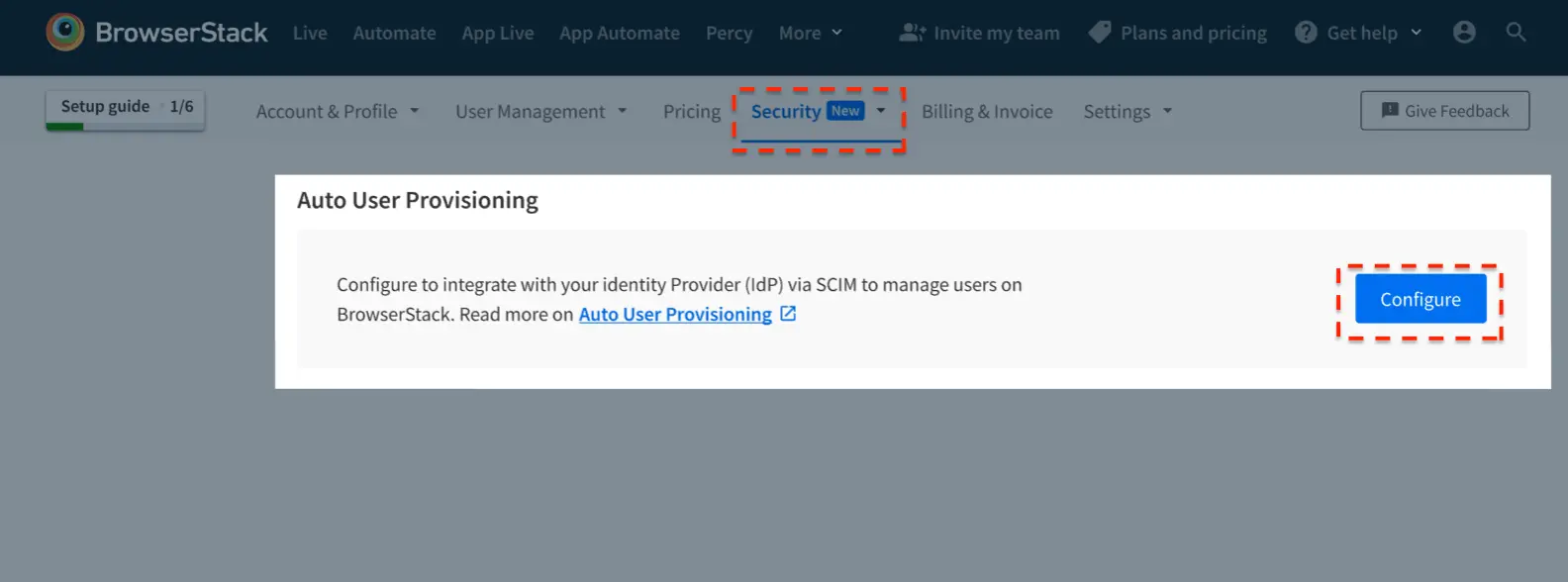
Go to Account > Security and select Authentication from the side-nav menu.
-
Under Auto User Provisioning, select Configure.
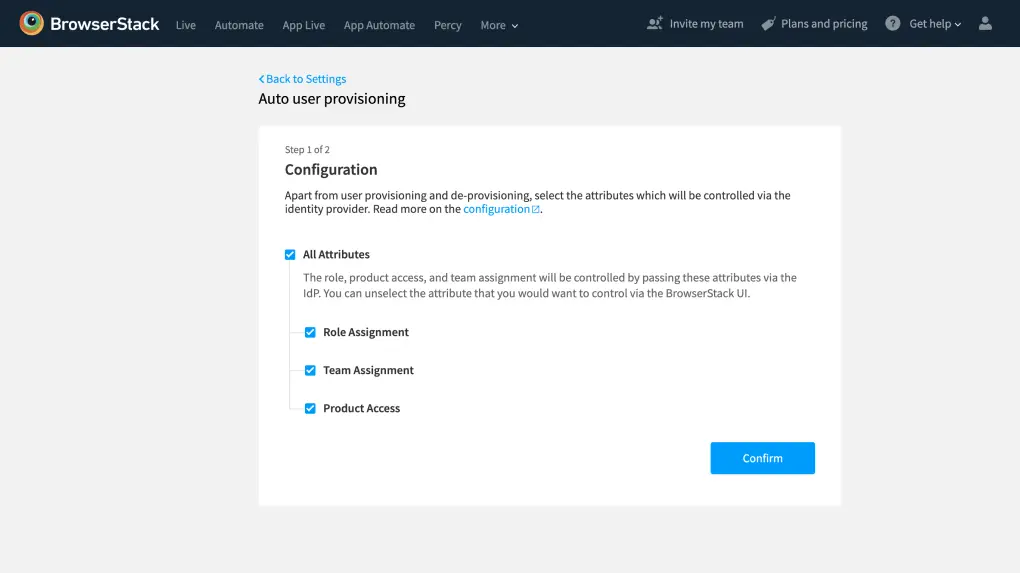
- On Step 1 of 2, select the user attributes that you want to control via your IdP. Ensure that these attributes are supported by your IdP, and then select Confirm to continue:
- IAM Role Assignment: Sets the user’s role from your IdP.
- Team Assignment: Sets the user’s team membership from your IdP.
-
Product Roles & Accesses: Sets product access and product-level roles from your IdP.
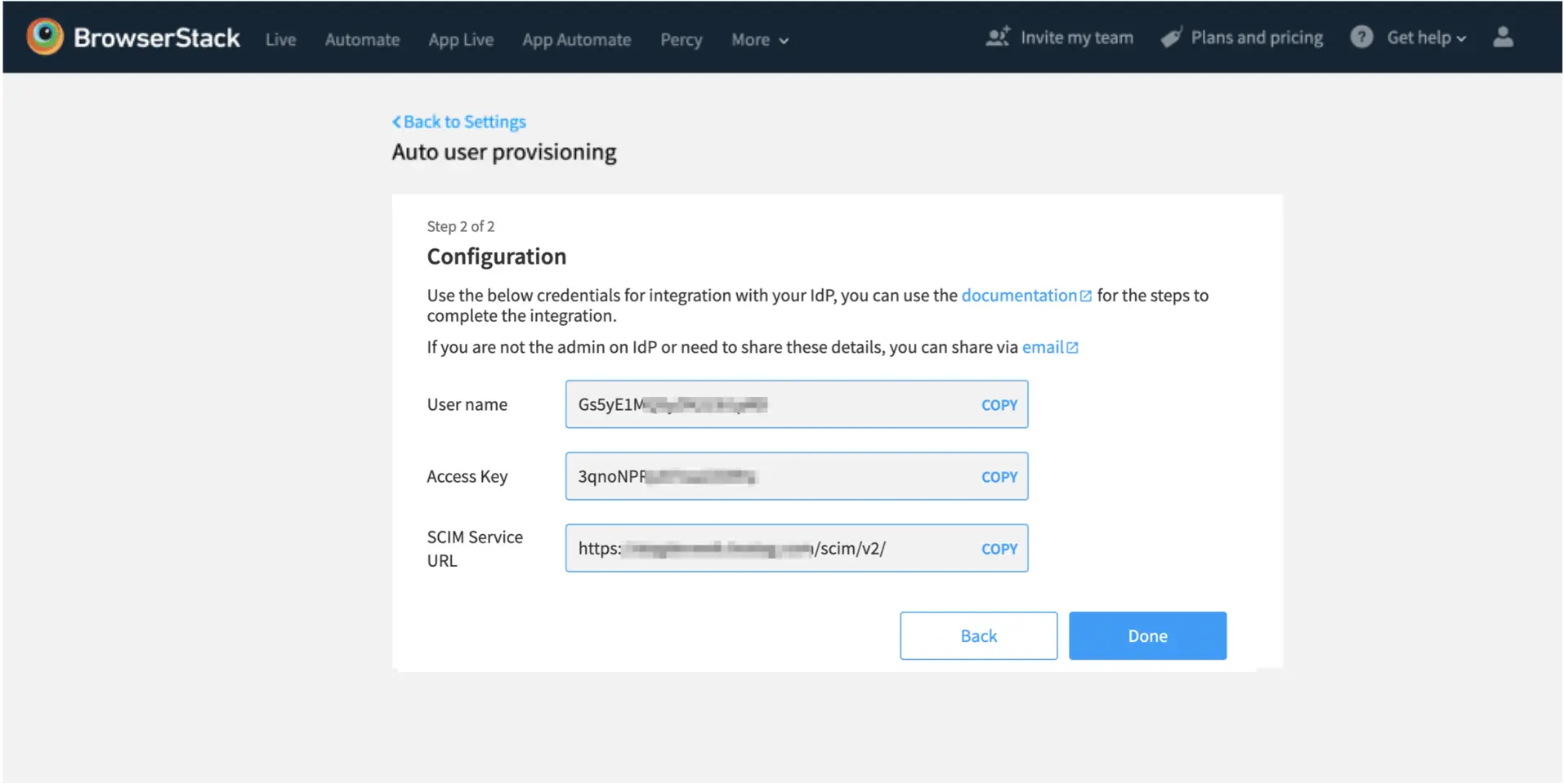
- On Step 2 of 2, copy the credentials to use on your IdP for authentication. If you are not the admin on your IdP, select email to share these details:
-
SCIM Base URL: The SCIM URL of BrowserStack server
https://www.browserstack.com/scim/v2 -
Authorization Details: We support Authorization Header as authorization type with Basic as well Bearer token method for authorization and does not enforce specific methods for authorization.
- For basic authorization: Copy User name and Access key from the BrowserStack and configure it on the connector.
-
For bearer token authorization: Copy Access key from the BrowserStack and configure it on the connector.
-
SCIM Base URL: The SCIM URL of BrowserStack server
-
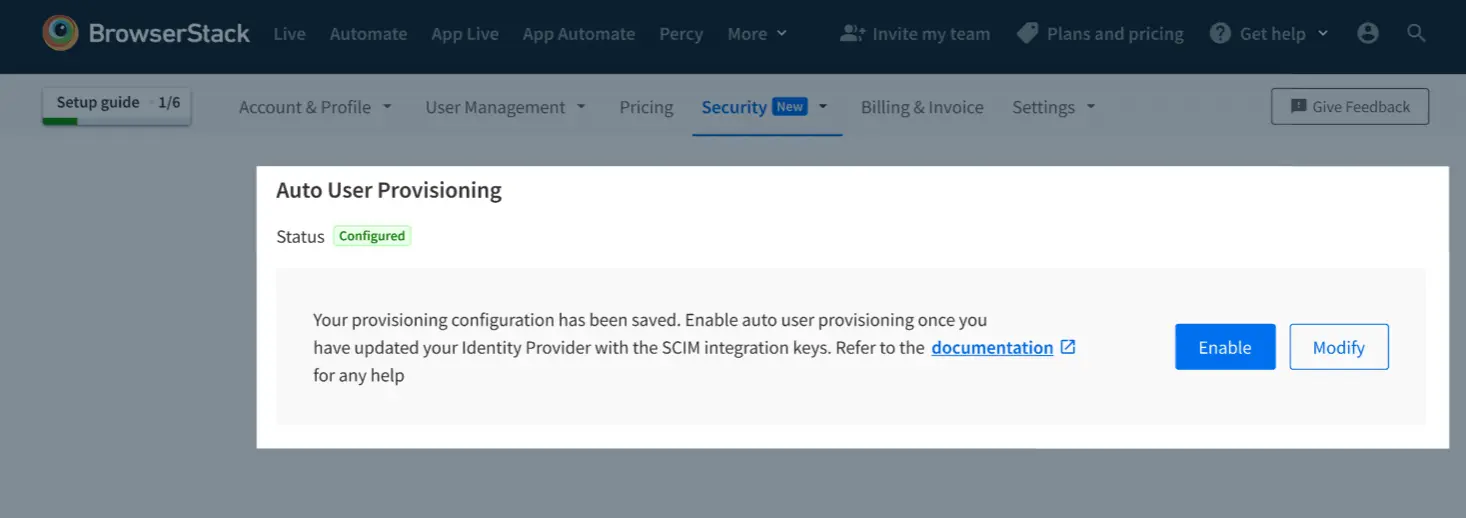
Select Done to save the configuration. The Auto User Provisioning status changes to Configured, and the Enable and Modify options appear.
-
Set up the SCIM integration on your IdP using the copied credentials. To change the saved attributes or view the credentials again before you enable provisioning, select Modify.
-
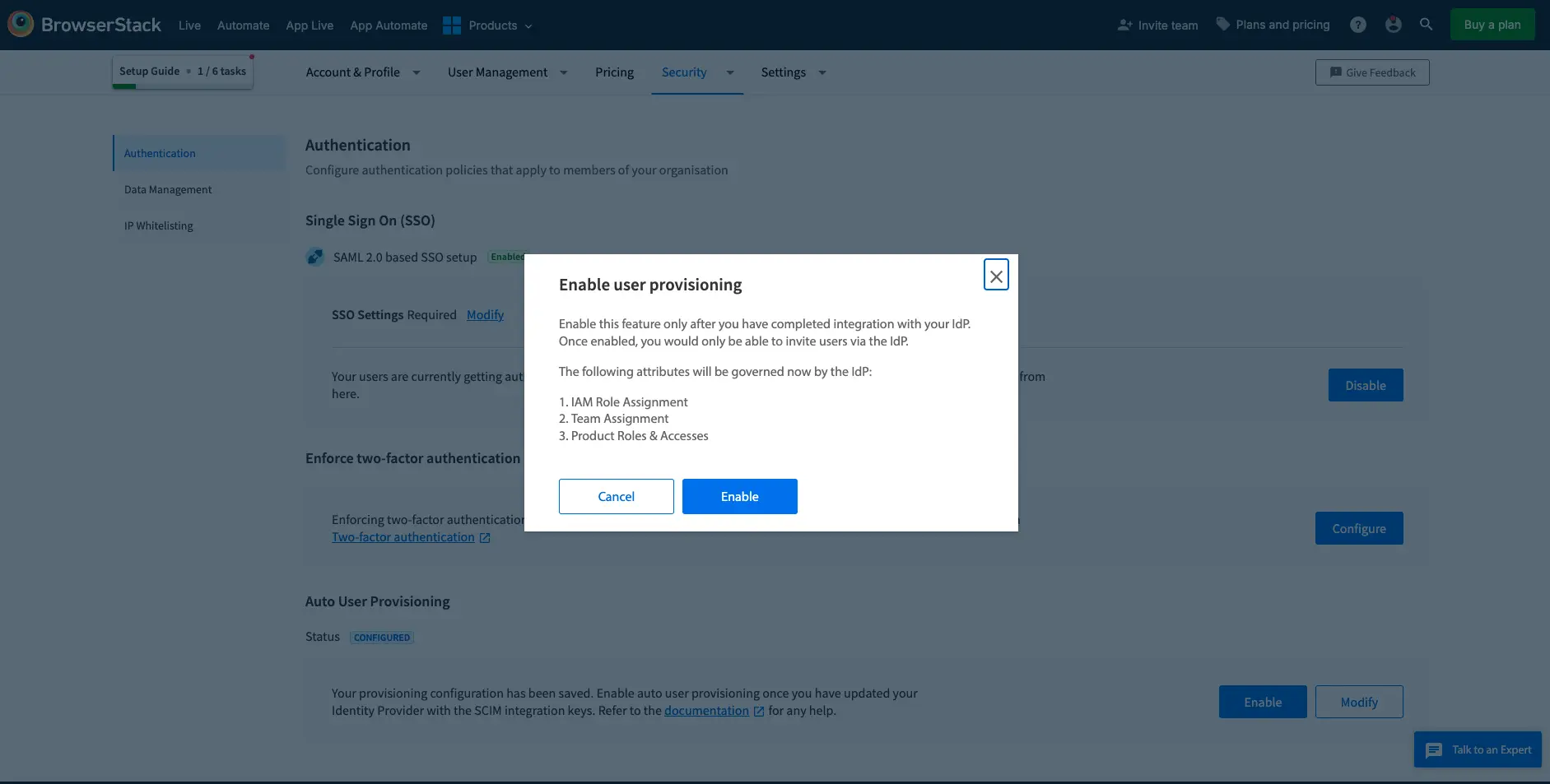
After you complete the setup on your IdP, select Enable. In the Enable user provisioning dialog, review the attributes that your IdP now governs, and then select Enable to confirm.
-
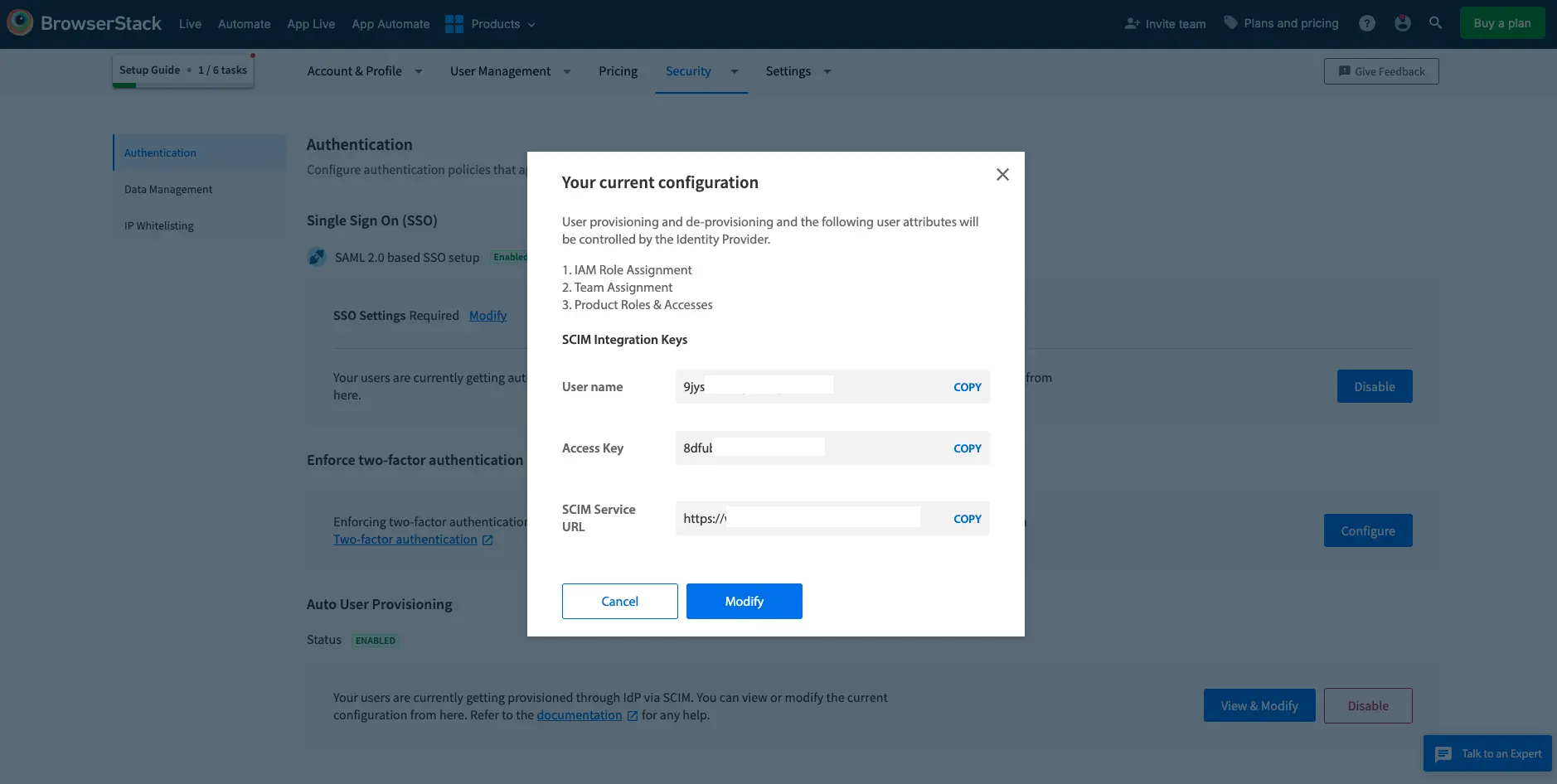
After Auto User Provisioning is enabled, the status changes to Enabled. To review or change the governed attributes and the SCIM integration keys, select View & Modify. To turn off provisioning, select Disable.
- Verify or test the configuration on your IdP.
After you enable Auto User Provisioning, you can invite and manage users only through your IdP.
Configuration steps for each Identity Provider would vary. We would suggest going through the support documentation for System for Cross-domain Identity Management (SCIM) standard on your IdP.
Set-up on your Identity Provider
- Find SCIM Connector on your IdP.
- Follow the steps to configure it, or use the details in Open SCIM endpoints section to configure it.
- Make sure that you configure the following in the connector:
a. SCIM Base URL: The SCIM URL of BrowserStack serverhttps://www.browserstack.com/scim/v2
b. Authorization Details: We support Authorization Header as authorization type with Basic as well Bearer token method for authorization and does not enforce specific methods for authorization.
- For basic authorization: Copy User name and Access key from the BrowserStack and configure it on the connector.
- For bearer token authorization: Copy Access key from the BrowserStack and configure it on the connector.
- Click on Verify / Test to check the configurations.
Custom attributes
If you’re a new BrowserStack customer, to assign roles and products, see Assign roles using Automated User Provisioning and Assign product access using Automated User Provisioning.
In order to control Role, Team and Product Access from IdP, add the following attributes on IdP’s end:
-
External Name:
bstack_role - Default role assigned is
User. This is possible in two scenarios:- Unexpected, empty or no value specified
- Role attribute is controlled from Account section
- Expected values when attribute controlled by OpenSCIM:
| Attribute Value | Role Update |
|---|---|
| User | User will be assigned |
| Admin | Admin will be assigned |
| Owner | Owner will be assigned. The current owner will be replaced with the new owner. The current owner will become a user. |
|
No Value Empty or Any other value |
The user is created as User by default. |
To know the structure of the custom attributes, hit the following endpoint:
GET https://www.browserstack.com/scim/v2/Schemas
Troubleshooting
We would suggest that as a first step, please put all the users you currently have on the BrowserStack account into the IdP connector app via the assignment tab. This would avoid any discrepancies between the user lists on your IdP and BrowserStack.
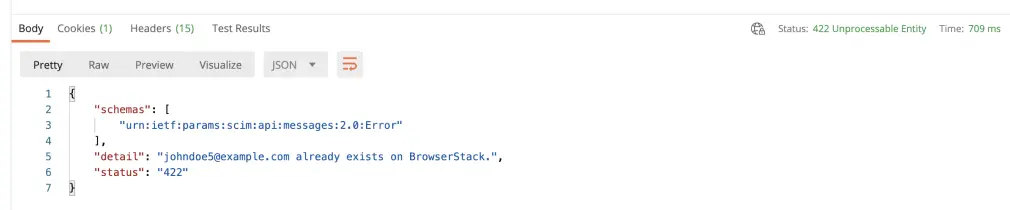
User already present On BrowserStack
Resolution: User already presents on BrowserStack under a different organization, please get the account deleted before provisioning the user.
Invalid parameter/attribute values passed for Role or Product
Resolution: Role/Product is not a valid use-case, please use the attribute values provided above.

Owner deletion
Resolution: Assign ownership to a different user before deletion of this user. The owner cannot be deleted, BrowserStack account needs a user to have Owner role assigned.
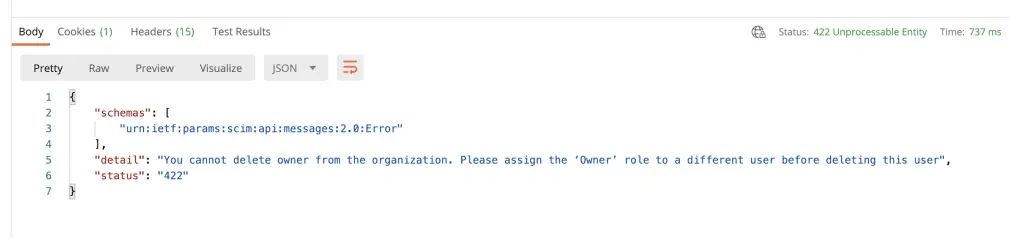
Owner cannot be directly deleted via the IdP. Please assign the owner role to another user via BrowserStack UI or IdP, and then delete the old owner.
Incompatible attributes
Resolution: You are assigning incompatible user attributes, for example, the Owner cannot have a team assigned.
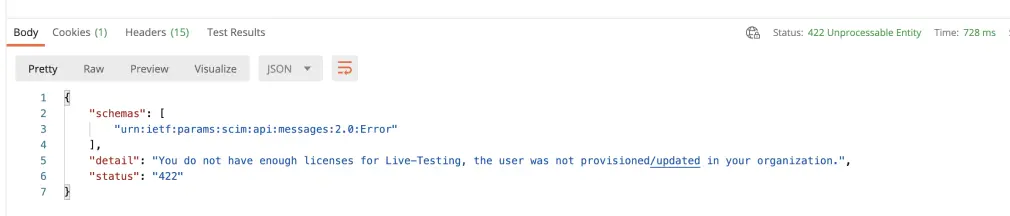
Licenses unavailability
Resolution: You have used up all your licenses for the product, please unassign users or add more licenses. Contact your Account Executive to get information on adding licenses.
When a user is deactivated on your IdP, the said user will be deleted from your BrowserStack account. Whenever the user is activated, a new user will be created on BrowserStack. This would lead to a new id being created.
Escalation/Support
Contact us for any escalations or support.
We're sorry to hear that. Please share your feedback so we can do better
Contact our Support team for immediate help while we work on improving our docs.
We're continuously improving our docs. We'd love to know what you liked
We're sorry to hear that. Please share your feedback so we can do better
Contact our Support team for immediate help while we work on improving our docs.
We're continuously improving our docs. We'd love to know what you liked
Thank you for your valuable feedback!