
 Join our Discord
Offline mode on BrowserStack Live
Test your websites, web apps, and progressive web apps (PWAs) in offline conditions on BrowserStack real iOS devices.
With offline mode on BrowserStack real iOS devices, you can test how your websites, web apps, and progressive web apps (PWAs) perform when an iOS device is completely disconnected from the internet. This allows you to identify and fix issues that users might face when they have no network connectivity.
BrowserStack provides true offline mode on real iOS devices instead of just network throttling or packet loss simulation. When you enable offline mode, BrowserStack devices replicate real device behavior when they are cut off from internet connectivity. Your apps respond exactly as they would on physical devices without internet access.
Supported devices
Offline mode is supported on the following devices:
| Device | iOS Version |
|---|---|
| iPhone | iOS v15 and later |
| iPad | iPadOS v15 and later |
Enable offline mode
Offline mode takes approximately 40 to 60 seconds to enable. You cannot use the device during this time. However, you can set up additional devices to start a multi-device test session while the device is enabling offline mode.
To enable offline mode on BrowserStack real iOS devices:
- Log in to the Live dashboard.
- On the Live dashboard, select the device-browser combination to start your test session.
- On the Live toolbar, click Throttle Network.
- On the Throttle Network prompt, select Offline.
The dashboard displays a message confirming that the device is offline.
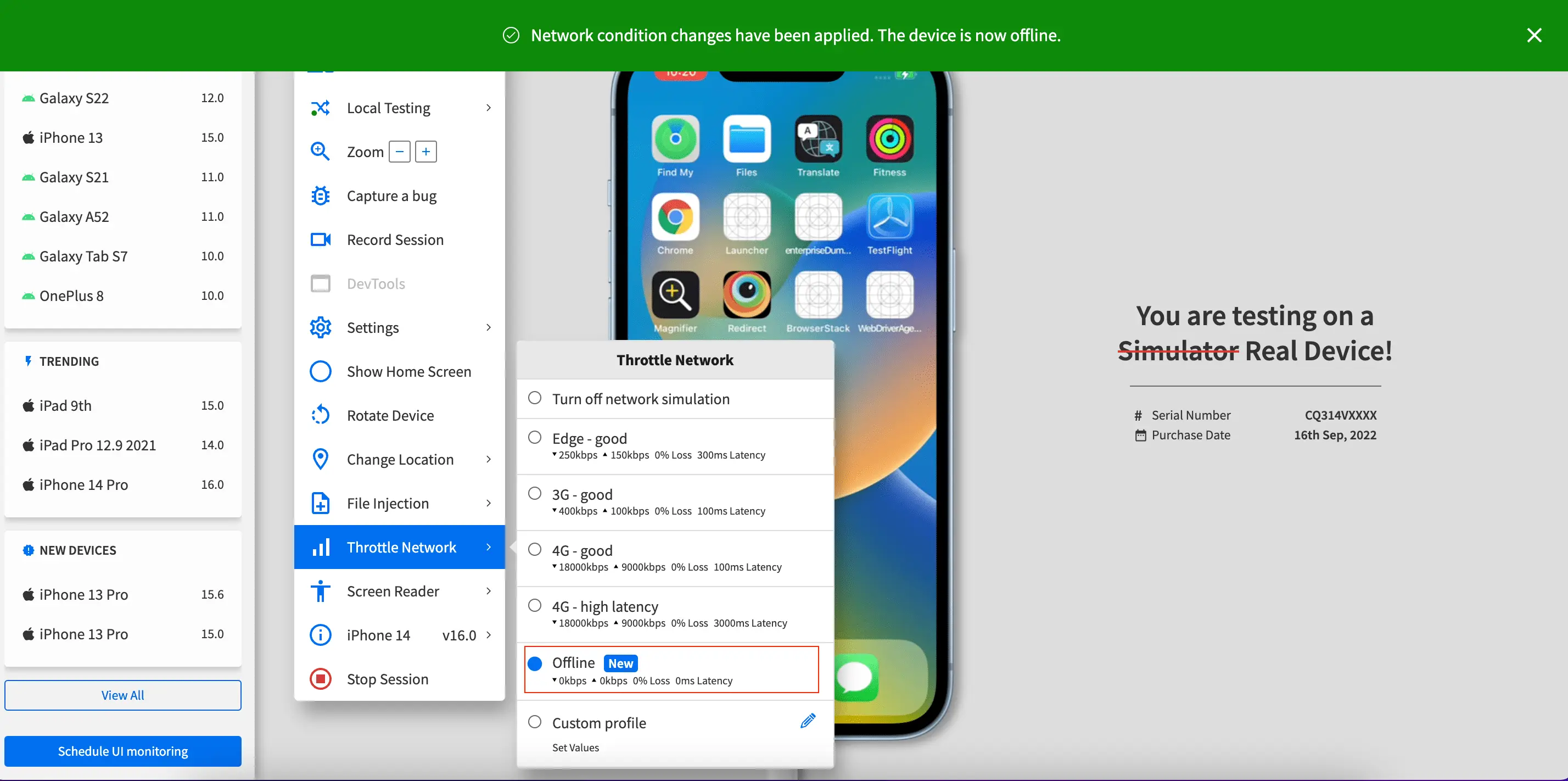
When you enable offline mode, the device disconnects from the internet and certain features such as Device Passcode, Low Power Mode, Date and Time, or Time Zone settings are disabled. To work around this limitation, enable these features before you turn on offline mode. The settings remain active when the device goes offline.
We're sorry to hear that. Please share your feedback so we can do better
Contact our Support team for immediate help while we work on improving our docs.
We're continuously improving our docs. We'd love to know what you liked
We're sorry to hear that. Please share your feedback so we can do better
Contact our Support team for immediate help while we work on improving our docs.
We're continuously improving our docs. We'd love to know what you liked
Thank you for your valuable feedback!