
Get your setup working faster. Join our Discord for optimisation tips from elite testers.
 Join our Discord
Join our Discord
Constant VUs
Set constant VUs to simulate steady load and assess performance in BrowserStack.
Depending on your preferred method, select any one of the following to set constant virtual users:
Configure Constant VUs Load Profile
Select Constant VUs from the dropdown menu, and set the number of virtual users, and test duration.
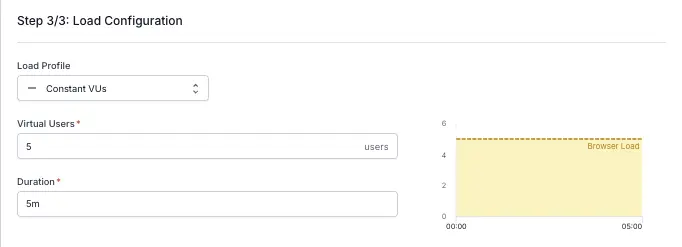
- Virtual Users: Enter the total number of users to simulate during the test.
- Duration: Specify how long the test should run (in minutes, seconds, or a combination of both).
We're sorry to hear that. Please share your feedback so we can do better
Contact our Support team for immediate help while we work on improving our docs.
We're continuously improving our docs. We'd love to know what you liked
We're sorry to hear that. Please share your feedback so we can do better
Contact our Support team for immediate help while we work on improving our docs.
We're continuously improving our docs. We'd love to know what you liked
Thank you for your valuable feedback!