
 Join our Discord
Spike VUs
Model sudden traffic bursts to test how your system handles and recovers from spikes in BrowserStack Load Testing.
Use the Spike VUs load profile to model a sudden burst of traffic, hold it for a moment, and return to a steady baseline. This helps you check how your system handles events such as flash sales, breaking news alerts, or marketing pushes, and whether it recovers cleanly once the surge passes.
A spike follows a baseline, spike, and recovery pattern:
- Baseline is the steady number of virtual users (VUs) that run before and after each spike.
- Spike is the burst that ramps up to a peak VU count and ramps straight back down, with no hold in between.
- Recovery is the gap between two spikes, during which the load returns to baseline so you can see whether your system clears its queues and frees up memory.
You can add up to 10 spikes in a single test to model repeated bursts.
The Spike VUs load profile is available only for protocol (API) load tests.
Depending on your preferred method, select any one of the following to configure spike virtual users:
Configure Spike VUs
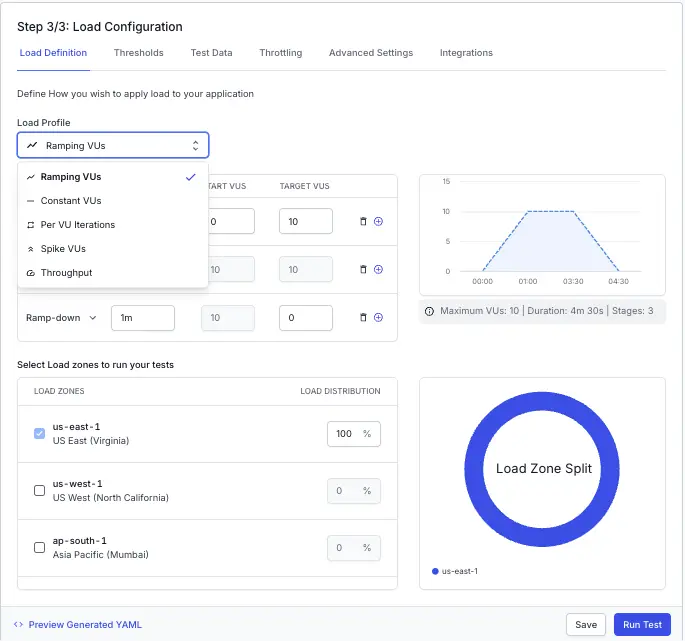
Select Spike VUs from the dropdown menu, then set the baseline load, the total test duration, and one or more spikes.
Set the following:
- Baseline VUs: The steady number of VUs that run before and after each spike. The default is 10.
- Total Test Duration: How long the test runs at the baseline level, in minutes, seconds, or a combination of both. The default is 5m.
For each spike, set the following:
- VUs: The peak number of VUs to reach during the spike. This must be higher than the baseline. The default is 100.
- Duration: The length of the spike. BrowserStack splits this evenly, ramping up to the peak for the first half and ramping back down for the second half, with no hold in between. The default is 1m.
- Recovery Time: The gap between two spikes, during which the load returns to the baseline. This field is optional. The default is 30s.
When you select Spike VUs, BrowserStack shows one spike at the midpoint of the total duration. To model repeated bursts, select Add Spike or Duplicate. You can add up to 10 spikes, and BrowserStack spaces them evenly around the midpoint. A preview chart and a short description update beside the fields as you adjust the values.
To keep results meaningful, add a recovery gap between consecutive spikes so your system has time to clear its queue, and keep each spike short. A short, sharp burst reflects a real spike more accurately than a long, gradual one.
We're sorry to hear that. Please share your feedback so we can do better
Contact our Support team for immediate help while we work on improving our docs.
We're continuously improving our docs. We'd love to know what you liked
We're sorry to hear that. Please share your feedback so we can do better
Contact our Support team for immediate help while we work on improving our docs.
We're continuously improving our docs. We'd love to know what you liked
Thank you for your valuable feedback!