No Result Found
Connect & Get help from fellow developers on our Discord community. Ask the CommunityAsk the Community

Network throttling

Simulate bandwidth, latency, and packet loss to mirror real conditions.

Apply network throttling to evaluate performance under constrained or unreliable network environments.

The network throttling feature is currently available only for browser load testing.

Depending on your preferred method, select any one of the following to configure network throttling:

Network throttling

Network throttling enables you to run load tests under real-world network conditions. This helps you understand how your application behaves for users on different connection types.

Simulate common networks or define a custom network profile. Network throttling applies to all virtual users in the test.

Supported modes

The following two modes are supported for configuring network throttling:

Use the following steps to apply predefined network throttling profiles:

  1. On your Load Testing dashboard, scroll to the Throttle Network section.
  2. Choose among the predefined profiles for 3G, Slow 4G, and Fast 4G.
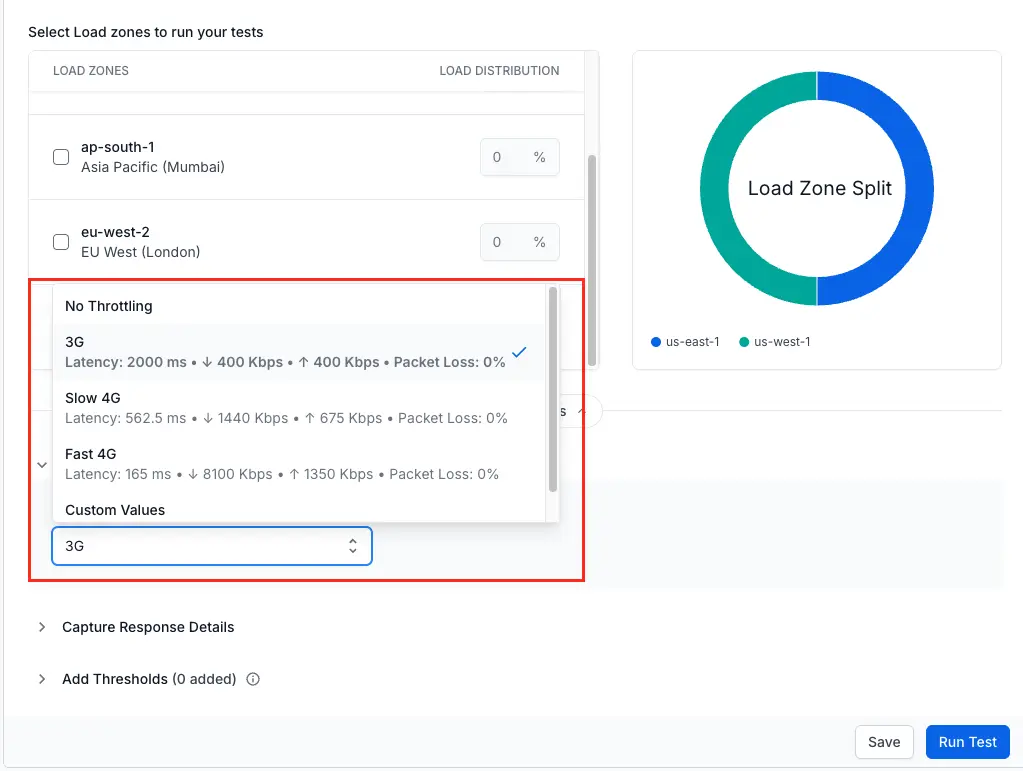
Load testing dashboard showing the Throttle Network section with predefined network profile options for 3G, Slow 4G, and Fast 4G

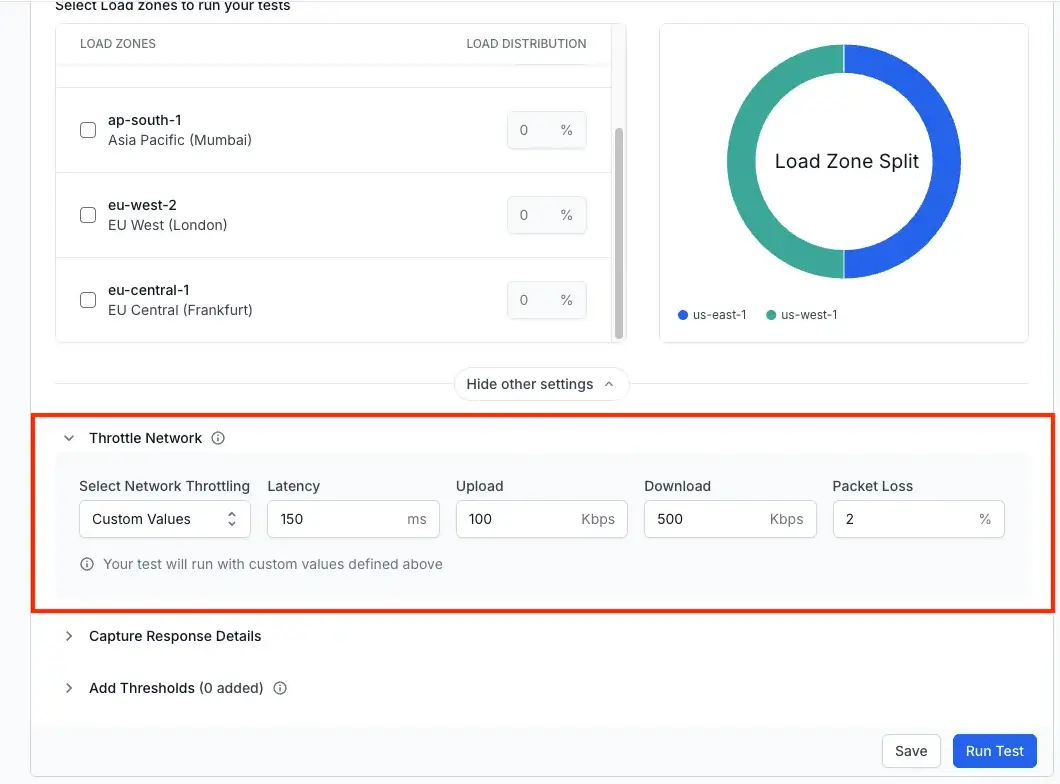
Follow these steps to set up custom network throttling:

  1. On your Load Testing dashboard, scroll to the Throttle Network section and select Custom Values.
  2. Input your desired values for Latency, Upload, Download, and Packet Loss.

Load testing dashboard showing the Throttle Network section with custom network configuration fields for Latency, Upload, Download, and Packet Loss

Configuration parameters

The following table lists the available configuration parameters:

Parameter Type Description Unit Allowed Range
Latency number Simulated network latency ms 0 – 1,000,000
Download number Simulated download bandwidth kb/s 1 – 10,000,000
Upload number Simulated upload bandwidth kb/s 1 – 10,000,000
Packet Loss number Simulated packet loss percentage % 0 – 99

Network throttling

Network throttling enables you to run load tests under real-world network conditions. This helps you understand how your application behaves for users on different connection types.

Simulate common networks or define a custom network profile. Network throttling applies to all virtual users in the test.

Supported modes

The following two modes are supported for configuring network throttling:

Quickly simulate popular network conditions using the following built-in profiles:

  • 3G
  • Slow 4G
  • Fast 4G

Use the following YAML configuration for predefined profiles:

browserstack-load.yml
Copy icon Copy

Define precise network conditions by configuring individual parameters. Use the following YAML configuration for custom profiles:

browserstack-load.yml
Copy icon Copy

Configuration parameters

The following table lists the available configuration parameters:

Parameter Type Description Unit Allowed Range
Latency number Simulated network latency ms 0 – 1,000,000
Download number Simulated download bandwidth kb/s 1 – 10,000,000
Upload number Simulated upload bandwidth kb/s 1 – 10,000,000
Packet Loss number Simulated packet loss percentage % 0 – 99

We're sorry to hear that. Please share your feedback so we can do better

Contact our Support team for immediate help while we work on improving our docs.

We're continuously improving our docs. We'd love to know what you liked


Thank you for your valuable feedback

Is this page helping you?

Yes
No

We're sorry to hear that. Please share your feedback so we can do better

Contact our Support team for immediate help while we work on improving our docs.

We're continuously improving our docs. We'd love to know what you liked


Thank you for your valuable feedback!

Talk to an Expert
Download Copy Check Circle