
 Join our Discord
IPsec site-to-site VPN setup guide
Set up an IPsec-based site-to-site VPN to securely connect your network to BrowserStack’s testing cloud.
For organizations testing applications on private or corporate networks, BrowserStack offers IPsec site-to-site (S2S) VPN integration. A dedicated, encrypted channel connects your infrastructure directly to BrowserStack’s testing cloud so test nodes can reach internal services without exposing them to the public internet.
What is IPsec site-to-site VPN?
Unlike remote-access VPNs that authenticate individual users on demand, a site-to-site VPN operates at the network level. Two VPN gateways exchange keys and hold an open tunnel between them so that traffic bound for the remote subnet routes through automatically — no user action required.
Key characteristics:
- Always-on tunnel that re-establishes automatically after any link interruption.
- Uses IKEv2 for key exchange and ESP in Tunnel Mode for encryption.
- Supports NAT Traversal (NAT-T) for environments where gateways sit behind NAT devices.
- Gives BrowserStack test nodes direct access to private hostnames and internal subnets not reachable over the internet.
- No software installation required on individual machines within your network.
Network architecture
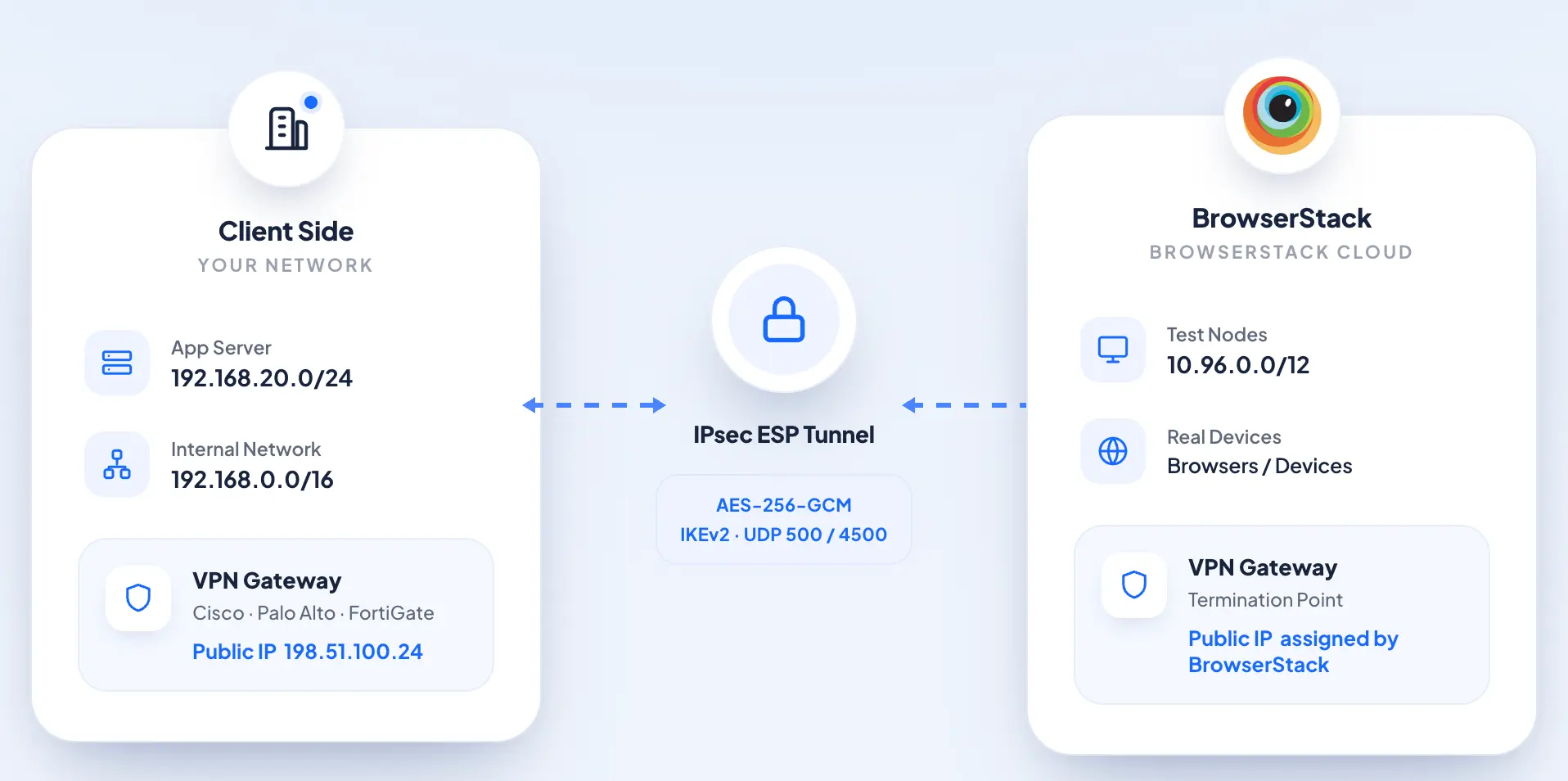
The architecture below shows how traffic moves between your private network and BrowserStack’s testing cloud over an encrypted IPsec channel.
Traffic flow steps
Each request from a BrowserStack test node to an internal resource follows this path:
- A BrowserStack test node sends a request to an internal hostname or IP (for example,
https://staging.internal.corp). - BrowserStack’s routing layer directs the request to the BrowserStack-side VPN gateway.
- The VPN gateway wraps the packet in an IPsec ESP envelope, encrypting it for transit.
- The encrypted payload travels across the internet to your organization’s public IP.
- Your VPN gateway receives, authenticates, and decrypts the packet.
- The original request is delivered to the target host on your internal network.
- The response returns via the same VPN tunnel back to the BrowserStack test node.
S2S VPN requirement gathering
IPsec site-to-site VPN configuration requires changes on your network infrastructure and cannot be completed by BrowserStack alone. Your Network Team must configure the VPN device, open the required firewall ports, and obtain any internal security approvals before the tunnel can be established. To begin, send the completed tables below to support@browserstack.com.
General information
The following table covers your server location and initial architecture review.
| Parameter | Example |
|---|---|
| Region where your server and VPN gateway reside | ap-south-1, us-east-1 |
| Does the above described architecture look acceptable to you? Share any concerns or clarifications. | — |
Public IP address information
The following table covers your VPN gateway’s public-facing IP details.
| Parameter | Example |
|---|---|
| Your public IP (static IP of your VPN gateway or router) | 203.0.113.45 |
| Is the IP static or dynamic? If dynamic, how do you handle DDNS? | Static |
Internal network details
The following table covers the subnets, DNS, and dynamic IP behavior within your internal network.
| Parameter | Example |
|---|---|
| Your internal subnet(s) — all networks that need VPN access | 192.168.1.0/24, 10.0.0.0/16 |
| Gateway IP — internal IP of your VPN device | 192.168.1.1 |
| DNS servers — internal DNS servers reachable via tunnel | 192.168.1.10, 8.8.8.8 |
| Internal domain suffixes that need resolution via your DNS | *.internal.corp, *.private.net |
| Do internal service IPs change dynamically (load balancers, auto-scaling)? If yes, how frequently? | Yes, every 5 minutes |
VPN equipment details
The following table covers the make, model, and configuration preferences for your VPN device.
| Parameter | Example |
|---|---|
| Device make and model | Cisco ASA 5506-X, pfSense, SonicWall TZ470 |
| Firmware version | 9.8.2 |
| Supported VPN protocols — confirm IPsec support and versions | IPsec IKEv2 |
| VPN type preference — route-based is recommended for flexibility | Policy-based VPN, Route-based VPN (VTI) |
IPsec parameters
The following table covers the IKE version supported by your gateway.
| Parameter | Example |
|---|---|
| IKE version — which version you support | IKEv1, IKEv2, or both |
Phase 1 (IKE) settings
The following table covers Phase 1 negotiation parameters.
| Parameter | Example |
|---|---|
| Encryption algorithm | AES-256, AES-128 |
| Hash algorithm | SHA-256, SHA-1 |
| DH Group | Group 14, Group 2 |
| Authentication method | Public Key Infrastructure, Pre-shared key |
| Lifetime | 28800 seconds (8 hours) |
Phase 2 (IPsec) settings
The following table covers Phase 2 data-plane encryption and lifetime parameters.
| Parameter | Example |
|---|---|
| Encryption | AES-256, 3DES |
| Authentication | SHA-256, MD5 |
| PFS Group | Group 14, disabled |
| Lifetime | 3600 seconds (1 hour) |
Firewall rules
The following table covers traffic permitted through the tunnel, firewall rules, and routing requirements. UDP 500, UDP 4500, and ESP protocol 50 must be open for the IPsec tunnel to establish.
| Parameter | Example |
|---|---|
| Allowed protocols and ports — traffic that should traverse the tunnel | HTTP (80), HTTPS (443), SSH (22), RDP (3389) |
| NAT configuration — any NAT rules on your side | — |
| Firewall rules for VPN traffic (UDP 500, UDP 4500, and ESP protocol 50 must be open) | UDP 500, UDP 4500, ESP (50) open |
| Dynamic routing — do you need to advertise routes dynamically? | — |
| Static routes only or BGP required | Static routes only, BGP required |
| If BGP is required: your Autonomous System Number (ASN) | 65001 |
High availability requirements
The following table covers redundancy and failover configuration. If a secondary gateway is required, provide its public IP address (all other parameters are assumed to be the same as the primary).
| Parameter | Example |
|---|---|
| Do you have redundant VPN gateways? | Yes |
| If yes, what is the failover mechanism? | Active-Passive, Active-Active |
| Secondary gateway public IP address (if applicable) | 203.0.113.46 |
Send the above details to support@browserstack.com to submit your VPN setup request. Our team reviews your request and follows up with next steps.
We're sorry to hear that. Please share your feedback so we can do better
Contact our Support team for immediate help while we work on improving our docs.
We're continuously improving our docs. We'd love to know what you liked
We're sorry to hear that. Please share your feedback so we can do better
Contact our Support team for immediate help while we work on improving our docs.
We're continuously improving our docs. We'd love to know what you liked
Thank you for your valuable feedback!