
 Join our Discord
Copy and paste steps
Learn how to copy and paste test steps in Low Code Automation to streamline test creation and improve efficiency.
Copy and paste lets you duplicate single or multiple test steps within the same test or across different tests in the same project. You can copy steps both in the recorder and outside it.
You can:
- Copy one or more steps and paste them within the same test.
- Copy steps from one test and paste them into another test in the same project.
- Paste a single copied selection into multiple tests without copying it again.
- Paste steps in bulk, either between any two existing steps or at the end of the test.
- Retain step configurations, including validations, custom locators, and failure logic.
Copy and paste steps in the recorder
To copy and paste steps in the recorder:
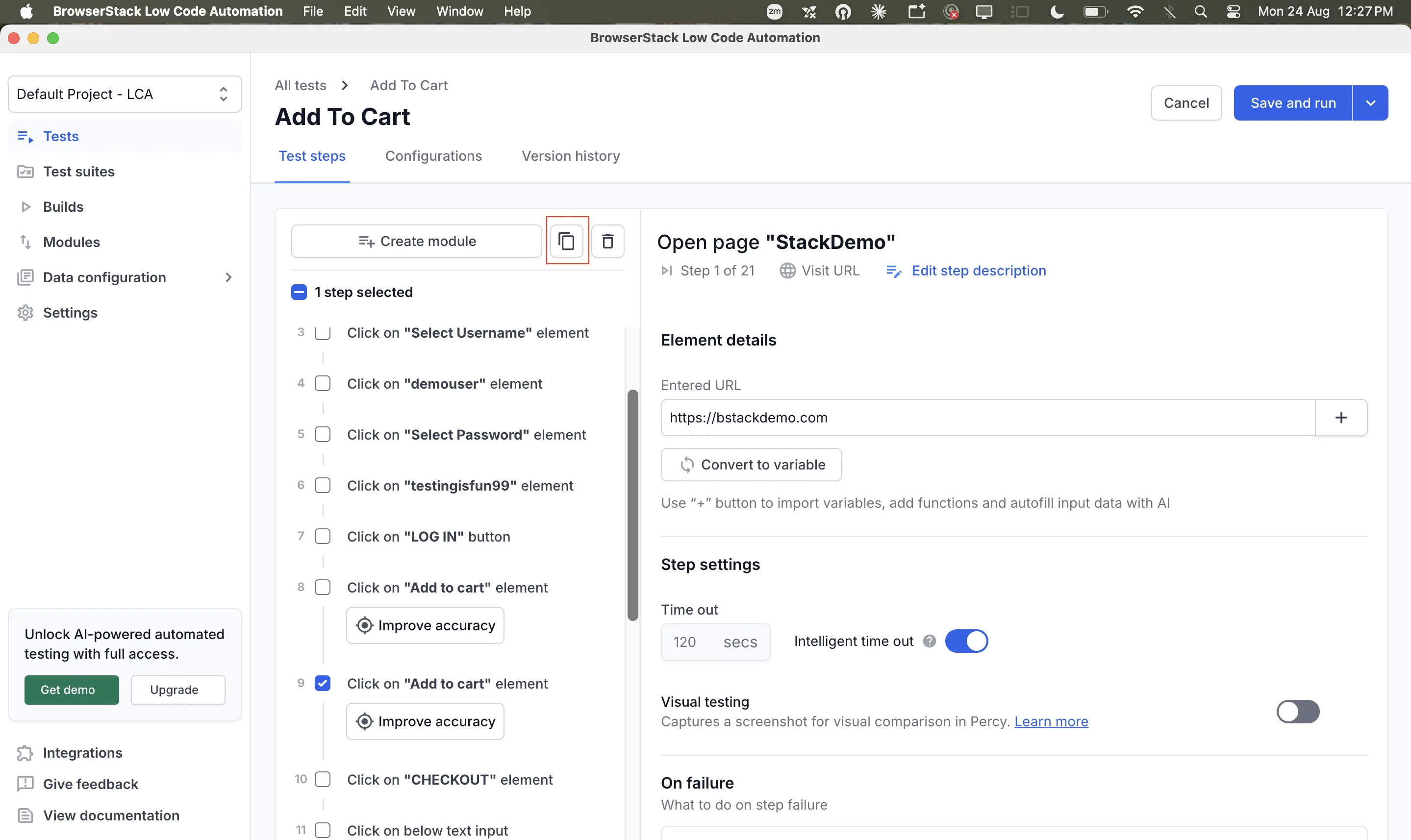
In the test steps panel, select the checkbox next to each step you want to copy. The header shows the number of steps selected.
Click the copy icon in the toolbar at the top of the panel.
Hover between the two steps where you want to insert the copied steps, click +Add step(s) and then click Paste step(s) here.
You can also copy and paste steps without launching the recorder. Click Tests in the left pane, open the test you want to edit, and use the same copy and paste actions on the Test steps tab.
Pasted steps are retained after you save the test, and saving creates a new test version that you can see on the Version history tab.
Copy and paste steps in a module
You can copy individual steps into and out of modules. The following cases aren’t allowed:
| What you copy | Where you paste it | Why it is not allowed |
|---|---|---|
| An entire module | Anywhere | A module can’t be copied. Copy the individual steps inside it instead. |
| Steps from outside a module that use a local variable | Into a module in the same test | The local variable is out of scope inside the module. |
| Steps from a module that use a local variable | Outside of a module, or within a different module in the same test | The local variable is out of scope in the other module. |
Points to remember
- You can copy a maximum of 10 steps at a time.
- The steps you select don’t have to be consecutive. You can select any combination of steps in a test and paste them together into another test.
- If you copy a step that is using a variable, also copy the step that created that variable. Otherwise, the pasted step fails. The step that creates the variable must come first in the pasted order.
- The first step of a test can’t be copied.
- You can’t copy an if-else conditional block of steps. Instead, copy the individual steps inside the conditional block.
- You can paste steps only into tests in the same project.
We're sorry to hear that. Please share your feedback so we can do better
Contact our Support team for immediate help while we work on improving our docs.
We're continuously improving our docs. We'd love to know what you liked
We're sorry to hear that. Please share your feedback so we can do better
Contact our Support team for immediate help while we work on improving our docs.
We're continuously improving our docs. We'd love to know what you liked
Thank you for your valuable feedback!