
 Join our Discord
Folders
Organize your bug reports into folders and control who can access them.
Use folders to organize your bug reports and to trigger automations.
Create folders
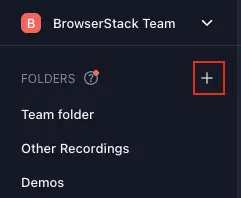
To create a folder, click the + button, then follow the on-screen instructions to complete the folder creation.
Once you have created a folder, you can upload bug reports directly to the folder, set up automations for it through the integrations settings page, or move bug reports between folders.
Access permissions
You can control which members of the workspace can access a folder by setting the access permissions to private or public. You can configure this when you create a folder, or change it later by hovering over the folder, clicking the menu button, and then clicking Manage access.
Private folders
Private folders and the recordings contained within can only be accessed by specific team members who have been given explicit permission. Team members without permissions cannot see the folder, and cannot view the bug reports in it, even if the folder’s contents are otherwise shared, unless a specific bug report’s own access is set to “anyone with link”. Private folders are always highlighted with a lock icon next to the folder name. For more information, see bug report access permissions.
Public folders
Public folders and the recordings contained within can be accessed by all members of the workspace.
Archive or delete a folder
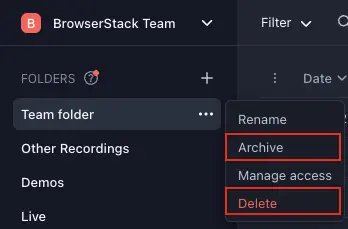
Deleting a folder deletes both the folder and all the bug reports stored within it. This action cannot be undone.
Alternatively, you can archive a folder. Archived folders are hidden under the Archived section. You cannot upload to an archived folder, but you can still access and manage the bug reports in it. You can restore an archived folder at any time.
We're sorry to hear that. Please share your feedback so we can do better
Contact our Support team for immediate help while we work on improving our docs.
We're continuously improving our docs. We'd love to know what you liked
We're sorry to hear that. Please share your feedback so we can do better
Contact our Support team for immediate help while we work on improving our docs.
We're continuously improving our docs. We'd love to know what you liked
Thank you for your valuable feedback!