
 Join our Discord
Native iOS linter for projects created with Xcode
Run an accessibility linter in Xcode projects to detect issues in SwiftUI and UIKit code before runtime.
The native iOS accessibility linter analyzes UI components, traits, labels, and hierarchy usage to flag common WCAG violations. It integrates with Xcode so you can lint during builds or as a separate step and receive inline diagnostics.
Prerequisites
- Xcode 15 or later.
- An Xcode project created.
- Project targets using SwiftUI or UIKit.
- A
.swift,.xib, or.storyboardfile.
Integration steps
You can use either of the following to scan your iOS Swift codebase for accessibility issues using BrowserStack’s Accessibility DevTools rule engine:
- Swift Package Manager (SPM) command plugin
- Command Line Interface (CLI)
Log in to your BrowserStack account or sign up if you don’t have an account.
Get your Username and Access Key from the Account & Profile section.
Set up the username and accesskey as environment variables to your shell configuration file:
export BROWSERSTACK_USERNAME=<your-username>
export BROWSERSTACK_ACCESS_KEY=<your-access-key>
export BROWSERSTACK_USERNAME=<your-username>
export BROWSERSTACK_ACCESS_KEY=<your-access-key>
set -x BROWSERSTACK_USERNAME <your-username>
set -x BROWSERSTACK_ACCESS_KEY <your-access-key>
At the root of your repository, run the following command to clone the script.
curl -L -o browserstack-a11y-scan-spm-zsh.sh "https://raw.githubusercontent.com/browserstack/AccessibilityDevTools/refs/heads/main/scripts/zsh/spm.sh" && chmod 0775 browserstack-a11y-scan-spm-zsh.sh
curl -L -o browserstack-a11y-scan-spm-bash.sh "https://raw.githubusercontent.com/browserstack/AccessibilityDevTools/refs/heads/main/scripts/bash/spm.sh" && chmod 0775 browserstack-a11y-scan-spm-bash.sh
curl -L -o browserstack-a11y-scan-spm-fish.sh "https://raw.githubusercontent.com/browserstack/AccessibilityDevTools/refs/heads/main/scripts/fish/spm.sh" && chmod 0775 browserstack-a11y-scan-spm-fish.sh
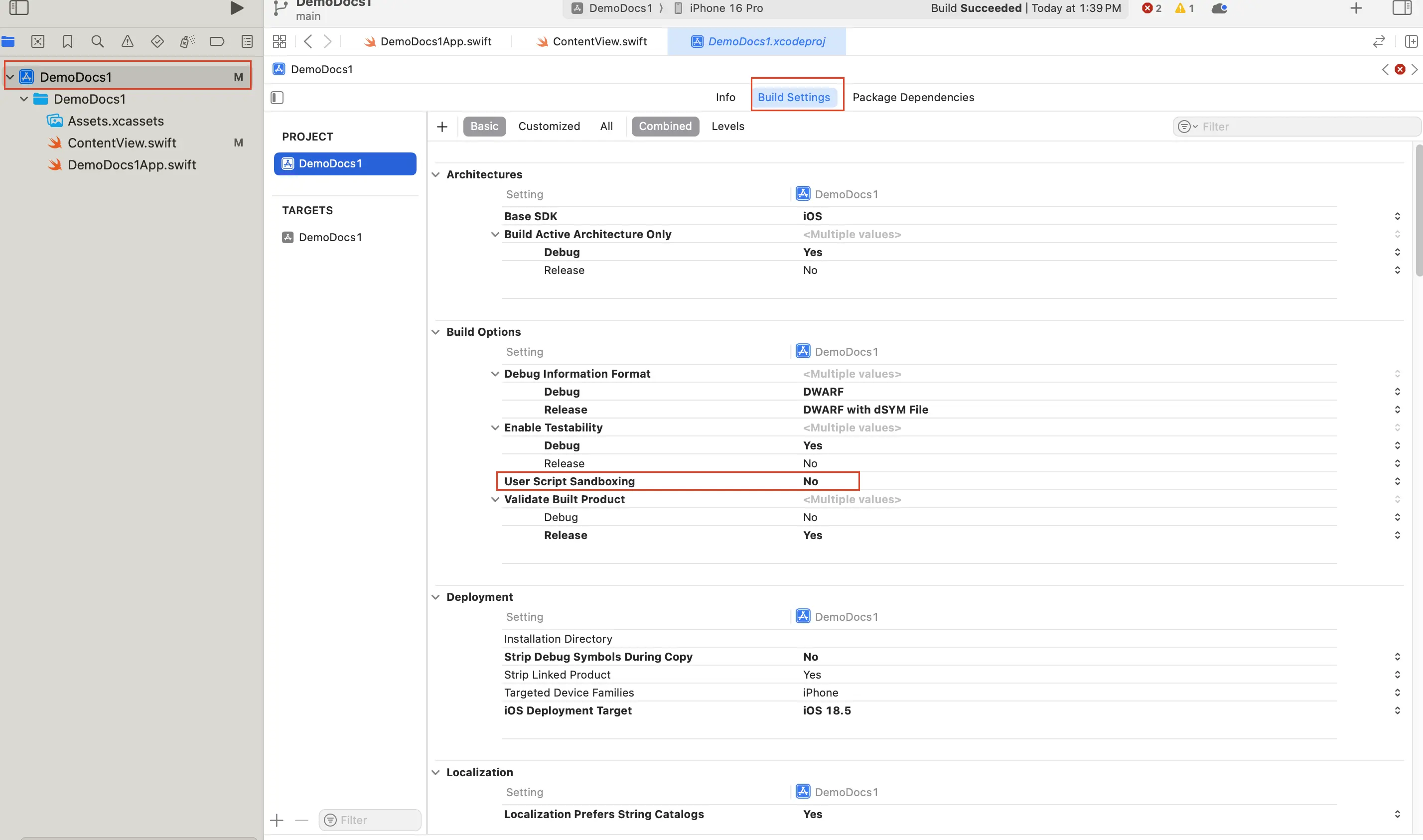
Open Xcode and select the project root folder on the left folder list.
Click Build Settings tab.
Search or navigate to User script sandboxing and set it to ‘No’.
Select a target from the target sidebar on the left.
Open Build Phases.
Click + and select New run script phase to create a new build phase.
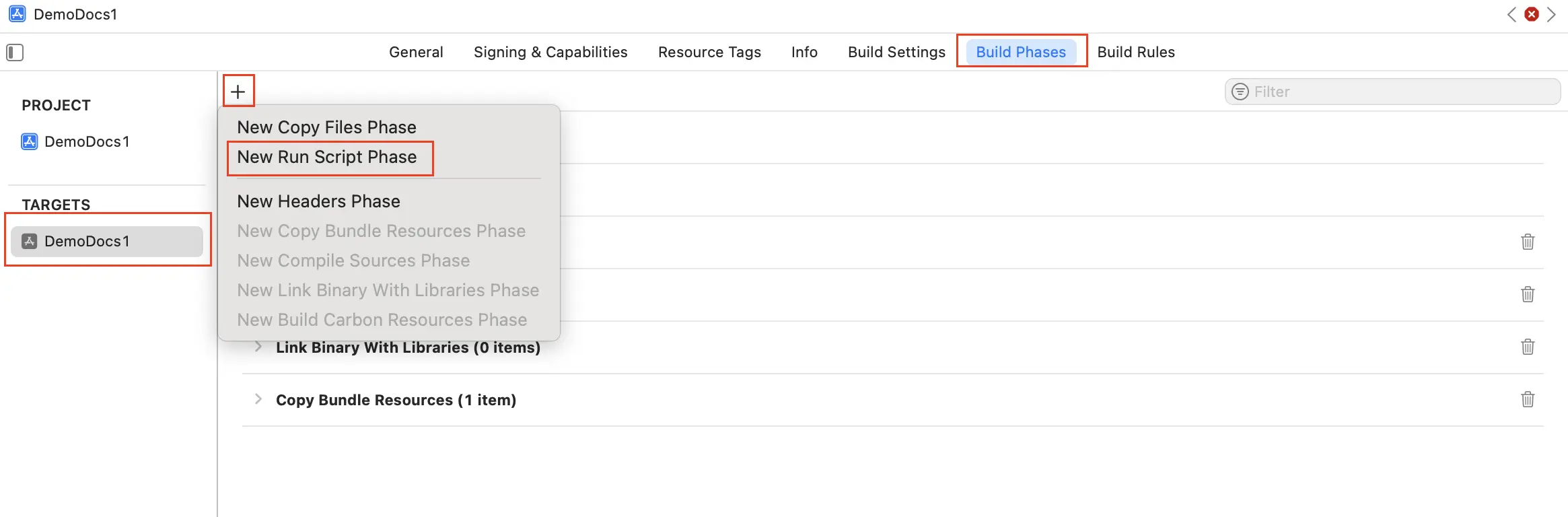
Name the new build phase.
Drag the newly created build phase and place it before the Compile Sources page.
Replace any existing code in the newly created build step with the following code:
./browserstack-a11y-scan-spm-zsh.sh --non-strict
./browserstack-a11y-scan-spm-bash.sh --non-strict
./browserstack-a11y-scan-spm-fish.sh --non-strict
Learn more on optional parameters like --include, --exclude, and --non-strict you can add to the above command.
Repeat steps 8 to 13 for all targets.
After setting up the integration, you can click the run button on Xcode or press Cmd + B to build the project. The BrowserStack Accessibility linter runs on each build and highlights issues in the Xcode build log and diagnostics.
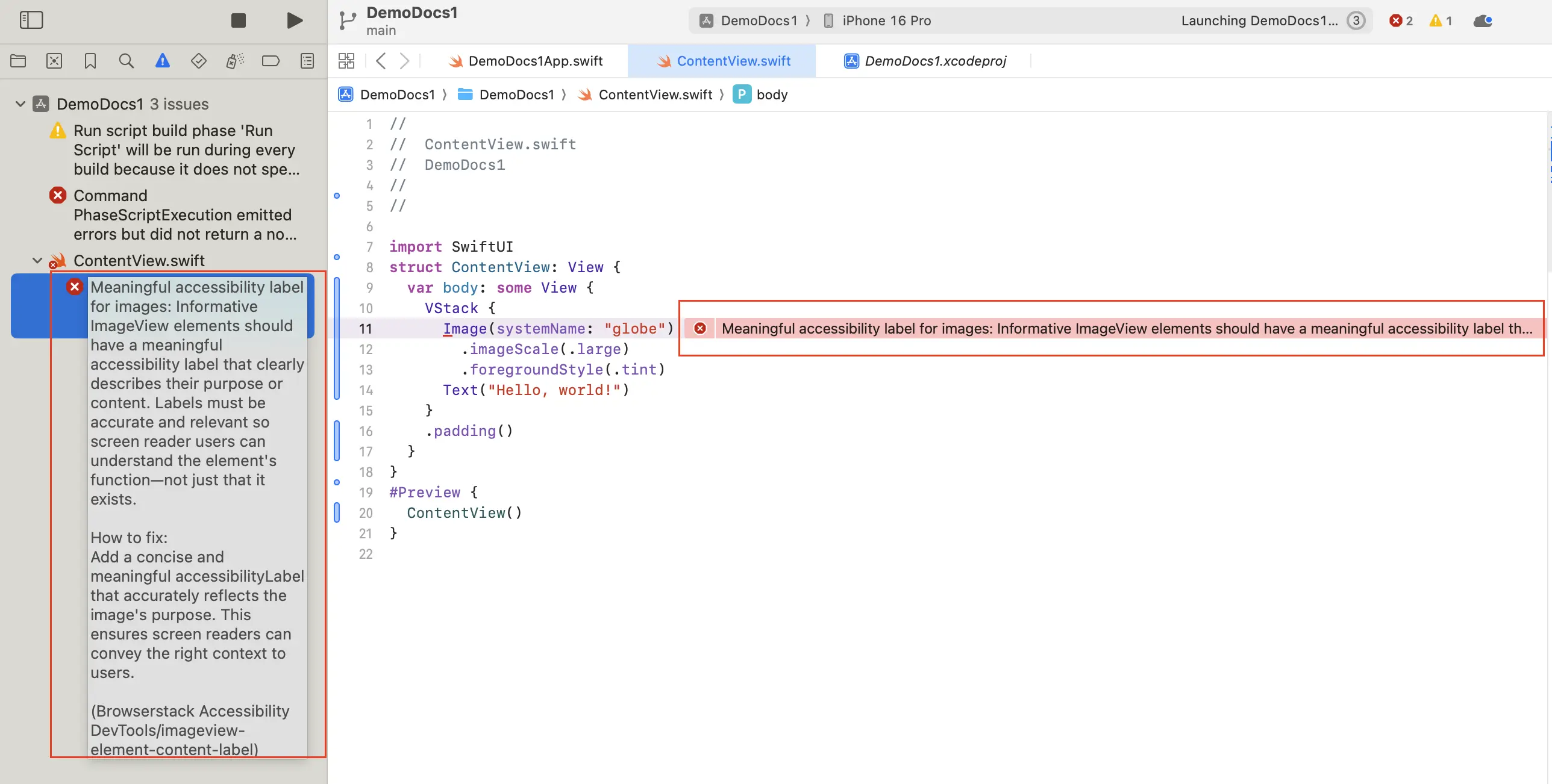
If --non-strict flag is not passed, builds will fail if there are Accessibility issues.
Register pre-commit hook
After integrating the SPM plugin, you can also run accessibility checks automatically before each commit by running a command. This command is different for CLI and SPM workflows. The following example commands are for SPM workflow:
./browserstack-a11y-scan-spm-zsh.sh register-pre-commit-hook
./browserstack-a11y-scan-spm-bash.sh register-pre-commit-hook
./browserstack-a11y-scan-spm-fish.sh register-pre-commit-hook
You can then edit the .git/hooks/pre-commit file to customize the registered pre-commit hook.
Related resources
We're sorry to hear that. Please share your feedback so we can do better
Contact our Support team for immediate help while we work on improving our docs.
We're continuously improving our docs. We'd love to know what you liked
We're sorry to hear that. Please share your feedback so we can do better
Contact our Support team for immediate help while we work on improving our docs.
We're continuously improving our docs. We'd love to know what you liked
Thank you for your valuable feedback!