
 Join our Discord
Troubleshooting app connectivity issues on Google Chrome
Steps to resolve connectivity issues with the BrowserStackLocal app on Google Chrome.
If you are experiencing connectivity issues with the BrowserStackLocal app on Google Chrome v142 or later, it may be due to changes in Chrome’s handling of Local Network Access (LNA).
From version 142 onwards, Google has introduced stricter checks regarding Local Network Access (LNA). LNA restricts requests from public websites, webapps, and browser extensions to resources on your private network. This is intended to protect users from potential security risks, such as Cross-Site Request Forgery (CSRF) attacks or other security vulnerabilities. These restrictions can cause local polling or resource requests to fail with CORS errors and may prevent the BrowserStackLocal app from connecting.
Follow these solutions in the order listed below, proceeding to the next only if the previous one doesn’t resolve your issue:
The second solution involves changing an experimental Chrome flag. BrowserStack recommends reverting the flag to the default state once your issue is resolved to ensure your browser remains secure.
Solution #1: Enable local network access for a specific site in Chrome
To resolve this issue, ensure that local network access is enabled in Chrome:
- In your browser’s address bar, click the Padlock or Tune icon beside the URL.
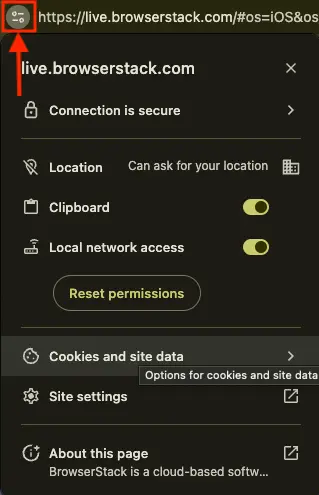
- Ensure Local network access is enabled.
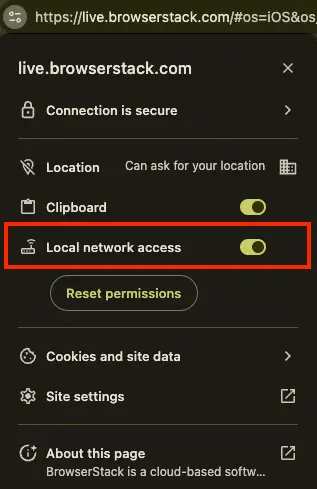
- Refresh the page to apply changes.
- Try connecting the BrowserStackLocal app again.
Solution #2: Disable the Local Network Access Check using Chrome flags
If enabling local network access does not resolve the issue, temporarily disable Chrome’s local network access check to allow the BrowserStackLocal app to connect:
- Open a new Chrome tab and go to the following URL:
chrome://flags/#local-network-access-check - From the dropdown, set Local Network Access Checks to Disabled.
- Relaunch Google Chrome.
- Try connecting the BrowserStackLocal app again.
After you complete testing, revert the flag setting to the default state to ensure your browser remains secure.
We're sorry to hear that. Please share your feedback so we can do better
Contact our Support team for immediate help while we work on improving our docs.
We're continuously improving our docs. We'd love to know what you liked
We're sorry to hear that. Please share your feedback so we can do better
Contact our Support team for immediate help while we work on improving our docs.
We're continuously improving our docs. We'd love to know what you liked
Thank you for your valuable feedback!