
 Join our Discord
Duplicate state info in spoken output
The duplicate state info in spoken output rule ensures that the accessibility labels of interactive elements do not include redundant information about the element’s state. Screen readers automatically announce the type and state of an element, such as “selected”, “checked”, or “disabled”, based on the element’s properties. Including this information in the accessibility label can lead to confusion and redundancy for users relying on assistive technologies.
- Rule Category :
Accessibility Labels - WCAG 2.1 & 2.2 SC :
4.1.2 (A) - RAAM 1.1 :
Best Practice - Rule Severity :
Moderate - Supported Platforms :
Android,iOS
Success criteria
The rule checks for the following potential violations:
-
Inclusion of State Information
Accessibility labels should not include information about the element’s state, such as “ON” or “OFF”. -
Redundant Information
Accessibility labels should not repeat information that screen readers automatically announce.
How to fix
To fix violations related to view state information in element accessibility labels, follow these steps:
-
Remove state information
Ensure that the accessibility labels defined in thecontentDescriptionproperty (Android) oraccessibilityLabelproperty (iOS) do not contain information about the state of a view. -
Rely on assistive technologies
Depend on assistive technologies to automatically convey the element’s type and current state alongside its accessible name. This approach avoids redundancy and ensures that the information presented is always up-to-date and accurate.
Example
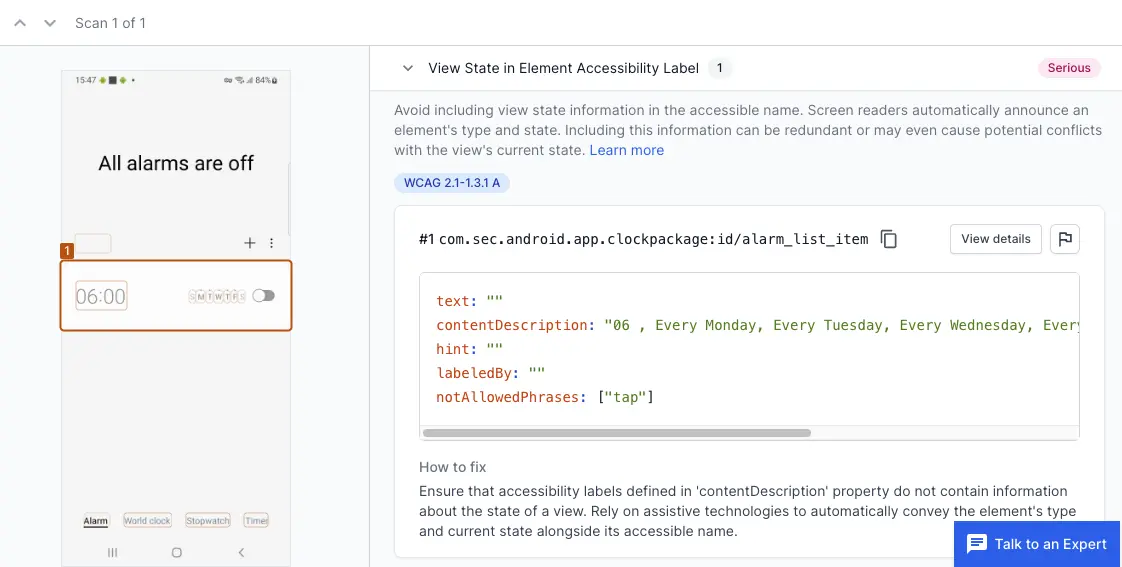
The following example scan report shows a duplicate state info violation in the app’s interface. The issue is identified for a UISwitch element that has the state information “(selected)” included in its accessibility label.
Violation
-
UISwitch control:
The UISwitch element has an accessibility label and state information that results in the detected label “1 1 (selected)”. This is a violation because the state information “(selected)” is included in the label that the screen reader announces. Screen readers will automatically announce the state of the switch (e.g., “selected” or “not selected”), and including it in the label leads to redundancy, which can cause confusion for users relying on assistive technologies.
Fix
- Remove “(selected)” or any state information from the accessibility label.
- Allow the screen reader to announce the element’s state automatically.
References
We're sorry to hear that. Please share your feedback so we can do better
Contact our Support team for immediate help while we work on improving our docs.
We're continuously improving our docs. We'd love to know what you liked
We're sorry to hear that. Please share your feedback so we can do better
Contact our Support team for immediate help while we work on improving our docs.
We're continuously improving our docs. We'd love to know what you liked
Thank you for your valuable feedback!