
 Ask the Community
Interactive elements with unsupported type
The rule ensures that custom interactive elements provide a supported class name (or the platform equivalent) to accessibility services. This ensures that assistive technologies correctly identify and announce the element’s role or type.
Assistive technologies, such as screen readers, rely on standard class names to understand the purpose and behavior of UI elements. If custom elements do not provide this information, assistive technologies may:
- Fail to announce the role of the element.
- Misrepresent interactive elements.
- Break the navigation flow.
- Rule Category :
Accessible Elements - WCAG 2.1 & 2.2 SC :
1.3.1 (A),4.1.2 (A) - Rule Severity :
Serious - Supported Platforms and Frameworks:
Android,iOS,React Native,Flutter
Success criteria
The specific criteria for success are:
- Each custom component must expose a supported role or widget type to accessibility services.
- Information and relationships conveyed by the element must be programmatically determinable.
How to fix
To prevent interactive elements with unsupported types violations, follow these steps:
-
Set standard class names: Set the
classNameto a standard Android widget class, such asandroid.widget.Button,android.widget.Switch. This ensures custom views or components expose a recognized accessibility role appropriate to the platform. -
Avoid ambiguous or undefined roles: Ensure custom interactive components do not present a generic or unsupported type like
Viewto accessibility services.
-
Set standard class names: Set the
accessibilityTraitsproperty, for example,.button,.switch, to indicate the element’s role. This ensures custom views or components expose a recognized accessibility role appropriate to the platform. -
Avoid ambiguous or undefined roles: Ensure custom interactive components do not present a generic or unsupported type like
Viewto accessibility services.
-
Set standard class names: Use the
accessibilityRoleprop to specify the role, such asbutton,switch, orlink. This ensures custom views or components expose a recognized accessibility role appropriate to the platform. -
Avoid ambiguous or undefined roles
Ensure custom interactive components do not present a generic or unsupported type likeViewto accessibility services.
-
Set standard class names: Use the
Semanticswidget to define the role, such asbutton,checkbox, orslider. This ensures custom views or components expose a recognized accessibility role appropriate to the platform. -
Avoid ambiguous or undefined roles
Ensure custom interactive components do not present a generic or unsupported type likeViewto accessibility services.
Example
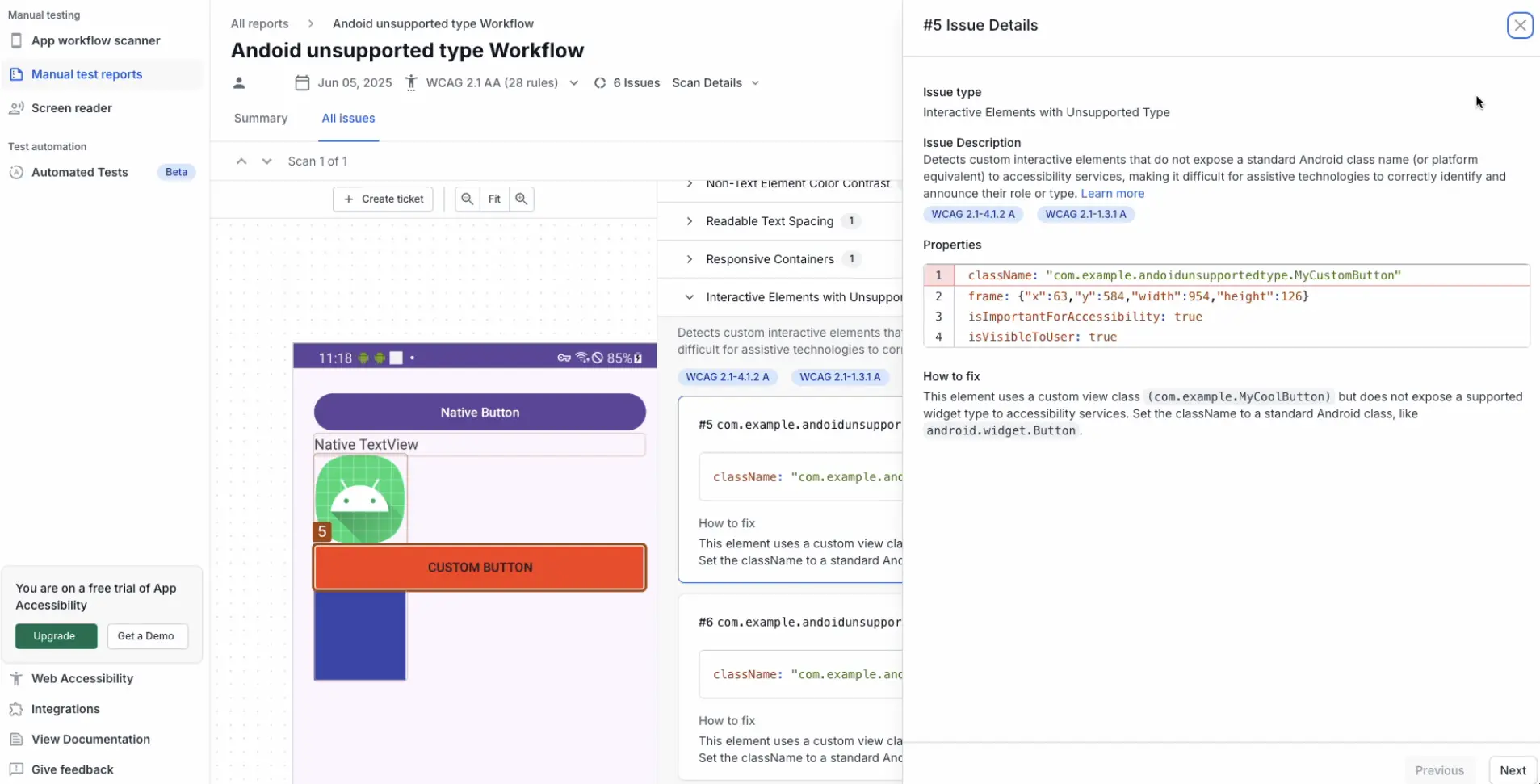
The following Android example report highlights a custom interactive element, MyCustomButton, that is exposed as an unknown widget type.
Fix
To correct this violation:
- Update the custom element to expose a supported widget type.
In this example, set the element’s accessibility class name toandroid.widget.Button.
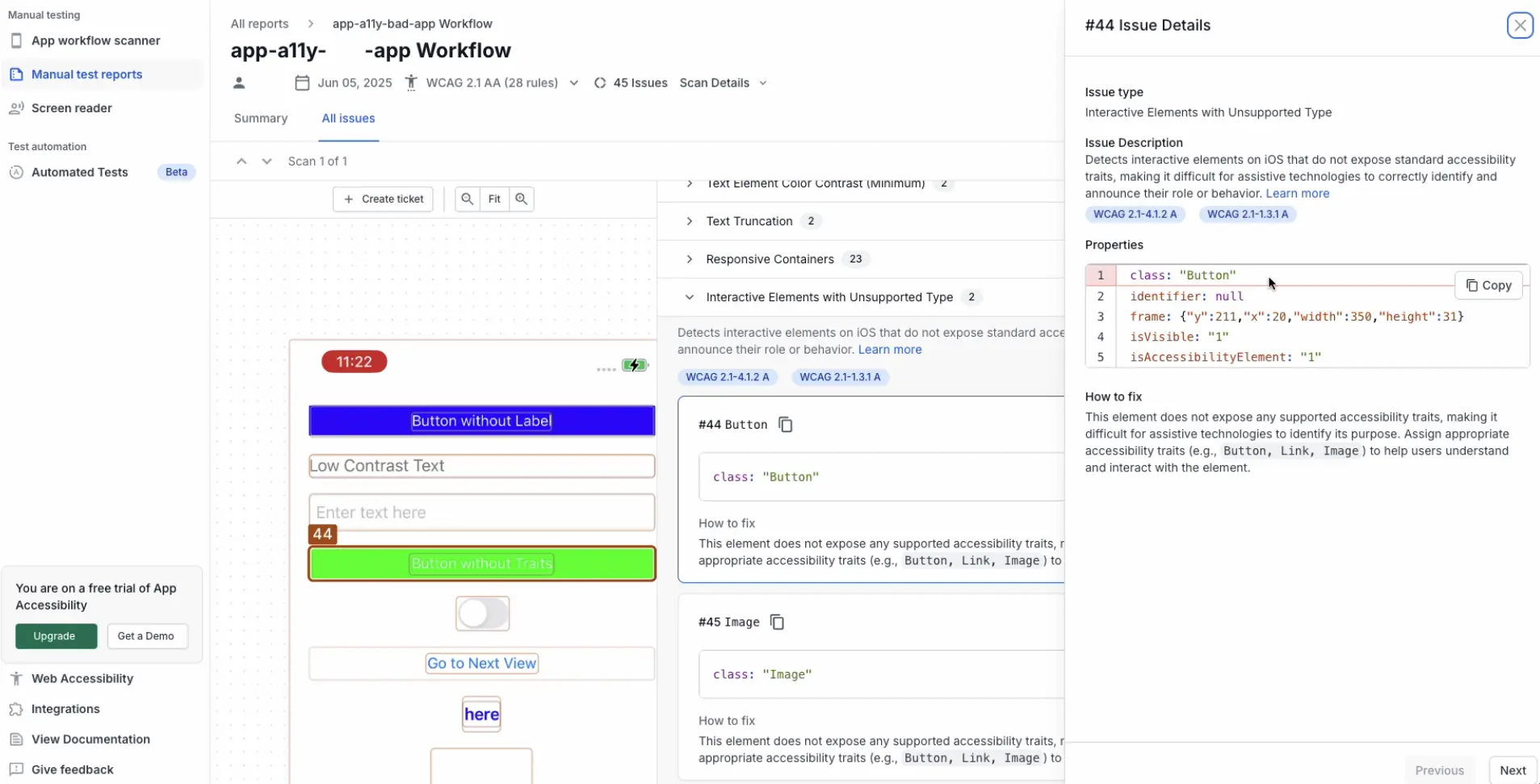
The following example scan report highlights an interactive element of type Button that does not expose a supported UIKit control class.
Fix
To correct this violation:
- Update the element to expose a supported accessibility traits using the
accessibilityTraitsattribute.
In this example, set the trait to.button.
References
- 1.3.1 Info and Relationships (Level A): WCAG 2.1 · WCAG 2.2
- 4.1.2 Name, Role, Value (Level A): WCAG 2.1 · WCAG 2.2
We're sorry to hear that. Please share your feedback so we can do better
Contact our Support team for immediate help while we work on improving our docs.
We're continuously improving our docs. We'd love to know what you liked
We're sorry to hear that. Please share your feedback so we can do better
Contact our Support team for immediate help while we work on improving our docs.
We're continuously improving our docs. We'd love to know what you liked
Thank you for your valuable feedback!