
 Join our Discord
Missing heading
Screen reader users rely on headings to navigate app content. However, if an app uses visual styling (font size, bold text, spacing) to suggest headings without programmatically marking them as headings, screen reader users cannot identify or navigate the content structure. This rule ensures that text elements visually functioning as headings are programmatically marked.
- Rule Category:
Content Structure - Rule Severity:
Serious - WCAG 2.1 & 2.2 SC:
1.3.1 (A),2.4.6 (AA) - Supported Platforms:
Android,iOS
Success criteria
The rule checks for the following:
- Text elements that visually function as section headings must be programmatically marked as a heading.
AI-powered testing
BrowserStack provides an AI-powered Issue Detection Agent that analyzes app screenshots and element properties to identify text that visually functions as a heading but lacks the semantic heading trait. If a heading is missing, the agent provides contextual reasoning and an actionable suggestion to fix the issue.
AI-powered results are clearly marked in the report so you can review and apply suggestions as needed.
The Issue Detection Agent performs the following checks:
-
Detects missing headings
- Identifies text elements with visual heading characteristics that are not programmatically marked as headings. The Issue Detection Agent checks for the following:
- Larger font size compared to surrounding text.
- Bold or emphasized text style.
- Spatial separation from a block of text.
- Text positioned at the start of sections, cards, or groups.
- The Issue Detection Agent takes the context into consideration and does not detect text elements that are purely decorative or promotional, or interactive elements such as buttons, links, or tab-bar icons, even if they are visually prominent.
- Confirms whether the heading trait is programmatically applied by checking element properties.
- Identifies text elements with visual heading characteristics that are not programmatically marked as headings. The Issue Detection Agent checks for the following:
-
Provides explanation
- Explains why the element was flagged and why it should be marked as a heading.
For more information about the Issue Detection Agent, see Issue Detection Agent.
How to fix
To resolve missing heading violations, manually mark the text element as a heading using the appropriate framework attribute:
- To mark a text element as a heading on Android, add the
android:accessibilityHeading="true"attribute to the view in your layout XML.
Example
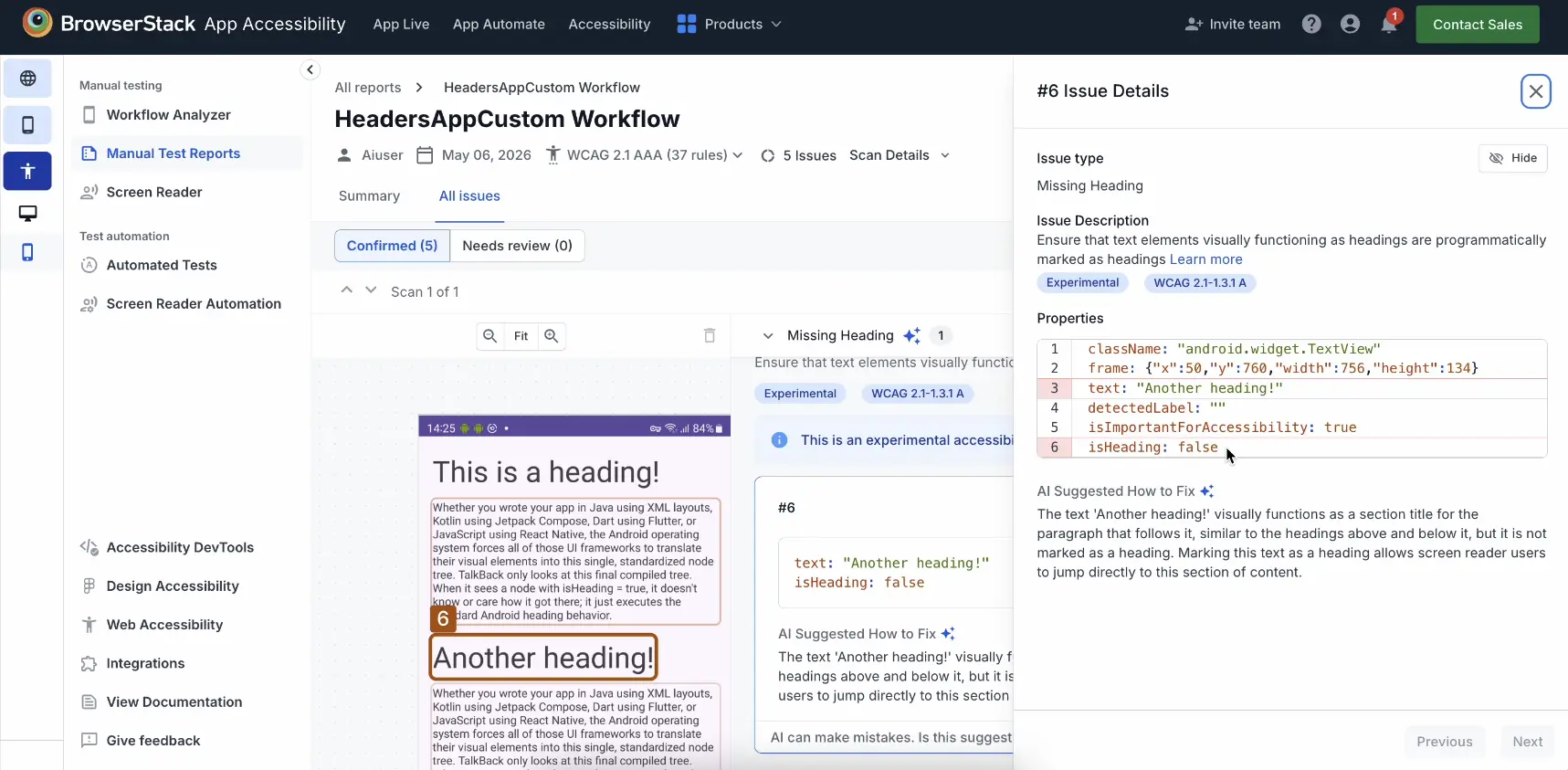
The following screenshot shows missing heading violations in an Android app:
Error
- In this example, the text element “Another heading!” visually introduces a new section but is not programmatically marked as a heading. The element’s heading trait is set to false,
isHeading: false. As a result, screen readers cannot recognize this text as a structural heading and will not announce it as a heading or make it available for navigation.
Fix
- To fix this violation, ensure the text element is programmatically marked as a heading. In this example, set the Android heading attribute,
android:accessibilityHeadingfor the text element totrue.
References
- 1.3.1 Info and Relationships (Level A): WCAG 2.1 · WCAG 2.2
- 2.4.6 Headings and Labels (Level AA): WCAG 2.1 · WCAG 2.2
We're sorry to hear that. Please share your feedback so we can do better
Contact our Support team for immediate help while we work on improving our docs.
We're continuously improving our docs. We'd love to know what you liked
We're sorry to hear that. Please share your feedback so we can do better
Contact our Support team for immediate help while we work on improving our docs.
We're continuously improving our docs. We'd love to know what you liked
Thank you for your valuable feedback!