
 Ask the Community
Input type for input fields
The input type for input fields rule ensures that each input field specifies the kind of information the user is expected to enter. Assigning accurate input types, such as email, phone number, or password, helps users quickly understand what they must enter in a particular field. Defining input types also supports assistive technologies in communicating the purpose of each field. Additionally, defining input types improves user experience by optimizing virtual keyboard usability and enhancing screen reader support.
- Rule Category :
Input Purpose - WCAG 2.1 & 2.2 SC :
1.3.5 (AA) - Rule Severity :
Moderate - Supported Platforms :
Android,iOS
Success criteria
The specific criteria for success are:
- Input elements are focusable using a screen reader.
- Each input field is assigned an accurate input type.
How to fix
- On Android, set the
android:inputTypeattribute to match the expected input described by the label. For example, usetextPasswordfor a passphrase or password input. - On iOS, set the appropriate
UITextContentType, such as.passwordor.newPassword. Additionally, ensure the input control, such asUITextFieldorSecureTextField, matches the expected input described by the label.
Examples
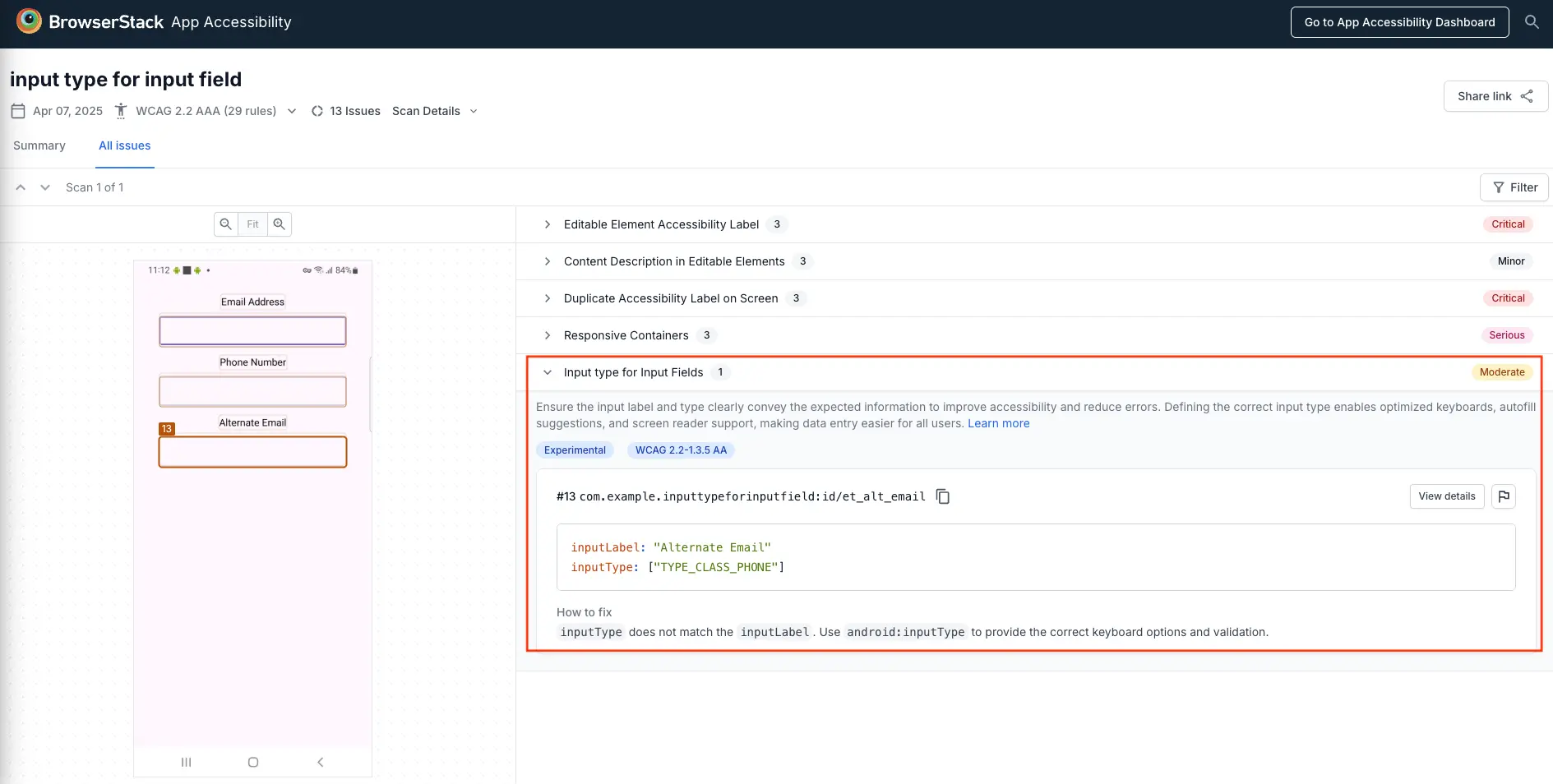
The following example scan report shows an input type violation in an Android app’s interface. The issue is identified for the Alternate Email input field.
Error
- The
inputTypedoes not match theinputLabel. Input types define the kind of information a user should enter in an input field. It should also match the input label accurately to avoid confusion. In this example, the input type isTYPE_CLASS_PHONE, which does not match the input label,Alternate Email.
Fix
- Change the input type from
TYPE_CLASS_PHONEtoTYPE_TEXT_VARIATION_EMAIL_ADDRESS. This accurately conveys the expected input.
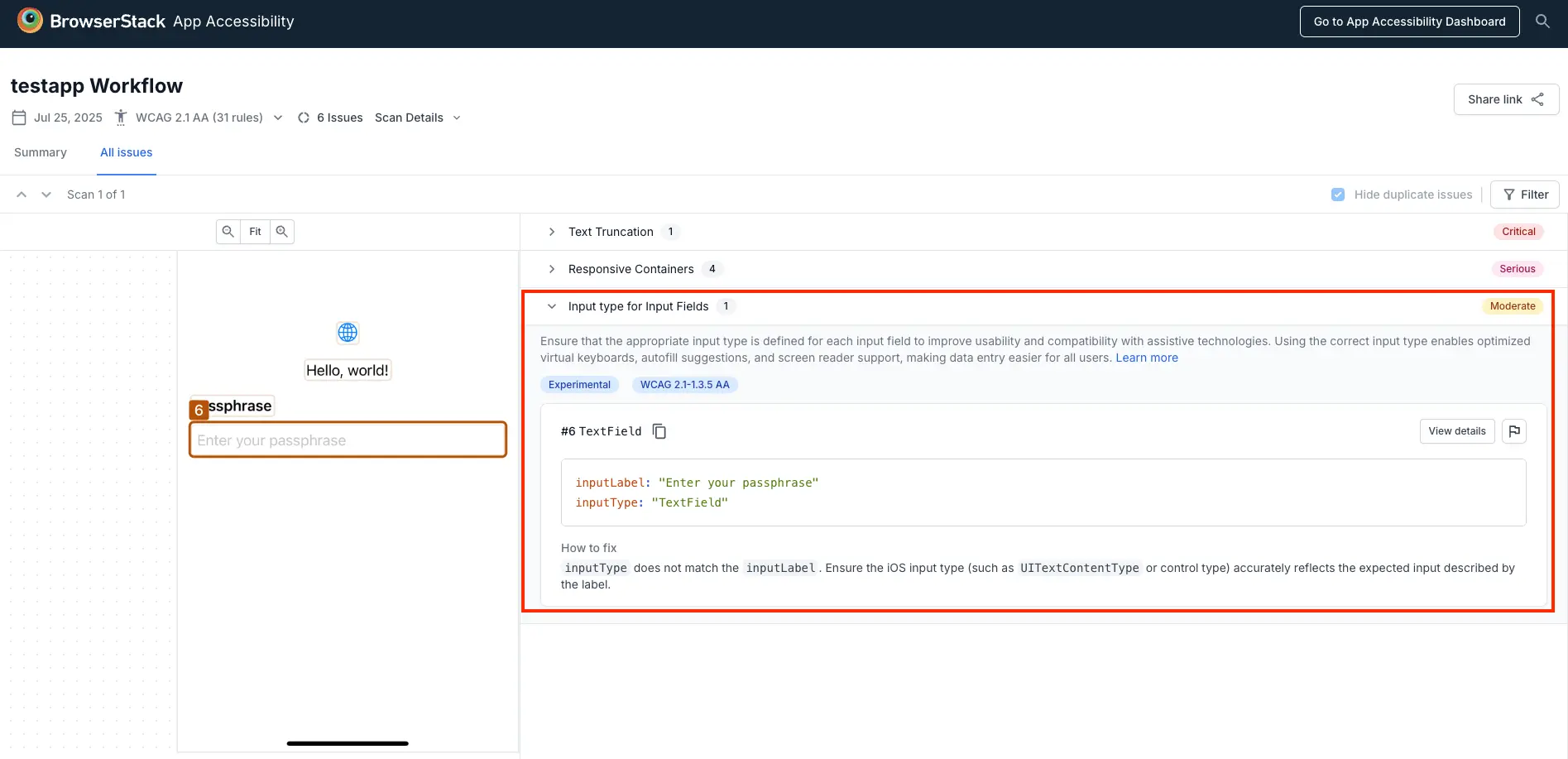
The following example scan report shows an input type violation in an iOS app’s interface. The issue is identified for the Passphrase input field.
Error
- The input type
TextFielddoes not align with the input labelEnter your passphrase. Sensitive fields like passphrases should use a secure input type (e.g.,UITextContentType.password) to ensure proper behavior for accessibility, security, and autofill.
Fix
- Change the
UITextContentTypefromTextFieldto.passwordor.newPasswordto accurately reflect the expected secure input and improve accessibility.
References
We're sorry to hear that. Please share your feedback so we can do better
Contact our Support team for immediate help while we work on improving our docs.
We're continuously improving our docs. We'd love to know what you liked
We're sorry to hear that. Please share your feedback so we can do better
Contact our Support team for immediate help while we work on improving our docs.
We're continuously improving our docs. We'd love to know what you liked
Thank you for your valuable feedback!