
 Join our Discord
Screen reader focus for interactive elements
The Screen reader focus for interactive elements rule ensures that all elements accessible through touch exploration are also reachable during navigation with assistive technologies. This rule is critical for users who rely on screen readers like TalkBack (Android) or VoiceOver (iOS) to navigate mobile apps.
- Rule Category:
Focus and Navigation - WCAG 2.1 & 2.2 SC:
2.4.3 (A) - RAAM 1.1 :
10.2 - Rule Severity:
Critical - Supported Platforms and Frameworks:
Android,iOS,React Native,Flutter
Success criteria
The specific criteria for success are:
- Each interactive element (buttons, inputs, links, custom controls) that a user can focus with touch exploration must also be focusable during linear navigation.
- All interactive elements must be included in the accessibility tree.
How to fix
To fix Screen Reader Focus for Interactive Elements violations:
- Verify that
importantForAccessibilityis not set tonofor interactive elements. Set it toyesorautoto ensure the element is included in the accessibility tree. - Ensure that parent containers do not have
importantForAccessibilityset tonoorno-hide-descendants, which can prevent child elements from being included in the accessibility tree.
Example
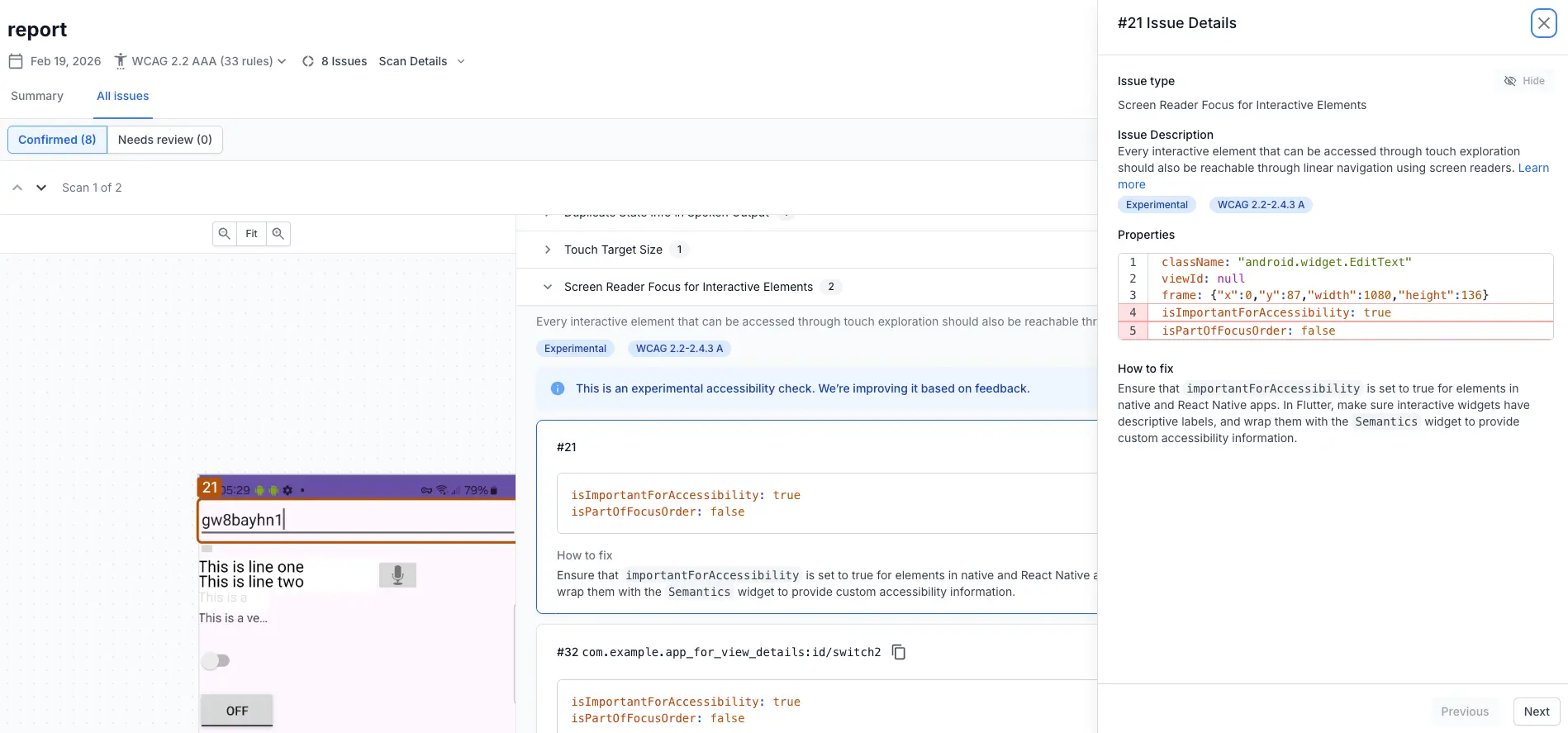
The following Android example scan report highlights a screen reader focus for interactive elements violation for an element that is set as important for accessibility but is not a part of the linear navigation order.
Error
- The
EditTextelement is marked as important for accessibility,isImportantForAccessibility=true, but is not included in the linear navigation order,isPartOfFocusOrder=false. As a result, the element is reachable through touch exploration as it is recognized as an interactive element, but a user navigating with a screen reader (such as TalkBack) will be unable to reach or interact with the element.
Fix
To fix this violation, ensure that the interactive element, EditText, is explicitly included in the linear navigation order:
- Verify that
importantForAccessibilityis set toyesorautoto ensure the element is included in the accessibility tree. - Ensure that parent containers do not have
importantForAccessibilityset tonoorno-hide-descendants, which can prevent child elements from being included in the accessibility tree.
References
WCAG
RAAM 1.1
- 10.2: RAAM 1.1
We're sorry to hear that. Please share your feedback so we can do better
Contact our Support team for immediate help while we work on improving our docs.
We're continuously improving our docs. We'd love to know what you liked
We're sorry to hear that. Please share your feedback so we can do better
Contact our Support team for immediate help while we work on improving our docs.
We're continuously improving our docs. We'd love to know what you liked
Thank you for your valuable feedback!