
 Join our Discord
Test orchestration on BrowserStack App Automate
Mobile app test optimization on BrowserStack App Automate. Orchestrate test runs, analyze reports, and rerun failures efficiently.
As test suites scale, running every test on every build can slow down release cycles and create CI bottlenecks. To maintain fast and reliable delivery, it becomes essential to optimize what tests run and how without compromising confidence.
Test Orchestration determines which tests run and defines how those tests are executed.
Using the BrowserStack SDK to integrate with App Automate offers significant benefits in stability, performance, and ease of management. Learn how to integrate your tests with BrowserStack SDK.
From the App Automate dashboard, you can click Try now in the Build Optimization widget to see the time saved by each strategy. Toggle your preferred strategies and copy the generated code into your browserstack.yml file to enable them.
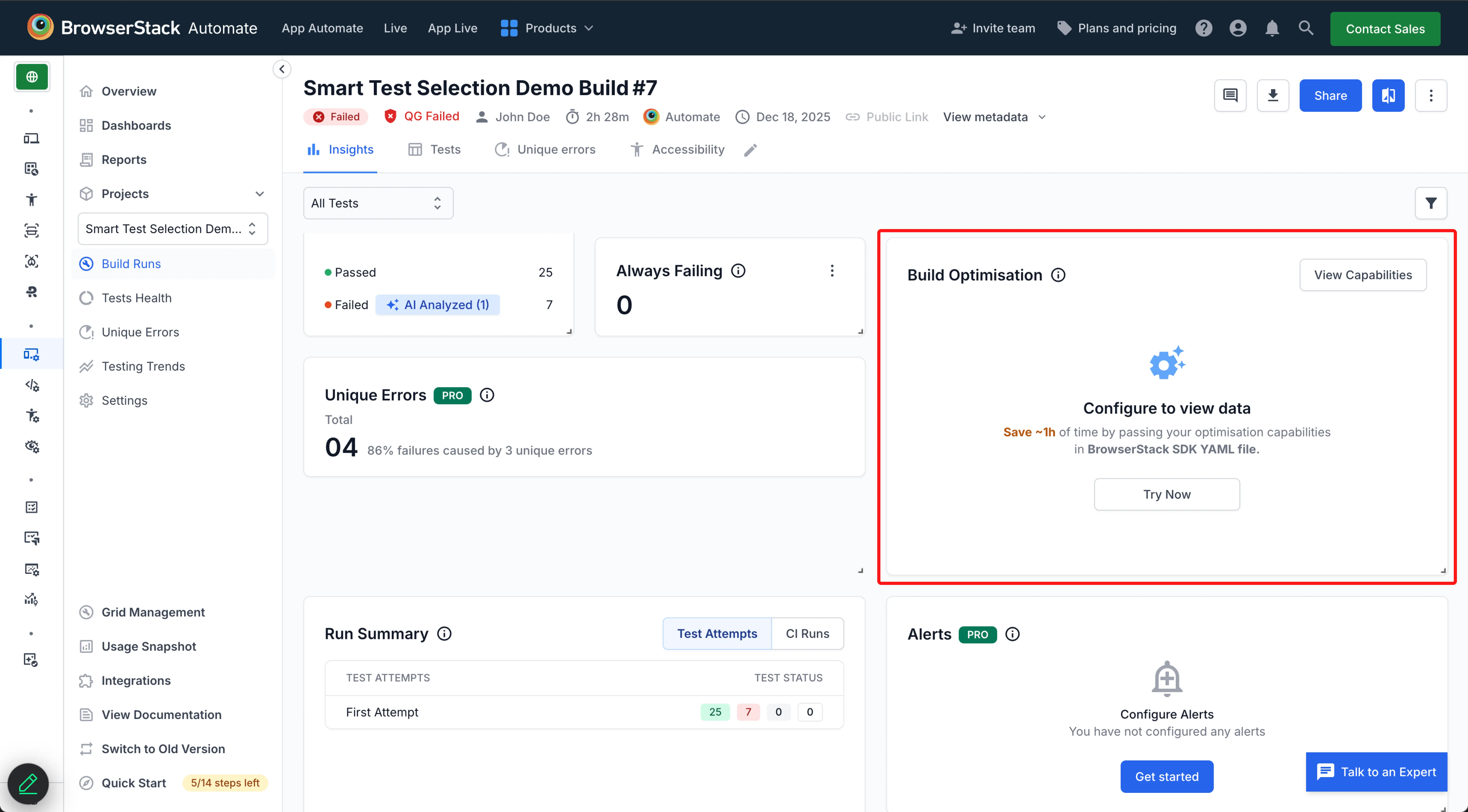
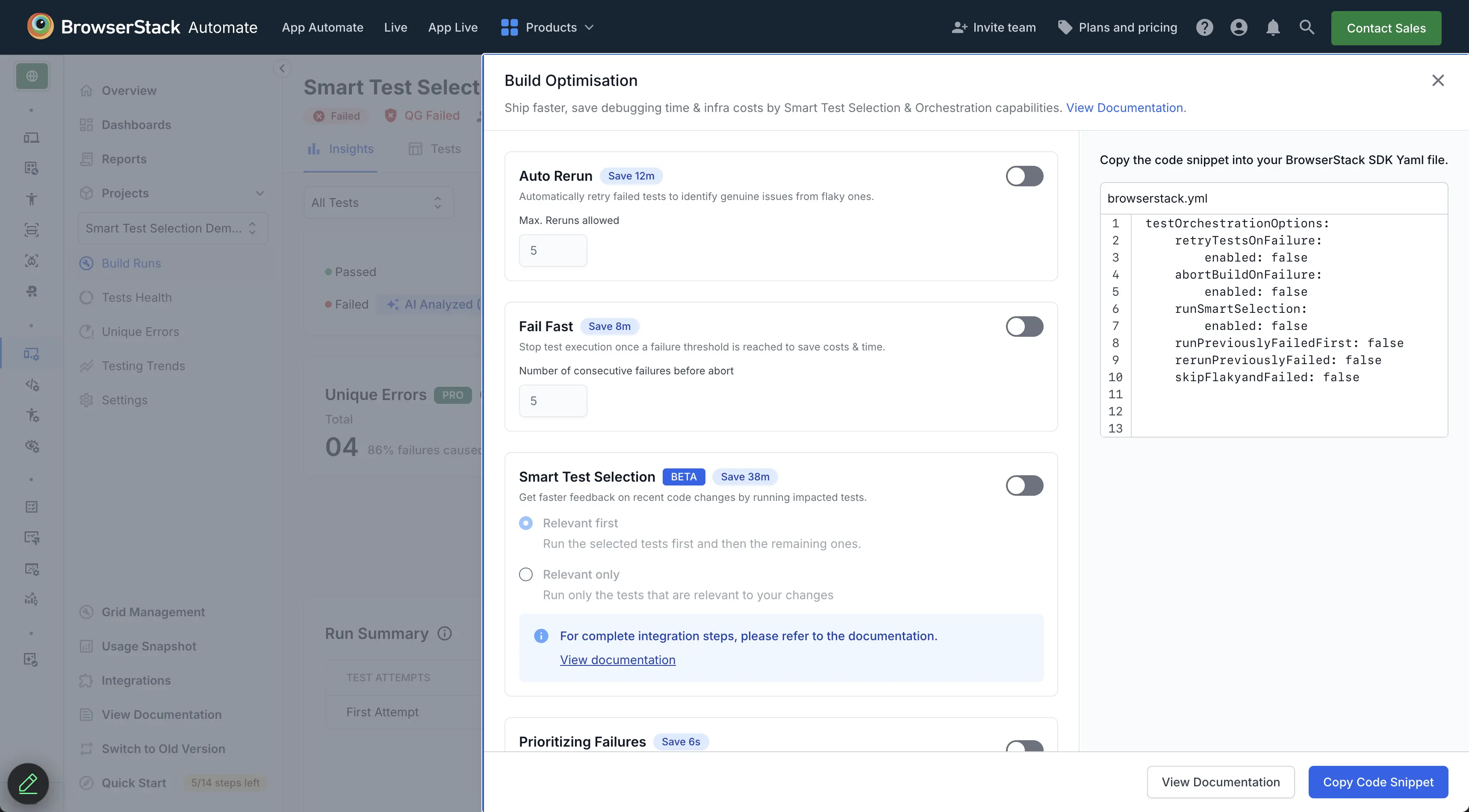
Switch to our new dashboard experience to access the Build Optimisation Widget and enable the Test Orchestration feature.
Supported strategies
BrowserStack App Automate supports the following strategies, which you can enable using the testOrchestrationOptions capability in your browserstack.yml file.
| Strategy | Description |
|---|---|
| Auto rerun | Immediately retries failed tests for a configurable number of attempts. |
| Fail fast | Stops the execution of a test suite once a failure threshold is reached. |
| Run failures only | Runs only the tests that failed in the previous build. |
| Prioritizing failures | Prioritizes running the previously failed tests in the suite first. |
| Skip flaky and failing | Skips tests based on criteria like previous failures or flakiness. |
Learn how to combine different orchestration strategies.
The following are supported testing frameworks:
- TestNG for Java
- Pytest for Python
- Jest for Node
- Nunit for C#
Auto reruns
Automatically rerun tests when they fail, to identify and manage flaky tests. This strategy helps you confirm whether a failure is persistent or intermittent, improving the reliability of your test results without manual intervention.
To enable auto reruns, configure the feature in your browserstack.yml file. You can control the number of reruns by setting a limit on how many times a test should be retried.
In addition to the frameworks listed above, Auto rerun is also supported for Junit-5 (Java), Behave and Robot (Python)
Fail fast
Fail fast stops the execution of a test suite when a critical failure occurs. This feature helps teams save resources and prioritize fixing high-priority issues by preventing further execution of tests that are likely to fail due to existing critical problems.
You can configure fail fast by setting thresholds for the number of allowable failures. Once this threshold is reached, the test suite automatically aborts, allowing the team to focus on resolving the most urgent issues.
In addition to the frameworks listed above, Fail fast is also supported for Junit-5 (Java)
Run failures only
Reruns only the tests that failed in the previous build. This provides a rapid feedback loop for developers and QA engineers who need to quickly verify a bug fix without executing the entire test suite.
Skip flaky and failing
Runs a test suite while temporarily ignoring tests that are known to be failing or flaky. This is useful when you want to assess the overall health of an application without being blocked by known issues, such as tests that are failing intermittently or are awaiting a fix.
Prioritize failures
Prioritizing failures involves running previously failed tests first to get faster feedback and identify bugs early. Prioritizing failures helps you quickly determine if issues persist or if new defects emerge. This approach ensures you address high-impact bugs early in the development process.
Prioritising failures is currently supported only for TestNG (Java) and in master-slave setups, it is supported with Jenkins CI/CD.
View results
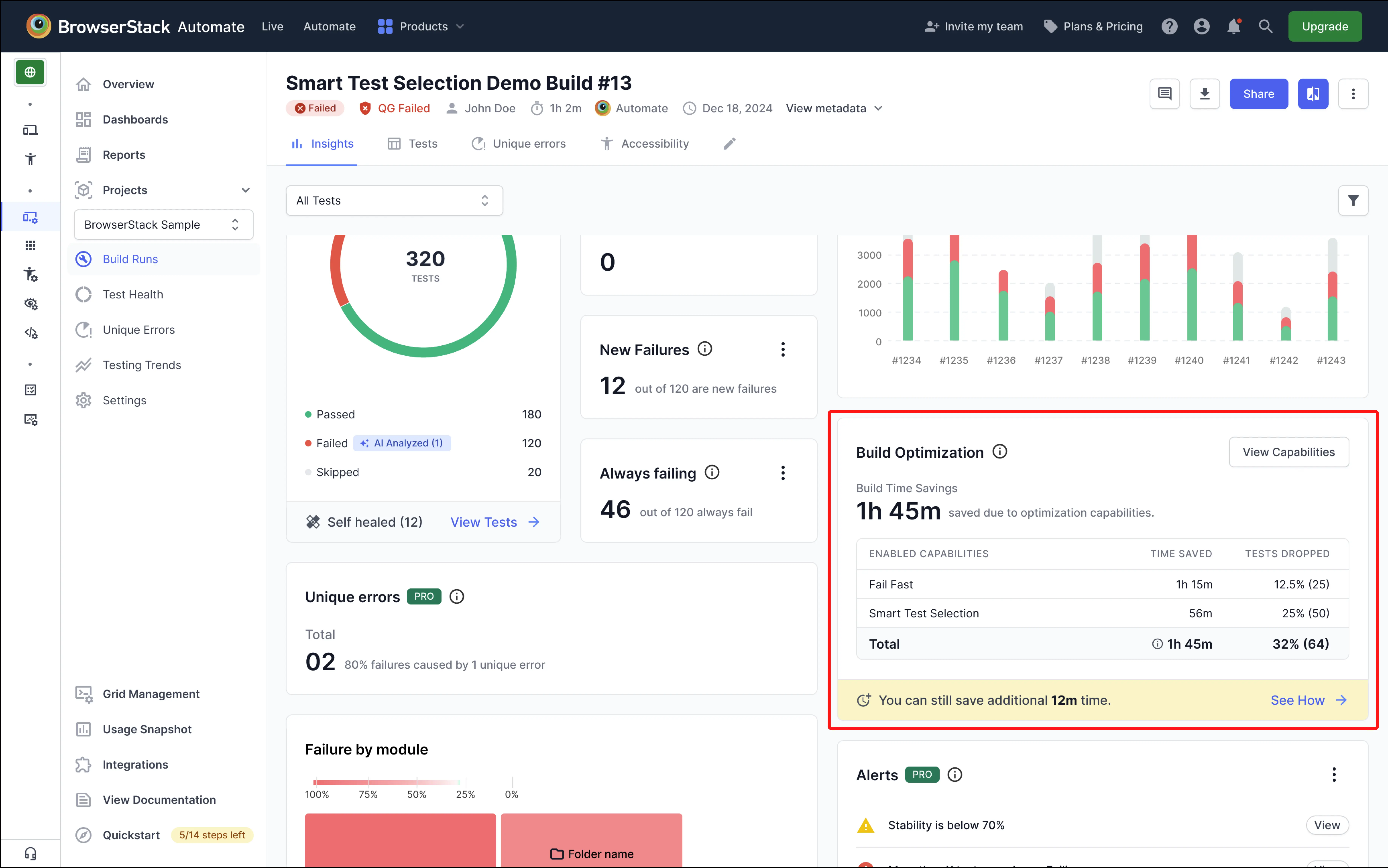
Once configured, the main build screen displays active orchestration strategies and time saved by these strategies for each run.
Supported orchestration strategy combinations
You can combine different orchestration strategies to optimize your testing workflow for speed, stability, or efficiency. While many valid combinations are possible to suit specific requirements, the following table highlights the most effective ones for common workflows.
| Combination | Use Case |
|---|---|
| Run failures only + Fail fast | Use for rapid debugging to verify fixes for previous failures and stop the build if those critical tests still fail. |
| Auto rerun + Fail fast | Automatically retries failed tests and aborts the build if failures persist beyond the configured threshold of allowable failures. |
Auto rerun and Fail fast can be combined with any other Test Orchestration strategy
All other strategies are mutually exclusive. For example, Prioritizing failures cannot be enabled together with Run failures only
If multiple mutually exclusive strategies are enabled at the same time, BrowserStack applies only one strategy based on the following priority order:
1. Prioritizing failures
2. Run failures only
3. Skip flaky and failing
The list of supported strategies is actively being expanded. If you have a requirement for a specific Test Orchestration feature that is not listed, we encourage you to submit a feature request by contacting BrowserStack support.
Benefits of Test Orchestration
-
Faster feedback loops Prioritizing relevant or previously failed tests surfaces critical issues earlier, reducing the time to detect and fix problems and preventing issues from progressing further into the development cycle.
-
Increased test efficiency Running only relevant tests or aborting a build on failures avoids unnecessary test execution, saves time, and reduces CI resource usage.
-
Improved development focus Identifying recurring or new failures quickly allows developers to focus on issues that are more likely to affect end-user experience.
Example: Jenkins pipeline integration
You can scale your testing by applying Test Orchestration in a CI/CD environment. The following Jenkinsfile script example configures a parallel pipeline that distributes the test suite across multiple nodes. By passing specific BrowserStack environment variables to each job, the orchestration server handles the heavy lifting of splitting tests and syncing results across different nodes automatically.
Configure these variables when using any orchestration strategy to ensure the orchestration server efficiently manages test distribution across your infrastructure.
We're sorry to hear that. Please share your feedback so we can do better
Contact our Support team for immediate help while we work on improving our docs.
We're continuously improving our docs. We'd love to know what you liked
We're sorry to hear that. Please share your feedback so we can do better
Contact our Support team for immediate help while we work on improving our docs.
We're continuously improving our docs. We'd love to know what you liked
Thank you for your valuable feedback!