Get your setup working faster. Join our Discord for optimisation tips from elite testers.Join our Discord
Mark tests as passed or failed
Mark your Automate tests as passed or failed from within the test script or after the test has completed.
You are currently viewing the documentation for the old dashboard. We’ve revamped the dashboard experience. Explore the new dashboard now!
BrowserStack cannot identify if your test’s assertions have passed or failed. Therefore, based on the assertions in your test script, you have to explicitly instruct BrowserStack whether your tests have passed or failed.
This guide will provide detailed information on how to mark your tests as passed or failed.
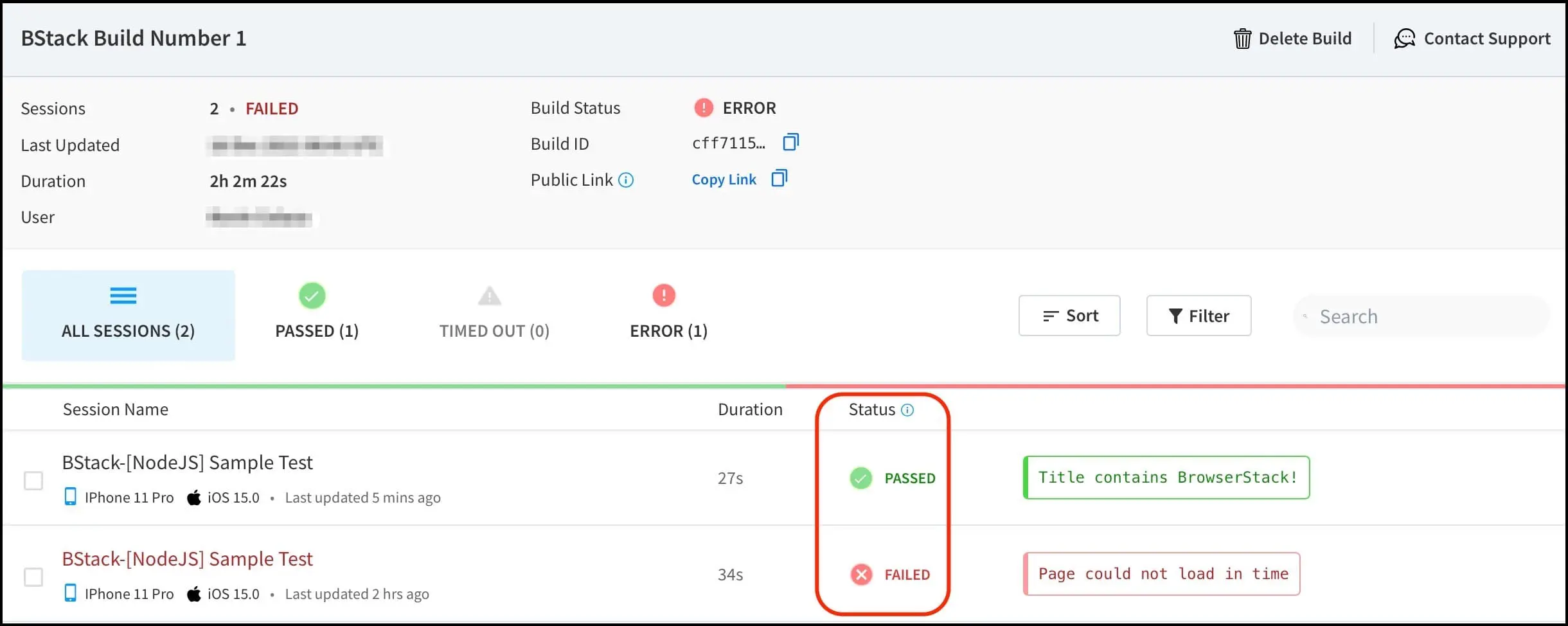
Once you have completed your test run, you will be able to view the status of your tests on the Automate Dashboard as shown below:
You can mark the status of your test along with the reason using the following methods:
If you are using BrowserStack SDK, setSessionStatus is managed autonomously by the SDK. However, this is applicable only for language frameworks. For vanilla flavours, Session status needs to be set manually using JavaScript Executor.
The following sample test script shows the test status and the associated reason:
packagebs_automate;importjava.net.URL;importorg.openqa.selenium.By;importorg.openqa.selenium.JavascriptExecutor;importorg.openqa.selenium.WebDriver;importorg.openqa.selenium.WebElement;importorg.openqa.selenium.MutableCapabilities;importorg.openqa.selenium.remote.RemoteWebDriver;publicclassbs_automate_class{publicstaticfinalStringUSERNAME="YOUR_USERNAME";publicstaticfinalStringAUTOMATE_KEY="YOUR_ACCESS_KEY";publicstaticfinalStringURL="https://"+USERNAME+":"+AUTOMATE_KEY+"@hub-cloud.browserstack.com/wd/hub";publicstaticvoidmain(String[]args)throwsException{// Input capabilitiesMutableCapabilitiescapabilities=newMutableCapabilities();capabilities.setCapability("browserName","Chrome");capabilities.setCapability("browserVersion","103.0");HashMap<String,Object>browserstackOptions=newHashMap<String,Object>();browserstackOptions.put("os","Windows");browserstackOptions.put("osVersion","10");browserstackOptions.put("resolution","1920x1080");browserstackOptions.put("projectName","Mark test as pass fail using JS Executor");// test namebrowserstackOptions.put("buildName","Sample Build");// CI/CD job or build namebrowserstackOptions.put("seleniumVersion","4.0.0");capabilities.setCapability("bstack:options",browserstackOptions);// Searching for 'BrowserStack' on google.comdriver.get("https://www.google.com");WebElementelement=driver.findElement(By.name("q"));element.sendKeys("BrowserStack");element.submit();System.out.println(driver.getTitle());// Setting the status of test as 'passed' or 'failed' based on the condition; if title of the web page matches 'BrowserStack - Google Search'if(driver.getTitle().equals("BrowserStack - Google Search")){jse.executeScript("browserstack_executor: {\"action\": \"setSessionStatus\", \"arguments\": {\"status\": \"passed\", \"reason\": \"Title matched!\"}}");}else{jse.executeScript("browserstack_executor: {\"action\": \"setSessionStatus\", \"arguments\": {\"status\":\"failed\", \"reason\": \"Title not matched\"}}");}driver.quit();}}
varwebdriver=require('selenium-webdriver');// Input capabilitiesvarcapabilities={'bstack:options':{"os":"Windows","osVersion":"10","resolution":"1920x1080","projectName":"Mark test as pass fail using JS Executor",// test name"buildName":"Sample Build",// CI/CD job or build name"seleniumVersion":"4.0.0","userName":"YOUR_USERNAME","accessKey":"YOUR_ACCESS_KEY",},"browserName":"Chrome","browserVersion":"103.0",}vardriver=newwebdriver.Builder().usingServer('https://YOUR_USERNAME:YOUR_ACCESS_KEY@hub-cloud.browserstack.com/wd/hub').withCapabilities(capabilities).build();// Searching for 'BrowserStack' on google.comdriver.get('https://www.google.com').then(function(){driver.findElement(webdriver.By.name('q')).sendKeys('BrowserStack\n').then(function(){driver.getTitle().then(function(title){console.log(title);// Setting the status of test as 'passed' or 'failed' based on the condition; if title of the web page matches 'BrowserStack - Google Search'if(title==="BrowserStack - Google Search"){driver.executeScript('browserstack_executor: {"action": "setSessionStatus", "arguments": {"status":"passed","reason": "Title matched!"}}');}else{driver.executeScript('browserstack_executor: {"action": "setSessionStatus", "arguments": {"status":"failed","reason": "Title not matched!"}}');}driver.quit();});});});
usingSystem;usingOpenQA.Selenium;usingOpenQA.Selenium.Remote;namespacecs_testing{classProgram{staticvoidMain(string[]args){IWebDriverdriver;// Input capabilitiesChromeOptionscapabilities=newChromeOptions();capabilities.BrowserVersion="103.0";Dictionary<string,object>browserstackOptions=newDictionary<string,object>();browserstackOptions.Add("os","Windows");browserstackOptions.Add("osVersion","10");browserstackOptions.Add("resolution","1920x1080");browserstackOptions.Add("projectName","Mark test as pass fail using JS Executor");// test namebrowserstackOptions.Add("buildName","Sample Build");// CI/CD job or build namebrowserstackOptions.Add("seleniumVersion","4.0.0");browserstackOptions.Add("userName","YOUR_USERNAME");browserstackOptions.Add("accessKey","YOUR_ACCESS_KEY");capabilities.AddAdditionalOption("bstack:options",browserstackOptions);// Searching for 'BrowserStack' on google.comdriver.Navigate().GoToUrl("https://www.google.com");IWebElementquery=driver.FindElement(By.Name("q"));query.SendKeys("BrowserStack");query.Submit();Console.WriteLine(driver.Title);// Setting the status of test as 'passed' or 'failed' based on the condition; if title of the web page matches 'BrowserStack - Google Search'stringstr="BrowserStack - Google Search";if(string.Equals(driver.Title,str)){((IJavaScriptExecutor)driver).ExecuteScript("browserstack_executor: {\"action\": \"setSessionStatus\", \"arguments\": {\"status\":\"passed\", \"reason\": \" Title matched!\"}}");}else{((IJavaScriptExecutor)driver).ExecuteScript("browserstack_executor: {\"action\": \"setSessionStatus\", \"arguments\": {\"status\":\"failed\", \"reason\": \" Title not matched \"}}");}driver.Quit();}}}
<?phprequire_once('vendor/autoload.php');useFacebook\WebDriver\Remote\RemoteWebDriver;useFacebook\WebDriver\WebDriverBy;# Input capabilities$caps=array('bstack:options'=>array("os"=>"Windows","osVersion"=>"10","resolution"=>"1920x1080","projectName"=>"Mark test as pass fail using JS Executor",#test name"buildName"=>"Sample Build",#CI/CD job or build name"seleniumVersion"=>"4.0.0",),"browserName"=>"Chrome","browserVersion"=>"103.0",)$web_driver=RemoteWebDriver::create("https://YOUR_USERNAME:YOUR_ACCESS_KEY@hub-cloud.browserstack.com/wd/hub",$caps);# Searching for 'BrowserStack' on google.com$web_driver->get("https://google.com");$element=$web_driver->findElement(WebDriverBy::name("q"));if($element){$element->sendKeys("BrowserStack");$element->submit();}print$web_driver->getTitle();# Setting the status of test as 'passed' or 'failed' based on the condition; if title of the web page matches 'BrowserStack - Google Search'if($web_driver->getTitle()=="BrowserStack - Google Search"){$web_driver->executeScript('browserstack_executor: {"action": "setSessionStatus", "arguments": {"status":"passed", "reason": "Title matched!"}}');}else{$web_driver->executeScript('browserstack_executor: {"action": "setSessionStatus", "arguments": {"status":"failed", "reason": "Title not matched!"}}');}$web_driver->quit();?>
importrequestsfromseleniumimportwebdriverfromselenium.webdriver.common.keysimportKeysfromselenium.webdriver.common.desired_capabilitiesimportDesiredCapabilities# Input capabilities
desired_cap={'bstack:options':{"os":"Windows","osVersion":"10","resolution":"1920x1080","projectName":"Mark test as pass fail using JS Executor",#test name
"buildName":"Sample Build",#CI/CD job or build name
"seleniumVersion":"4.0.0",},"browserName":"Chrome","browserVersion":"103.0",}driver=webdriver.Remote(command_executor='https://YOUR_USERNAME:YOUR_ACCESS_KEY@hub-cloud.browserstack.com/wd/hub',desired_capabilities=desired_cap)# Searching for 'BrowserStack' on google.com
driver.get("https://www.google.com")ifnot"Google"indriver.title:raiseException("Unable to load google page!")elem=driver.find_element_by_name("q")elem.send_keys("BrowserStack")elem.submit()print(driver.title)# Setting the status of test as 'passed' or 'failed' based on the condition; if title of the web page matches 'BrowserStack - Google Search'
if(driver.title=="BrowserStack - Google Search"):driver.execute_script('browserstack_executor: {"action": "setSessionStatus", "arguments": {"status":"passed", "reason": "Title matched!"}}')else:driver.execute_script('browserstack_executor: {"action": "setSessionStatus", "arguments": {"status":"failed", "reason": "Title not matched"}}')driver.quit()
require"rubygems"require"selenium-webdriver"# Input capabilitiescapabilities={'bstack:options'=>{"os"=>"Windows","osVersion"=>"10","resolution"=>"1920x1080","projectName"=>"Mark test as pass fail using JS Executor",#test name"buildName"=>"Sample Build",#CI/CD job or build name"seleniumVersion"=>"4.0.0",},"browserName"=>"Chrome","browserVersion"=>"103.0",}driver=Selenium::WebDriver.for(:remote,:url=>"https://YOUR_USERNAME:YOUR_ACCESS_KEY@hub-cloud.browserstack.com/wd/hub",:desired_capabilities=>caps)# Searching for 'BrowserStack' on google.comdriver.navigate.to"https://www.google.com"element=driver.find_element(:name,"q")element.send_keys"BrowserStack"element.submitputsdriver.title# Setting the status of test as 'passed' or 'failed' based on the condition; if title of the web page matches 'BrowserStack - Google Search'ifdriver.title=="BrowserStack - Google Search"driver.execute_script('browserstack_executor: {"action": "setSessionStatus", "arguments": {"status":"passed", "reason": "Title matched!"}}')elsedriver.execute_script('browserstack_executor: {"action": "setSessionStatus", "arguments": {"status":"failed", "reason": "Title not matched"}}')enddriver.quit
packagebs_automate;importjava.net.URL;importorg.openqa.selenium.By;importorg.openqa.selenium.JavascriptExecutor;importorg.openqa.selenium.WebDriver;importorg.openqa.selenium.WebElement;importorg.openqa.selenium.remote.DesiredCapabilities;importorg.openqa.selenium.remote.RemoteWebDriver;publicclassbs_automate_class{publicstaticfinalStringUSERNAME="YOUR_USERNAME";publicstaticfinalStringAUTOMATE_KEY="YOUR_ACCESS_KEY";publicstaticfinalStringURL="https://"+USERNAME+":"+AUTOMATE_KEY+"@hub-cloud.browserstack.com/wd/hub";publicstaticvoidmain(String[]args)throwsException{// Input capabilitiesDesiredCapabilitiescaps=newDesiredCapabilities();caps.setCapability("browser","Chrome");caps.setCapability("browser_version","72.0");caps.setCapability("os","Windows");caps.setCapability("os_version","10");WebDriverdriver=newRemoteWebDriver(newURL(URL),caps);JavascriptExecutorjse=(JavascriptExecutor)driver;// Searching for 'BrowserStack' on google.comdriver.get("https://www.google.com");WebElementelement=driver.findElement(By.name("q"));element.sendKeys("BrowserStack");element.submit();System.out.println(driver.getTitle());// Setting the status of test as 'passed' or 'failed' based on the condition; if title of the web page matches 'BrowserStack - Google Search'if(driver.getTitle().equals("BrowserStack - Google Search")){jse.executeScript("browserstack_executor: {\"action\": \"setSessionStatus\", \"arguments\": {\"status\": \"passed\", \"reason\": \"Title matched!\"}}");}else{jse.executeScript("browserstack_executor: {\"action\": \"setSessionStatus\", \"arguments\": {\"status\":\"failed\", \"reason\": \"Title not matched\"}}");}driver.quit();}}
varwebdriver=require('selenium-webdriver');// Input capabilitiesvarcapabilities={'browserName':'chrome','browserVersion':'72.0','os':'windows','os_version':'10'}vardriver=newwebdriver.Builder().usingServer('https://YOUR_USERNAME:YOUR_ACCESS_KEY@hub-cloud.browserstack.com/wd/hub').withCapabilities(capabilities).build();// Searching for 'BrowserStack' on google.comdriver.get('https://www.google.com').then(function(){driver.findElement(webdriver.By.name('q')).sendKeys('BrowserStack\n').then(function(){driver.getTitle().then(function(title){console.log(title);// Setting the status of test as 'passed' or 'failed' based on the condition; if title of the web page matches 'BrowserStack - Google Search'if(title==="BrowserStack - Google Search"){driver.executeScript('browserstack_executor: {"action": "setSessionStatus", "arguments": {"status":"passed","reason": "Title matched!"}}');}else{driver.executeScript('browserstack_executor: {"action": "setSessionStatus", "arguments": {"status":"failed","reason": "Title not matched!"}}');}driver.quit();});});});
usingSystem;usingOpenQA.Selenium;usingOpenQA.Selenium.Remote;namespacecs_testing{classProgram{staticvoidMain(string[]args){IWebDriverdriver;// Input capabilitiesOpenQA.Selenium.Chrome.ChromeOptionscapability=newOpenQA.Selenium.Chrome.ChromeOptions();capability.AddAdditionalCapability("os_version","10",true);capability.AddAdditionalCapability("resolution","1920x1080",true);capability.AddAdditionalCapability("browser","Chrome",true);capability.AddAdditionalCapability("browser_version","latest",true);capability.AddAdditionalCapability("os","Windows",true);capability.AddAdditionalCapability("name","Mark test as pass fail using JS Executor",true);// test namecapability.AddAdditionalCapability("build","C-sharp Sample Build",true);// CI/CD job or build namecapability.AddAdditionalCapability("browserstack.user","YOUR_USERNAME",true);capability.AddAdditionalCapability("browserstack.key","YOUR_ACCESS_KEY",true);driver=newRemoteWebDriver(newUri("https://hub-cloud.browserstack.com/wd/hub/"),capability);// Searching for 'BrowserStack' on google.comdriver.Navigate().GoToUrl("https://www.google.com");IWebElementquery=driver.FindElement(By.Name("q"));query.SendKeys("BrowserStack");query.Submit();Console.WriteLine(driver.Title);// Setting the status of test as 'passed' or 'failed' based on the condition; if title of the web page matches 'BrowserStack - Google Search'stringstr="BrowserStack - Google Search";if(string.Equals(driver.Title,str)){((IJavaScriptExecutor)driver).ExecuteScript("browserstack_executor: {\"action\": \"setSessionStatus\", \"arguments\": {\"status\":\"passed\", \"reason\": \" Title matched!\"}}");}else{((IJavaScriptExecutor)driver).ExecuteScript("browserstack_executor: {\"action\": \"setSessionStatus\", \"arguments\": {\"status\":\"failed\", \"reason\": \" Title not matched \"}}");}driver.Quit();}}}
<?phprequire_once('vendor/autoload.php');useFacebook\WebDriver\Remote\RemoteWebDriver;useFacebook\WebDriver\WebDriverBy;# Input capabilities$caps=array("browserName"=>"chrome","browserVersion"=>"72.0","os"=>"windows","os_version"=>"10",);$web_driver=RemoteWebDriver::create("https://YOUR_USERNAME:YOUR_ACCESS_KEY@hub-cloud.browserstack.com/wd/hub",$caps);# Searching for 'BrowserStack' on google.com$web_driver->get("https://google.com");$element=$web_driver->findElement(WebDriverBy::name("q"));if($element){$element->sendKeys("BrowserStack");$element->submit();}print$web_driver->getTitle();# Setting the status of test as 'passed' or 'failed' based on the condition; if title of the web page matches 'BrowserStack - Google Search'if($web_driver->getTitle()=="BrowserStack - Google Search"){$web_driver->executeScript('browserstack_executor: {"action": "setSessionStatus", "arguments": {"status":"passed", "reason": "Title matched!"}}');}else{$web_driver->executeScript('browserstack_executor: {"action": "setSessionStatus", "arguments": {"status":"failed", "reason": "Title not matched!"}}');}$web_driver->quit();?>
importrequestsfromseleniumimportwebdriverfromselenium.webdriver.common.keysimportKeysfromselenium.webdriver.common.desired_capabilitiesimportDesiredCapabilities# Input capabilities
desired_cap={'browserName':'chrome','browserVersion':'72.0','os':'windows','os_version':'10'}driver=webdriver.Remote(command_executor='https://YOUR_USERNAME:YOUR_ACCESS_KEY@hub-cloud.browserstack.com/wd/hub',desired_capabilities=desired_cap)# Searching for 'BrowserStack' on google.com
driver.get("https://www.google.com")ifnot"Google"indriver.title:raiseException("Unable to load google page!")elem=driver.find_element_by_name("q")elem.send_keys("BrowserStack")elem.submit()print(driver.title)# Setting the status of test as 'passed' or 'failed' based on the condition; if title of the web page matches 'BrowserStack - Google Search'
if(driver.title=="BrowserStack - Google Search"):driver.execute_script('browserstack_executor: {"action": "setSessionStatus", "arguments": {"status":"passed", "reason": "Title matched!"}}')else:driver.execute_script('browserstack_executor: {"action": "setSessionStatus", "arguments": {"status":"failed", "reason": "Title not matched"}}')driver.quit()
require"rubygems"require"selenium-webdriver"# Input capabilitiescaps=Selenium::WebDriver::Remote::Capabilities.newcaps["os"]="Windows"caps["os_version"]="10"caps["browser"]="Chrome"caps["browser_version"]="72.0"caps["javascriptEnabled"]="true"driver=Selenium::WebDriver.for(:remote,:url=>"https://YOUR_USERNAME:YOUR_ACCESS_KEY@hub-cloud.browserstack.com/wd/hub",:desired_capabilities=>caps)# Searching for 'BrowserStack' on google.comdriver.navigate.to"https://www.google.com"element=driver.find_element(:name,"q")element.send_keys"BrowserStack"element.submitputsdriver.title# Setting the status of test as 'passed' or 'failed' based on the condition; if title of the web page matches 'BrowserStack - Google Search'ifdriver.title=="BrowserStack - Google Search"driver.execute_script('browserstack_executor: {"action": "setSessionStatus", "arguments": {"status":"passed", "reason": "Title matched!"}}')elsedriver.execute_script('browserstack_executor: {"action": "setSessionStatus", "arguments": {"status":"failed", "reason": "Title not matched"}}')enddriver.quit
Mark test status after test completion using REST API
You can also mark your test as as passed or failed on BrowserStack after the test script has completed its run, however, you will not be able to follow the above-mentioned approach.
In such cases, it is recommended that you mark your tests using our REST API endpoint to mark the status of test as passed or failed. You can also provide a reason to explain why you’re marking a test as failed (or passed).
Use the following arguments in the REST API call to set the test status, and the corresponding reason:
Argument
Description
Accepted values
status
Status of the test
A string. passed or failed
reason
Test Pass or Fail reason
A string.
The following REST API can be used to achieve this:

 Join our Discord