
 Join our Discord
BrowserStack Percy with the MCP server
Use natural language prompts in your AI assistant to set up, run, and review Percy visual tests on your web projects with the BrowserStack MCP server.
Use the BrowserStack MCP server to set up and run Percy visual testing directly from your AI assistant, such as GitHub Copilot, Claude, or Cursor. Skip manual setup and start visual testing with prompts.
To set up the server, see get started with the BrowserStack MCP server.
To use Percy tools on the MCP server, you need a Percy license. Contact BrowserStack support to enable a license for your account.
Streamline visual testing with Percy
Use the following tools to add Percy snapshots, expand coverage, run visual scans, and review changes all through natural language prompts:
Add Percy snapshot commands (addPercySnapshotCommands)
Add Percy snapshot commands to your test files so Percy can take visual screenshots. Helpful when you already have tests and want visual checks.
Example prompts:
- “Add Percy snapshot commands to all Playwright tests under tests/e2e/checkout.”
- “Insert a Percy snapshot after major steps in tests/login.spec.ts with name prefix Login-.”
Expand Percy visual testing (expandPercyVisualTesting)
Configure or expand Percy visual testing for an existing project using Percy Web Standalone or Percy with BrowserStack Automate. The expandPercyVisualTesting tool detects the test files and adds the required Percy configurations and snapshots.
Example prompt: “Expand Percy coverage for project shop-web (Playwright). Add snapshots for checkout and PDP.”
Run Percy scan (runPercyScan)
Run a Percy visual build or scan from your current setup. Use this tool to trigger a scan.
Example prompt: “Run a Percy scan for project shop-web on branch feature/cart-badge.”
For more visual testing tools, refer to the section on Tool reference.
Tool reference
Use the following Percy tools to set up, run, and review visual tests:
Percy supports a wide range of web frameworks and CI/CD integrations. For the latest supported frameworks, see SDK framework coverage. For supported CI/CD tools, see CI/CD integrations.
| Example prompt | Description | Input parameters | Invoked tool |
|---|---|---|---|
| Add Percy snapshot commands to all Playwright tests under tests/e2e/checkout. | Adds Percy snapshot commands to your test files so Percy can take visual screenshots. Helpful when you already have tests and want visual checks. Returns: List of files updated with snapshot commands. |
• testFilePaths (required): Array of test file paths • snapshotNamePrefix (optional): Prefix for snapshot names |
addPercySnapshotCommands |
| Expand Percy coverage for project shop-web (Playwright). Add snapshots for checkout and PDP. | Sets up or expands Percy visual testing for an existing project. Detects files and adds needed configs and snapshots. Returns: List of files updated, config changes, and snapshot coverage summary. |
• projectName (required): Project name • framework (required): Framework type • targetFiles (optional): Array of files or folders to expand coverage |
expandPercyVisualTesting |
| Run a Percy scan for project shop-web on branch feature/cart-badge. | Runs a Percy visual build or scan from your current setup. Returns: Percy build ID, status, and link to results. |
• projectName (required): Project name • branch (optional): Branch name |
runPercyScan |
| Fetch visual change summary for the latest Percy build in shop-web. | Shows a summary of all visual changes between the latest Percy build and the previous one. Returns: AI-generated summary of changes, per-snapshot diffs. |
• projectName (required): Project name | fetchPercyChanges |
| List all test files under tests/e2e and specs/flows. | Lists test files in chosen folders. Returns: Array of test file paths. |
• folderPaths (required): Array of folder paths | listTestFiles |
| Approve Percy build bld_9731 with note ‘New header styles baseline’. | Approves or rejects a Percy build. Approval sets a new visual baseline for future compares. Returns: Build approval status, notes. |
• buildId (required): Percy build ID • action (required): approve or reject • note (optional): Approval or rejection note |
managePercyBuildApproval |
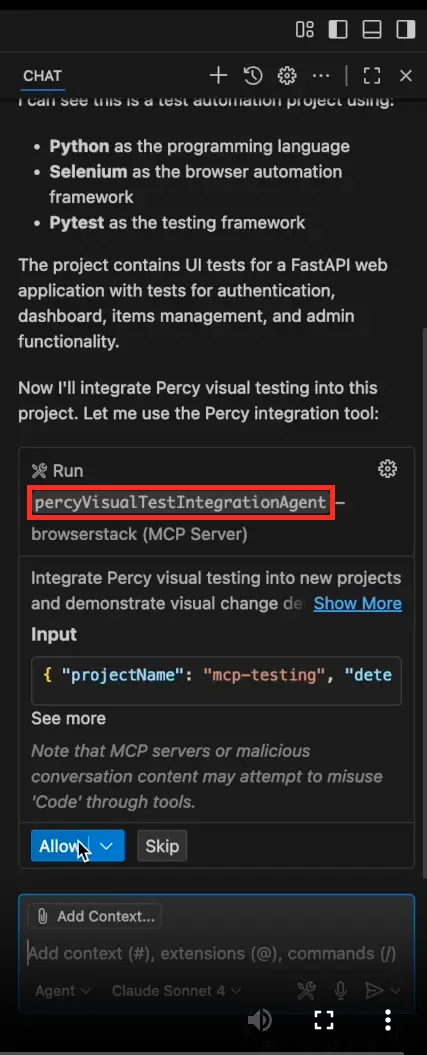
| Integrate Percy for this project using percyVisualTestIntegrationAgent. | Full onboarding for new Percy users. Detects tech stack, installs SDK and dependencies, adds snapshots, runs Build 1, simulates a safe UI change, runs Build 2, shows diffs, then reverts the demo changes. Returns: Onboarding summary, demo diff, and next steps. |
• projectPath (required): Path to project root | percyVisualTestIntegrationAgent |
The following example shows GitHub Copilot in VS Code calling the percyVisualTestIntegrationAgent tool:
Common workflows
The BrowserStack MCP server supports the following workflows for complex testing scenarios. Each workflow shows the sequence of tools and automated actions.
Ensure you have active licenses for all the BrowserStack products in your workflows, such as Percy, App Automate, and Automate, before running these prompts. Contact BrowserStack support to enable a license for your account.
Percy setup for new users
Get Percy running and see visual diffs in minutes.
Tools invoked: percyVisualTestIntegrationAgent
Example prompt:
“Integrate Percy in shop-web and show a two-build diff demo.”
The MCP server performs the following actions:
-
Detects stack (framework and language).
-
Installs Percy SDK and dependencies.
-
Adds snapshot commands in a few tests.
-
Runs Build 1 on BrowserStack.
-
Simulates a small UI change.
-
Runs Build 2.
-
Shows visual diffs (what changed).
-
Reverts the demo change (keeps setup).
Expand coverage, scan, summarize changes, and approve a baseline build
Expand Percy visual testing by adding Percy snapshot commands in relevant test cases, get a natural language summary of visual changes compared to the baseline build, and set the baseline build.
Tools invoked: percyVisualTestIntegrationAgent or expandPercyVisualTesting, runPercyScan, fetchPercyChanges, managePercyBuildApproval
Example prompt:
“Expand Percy coverage for PDP (Product Detail Page) and Cart test cases, run a scan, summarize visual changes, then approve if only header color changed.”
The MCP server performs the following actions:
-
Sets up or expands Percy coverage.
-
Runs a Percy scan using
runPercyScan. -
Summarizes visual changes using
fetchPercyChanges. -
Approves or rejects as baseline using
managePercyBuildApproval.
Expand Percy coverage on test cases (existing users)
Expand Percy coverage by taking snapshots across key test cases.
Tools invoked: expandPercyVisualTesting, listTestFiles, addPercySnapshotCommands
Example prompt:
“List Playwright specs under tests/flows, then add Percy snapshots for the test cases after login and before checkout.”
The MCP server performs the following actions:
-
Lists candidate files using
listTestFiles. -
Plans where to snapshot (key pages or states).
-
Inserts snapshots using
addPercySnapshotCommands. -
Runs Percy scan and reviews results.
Related topics
For more help, see the following pages:
We're sorry to hear that. Please share your feedback so we can do better
Contact our Support team for immediate help while we work on improving our docs.
We're continuously improving our docs. We'd love to know what you liked
We're sorry to hear that. Please share your feedback so we can do better
Contact our Support team for immediate help while we work on improving our docs.
We're continuously improving our docs. We'd love to know what you liked
Thank you for your valuable feedback!