
 Join our Discord
App Accessibility on Custom Device Lab
Test the accessibility of your app on real devices with Custom Device Lab, ensuring an inclusive user experience for all users.
Use BrowserStack App Accessibility within your Custom Device Lab to run WCAG-compliant audits on the privately managed devices you rely on for regulated releases. If you are a paid App Accessibility testing customer, you automatically unlock these capabilities on Custom Device Lab. The features supported are based on your specific accessibility subscription plan. You can run manual accessibility tests or automate your tests using one of the frameworks supported on App Accessibility Testing.
Manual testing with Workflow Analyzer
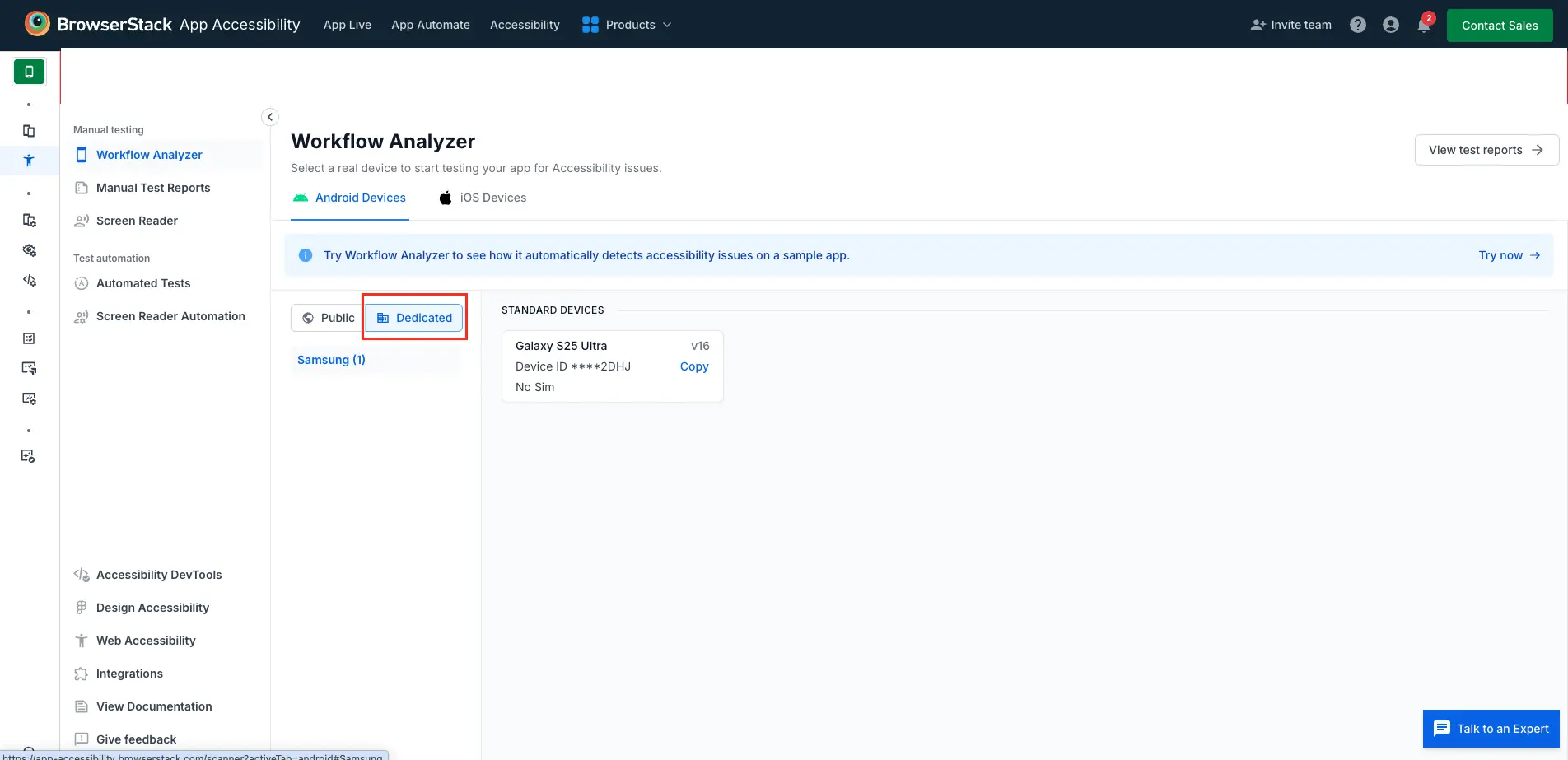
Workflow Analyzer is the manual accessibility workflow supported on Custom Device Lab. Use it to triage issues on real, privately managed devices by following these steps:
- Sign in to the BrowserStack App Accessibility Workflow Analyser dashboard.
- In the Manual testing section, open Workflow Analyzer and switch to the Dedicated tab to access your Custom Device Lab.
- Select the required Android or iOS device and launch the analyzer to investigate accessibility issues.
Automated testing with BrowserStack App Accessibility
Run automated accessibility audits on your Custom Device Lab devices using BrowserStack App Accessibility. Select from the list of supported frameworks, set the accessibility capability to true alongside the dedicatedDevice and deviceId capabilities that route your session to a privately managed device.
Automated App Accessibility testing is supported across every framework on the Supported frameworks list, though the exact steps and dependencies differ between frameworks. The dedicatedDevice and deviceId capabilities come from the BrowserStack SDK, so they work no matter which framework you use.
The steps below use Appium as an example to run automated App Accessibility tests on a dedicated private device. If you use a different framework, follow its getting started guide from the Supported frameworks list.
Upload your app
Upload the app you want to test to BrowserStack. For more information, refer to upload and manage apps.
Fetch the device ID
Authenticate your API request using your BrowserStack credentials and call the Custom Device Lab REST API to fetch the devices assigned to you. Note the deviceId of the device you want to test on. For more information, refer to the Custom Device Lab REST API reference.
Configure the browserstack.yml file
This browserstack.yml configuration is an example for Appium. The capabilities you set and the configuration file itself vary by framework. For framework-specific configuration steps, refer to App Accessibility automated testing.
Include the following capabilities in your browserstack.yml file:
-
accessibility: Set this totrueto run an accessibility audit during the session. -
dedicatedDevice: Set this totrueto run the test on your Custom Device Lab device. This is mandatory to run App Accessibility tests on privately managed devices. -
deviceId: Provide the device ID you noted in the previous step. This is mandatory to run App Accessibility tests on privately managed devices
Here’s an example configuration:
Replace deviceName, platformVersion, and deviceId with values that match your device. To configure detailed accessibility options, refer to get started with automated App Accessibility testing.
Run your test
Run your Appium test suite against BrowserStack. Each session is scanned for accessibility issues, and the results appear on your App Accessibility dashboard.
We're sorry to hear that. Please share your feedback so we can do better
Contact our Support team for immediate help while we work on improving our docs.
We're continuously improving our docs. We'd love to know what you liked
We're sorry to hear that. Please share your feedback so we can do better
Contact our Support team for immediate help while we work on improving our docs.
We're continuously improving our docs. We'd love to know what you liked
Thank you for your valuable feedback!