
 Ask the Community
Per-VU external inputs with test data
Configure test data inputs for repeatable load runs.
Configure test data to parameterize requests, credentials, and dynamic values across scenarios.
Depending on your preferred method, select any one of the following to test data configuration:
Test data configuration
Use test data to inject external values so each virtual user (VU) runs with different inputs. This helps you simulate real-world traffic without hard-coding values into your scripts.
- Expand Test Data and upload a
.csv. You can upload up to three files per test, each not exceeding 10 MB and 100 columns. Ensure the.csvfiles have headers. The system automatically stores up to five versions of each file.
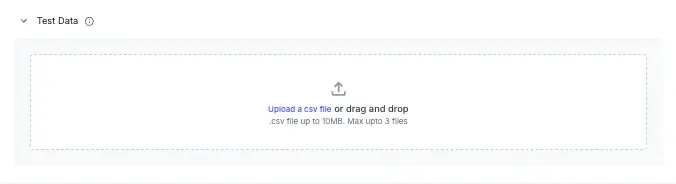
- After upload: set delimiter; confirm header row and row count; headers map to variables.
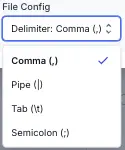
- Choose how VUs pick rows from the data file. Random (per-iteration random, high-volume) or Sequential (circular, even distribution).
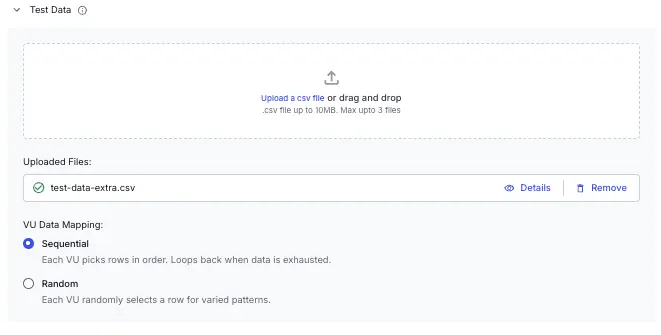
Add the filepath, delimiter and vuMappingStrategy values to the testData block. Ensure that the filepath value should use relative paths instead of absolute paths. You can add up to three files under the testData block.
Code implementation example
For this feature to work, ensure that your code reads only the first row from the uploaded CSV file. Refer to the sample JavaScript snippet below:
const row = await readFirstRow('test-data-extra.csv');

export async function readFirstRow(csvFilePath) {
  return new Promise((resolve, reject) => {
    let firstRow = null;
    const fullPath = path.resolve(csvFilePath);

    const stream = fs.createReadStream(fullPath)
      .pipe(csv())
      .on('data', (data) => {
        if (!firstRow) {
          firstRow = data;
          stream.destroy(); // Stop reading after first row
        }
      })
      .on('end', () => {
        console.log(`Read first row from ${csvFilePath}`);
        resolve(firstRow);
      })
      .on('close', () => {
        if (firstRow) {
          console.log(`Read first row from ${csvFilePath}`);
          resolve(firstRow);
        }
      })
      .on('error', (error) => {
        console.error(`Error reading CSV file: ${error.message}`);
        reject(error);
      });
  });
}
Test data configuration
Use test data to inject external values so each virtual user (VU) runs with different inputs. This helps you simulate real-world traffic without hard-coding values into your scripts.
Add the filepath, delimiter and vuMappingStrategy values to the testData block. Ensure that the filepath value should use relative paths instead of absolute paths. You can add up to three files under the testData block.
Code implementation example
For this feature to work, ensure that your code reads only the first row from the uploaded CSV file. Refer to the sample JavaScript snippet below:
const row = await readFirstRow('test-data-extra.csv');

export async function readFirstRow(csvFilePath) {
  return new Promise((resolve, reject) => {
    let firstRow = null;
    const fullPath = path.resolve(csvFilePath);

    const stream = fs.createReadStream(fullPath)
      .pipe(csv())
      .on('data', (data) => {
        if (!firstRow) {
          firstRow = data;
          stream.destroy(); // Stop reading after first row
        }
      })
      .on('end', () => {
        console.log(`Read first row from ${csvFilePath}`);
        resolve(firstRow);
      })
      .on('close', () => {
        if (firstRow) {
          console.log(`Read first row from ${csvFilePath}`);
          resolve(firstRow);
        }
      })
      .on('error', (error) => {
        console.error(`Error reading CSV file: ${error.message}`);
        reject(error);
      });
  });
}
testData:
  files:
    - filepath: ./data.csv
      delimiter: comma
  vuMappingStrategy: sequential  #or random
We're sorry to hear that. Please share your feedback so we can do better
Contact our Support team for immediate help while we work on improving our docs.
We're continuously improving our docs. We'd love to know what you liked
We're sorry to hear that. Please share your feedback so we can do better
Contact our Support team for immediate help while we work on improving our docs.
We're continuously improving our docs. We'd love to know what you liked
Thank you for your valuable feedback!