
 Join our Discord
Connect to Confluence
Learn how to fetch context from Confluence links to quickly generate test cases and create automation scripts.
Connect your Confluence workspace to Test Companion to fetch data via page URLs. This integration enables you to generate and automate test cases directly from your documented requirements, Product Requirement Documents (PRDs), team debriefs or technical specifications.
Set up Confluence for your IDE
In Visual Studio Code, Test Companion reaches Confluence through the Atlassian MCP server. In every IDE, it reaches Confluence through the BrowserStack integration. Select your IDE:
In Visual Studio Code, Test Companion reads and updates Confluence pages through the Atlassian MCP server. You name the page in chat. Test Companion asks for your approval before it fetches the page.
Prerequisites for the MCP server
Ensure you have the following:
- Test Companion is installed in Visual Studio Code and you are signed in.
- An Atlassian account with permission to view the Confluence pages you want to use.
Connect the Atlassian MCP server
To connect the server:
- Click
...(more options) on the Test Companion panel, then select MCP Servers. -
Select the Catalog tab, then click Connect on the Atlassian card.
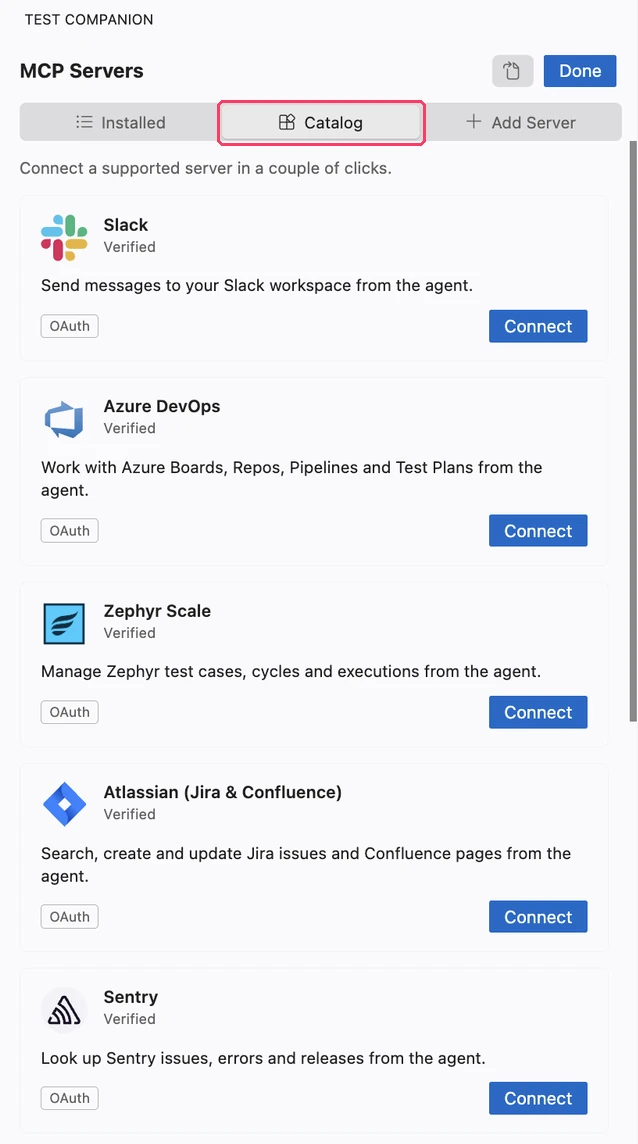
- Sign in with your Atlassian account in the browser and grant the requested access, then return to your IDE. The Installed tab shows the server with a green dot and its tool count.
For the controls of a connected server, see Atlassian in Connect an MCP server to Test Companion.
Use Confluence pages in chat
To work with a page:
- Describe the task and name the page and its space. For example:
Read the Confluence page "Checkout requirements" in the PAY space and generate test cases for the payment flow. - When the approval card appears, click Approve.
Test Companion reads the page and continues the task. It can also update a page when you ask, for example to add the generated test cases to it. Each update shows an approval card first.
You can also paste a Confluence page link in chat. A pasted link uses the BrowserStack integration described in the Other IDEs tab, not the MCP server.
We're sorry to hear that. Please share your feedback so we can do better
Contact our Support team for immediate help while we work on improving our docs.
We're continuously improving our docs. We'd love to know what you liked
We're sorry to hear that. Please share your feedback so we can do better
Contact our Support team for immediate help while we work on improving our docs.
We're continuously improving our docs. We'd love to know what you liked
Thank you for your valuable feedback!