
Get your setup working faster. Join our Discord for optimisation tips from elite testers.
 Join our Discord
Join our Discord
Record a bug on Bug Capture
Learn how to record a bug on Bug Capture
Recording a bug on Bug Capture depends on how you are using Bug Capture.
After installation, the extension can be found behind the browser extensions menu (puzzle icon).
Pin the extension by clicking the pin icon to make it easier to find later on.
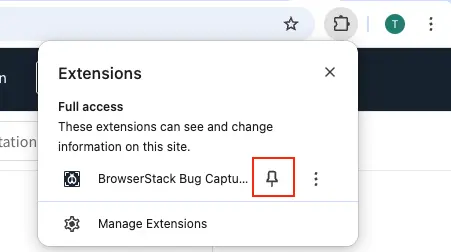
Follow these steps to record a bug from the Bug Capture extension:
- Click the Bug Capture extension and then click the Record current tab button to start a recording.
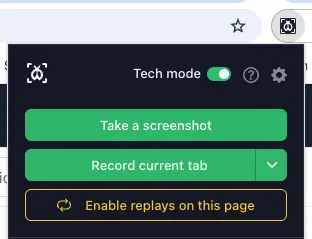
- To end the recording, click the extension again or the stop button in the toolbar.
- Your complete recording is displayed. Now, click Upload to save and share the recording.

We're sorry to hear that. Please share your feedback so we can do better
Contact our Support team for immediate help while we work on improving our docs.
We're continuously improving our docs. We'd love to know what you liked
We're sorry to hear that. Please share your feedback so we can do better
Contact our Support team for immediate help while we work on improving our docs.
We're continuously improving our docs. We'd love to know what you liked
Thank you for your valuable feedback!