
 Join our Discord
Environment variables
Use environment variables in BrowserStack Load Testing to parameterize tests and avoid hard-coding secrets. You can also mask sensitive values to prevent exposure in the browser console or CLI logs.
You can set environment variables to pass dynamic values to your load tests, such as API keys, user credentials, or configuration settings.
Mask sensitive values
Mark environment variables as masked to hide their values across the BrowserStack Load Testing dashboard. Use this for API keys, passwords, tokens, and other credentials you don’t want surfaced when reviewing or sharing a load test.
Masked values are hidden:
- When configuring a load test
- On load test details and run history pages
- When comparing runs
- In links you share with others
Masked values are not hidden:
- Inside your test runtime - your script reads
process.env.Xas the original value. This is required for tests to actually run. - In logs your test prints to
stdout- anything your script writes (console.log, framework debug output) appears verbatim in your run logs. If your test logs a secret, mask it in your test code as well. - In your local
.envsource file, BrowserStack never modifies the file you upload. Masking is opt-in per variable. Both UI Builder and CLI support it - see each tab below for the exact steps.
Configure environment variables
First, set up your environment variables using either the UI Builder or CLI. Once configured, you can enable masking for sensitive values.
Depending on your preferred method, select any one of the following:
Configure environment variables
Use environment variables to avoid hard-coding secrets and to parameterize your test runs:
- Upload one or more
.envfiles (up to 5 MB each) by dragging and dropping into the upload area:- You can upload
.env,.yaml,.yml,.json,.properties,.ini, or.cfgfiles. - After upload, the variables become available to your test run.
- You can upload
- Manually add key–value pairs:
- Click Add Variable, then enter the Key and Value.
- Your variables are saved for this run and applied during execution.
- Use the bin icon to delete any key-value pair
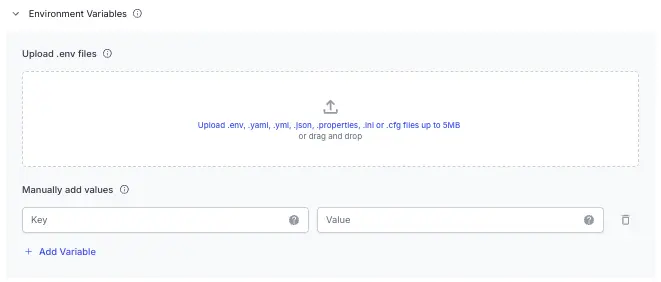
Enable masking in UI Builder
To mask a variable when using the UI Builder:
- Select the closed-eye icon next to the variable name you want to mask.
- The variable value is then hidden wherever sensitive values should not be exposed.
Where masked values are not exposed:
- UI Builder editor
- Public-facing interfaces
Where masked values remain visible:
- Test execution on BrowserStack (for debugging purposes)
Environment variables with JMeter properties
If you’re running JMeter tests, the environment variables you configure are also available through the JMeter __P() function. Parameterize your scripts using standard JMeter syntax:
${__P(target_host, localhost)}
${__P(api_key, default-key)}
When your test runs, BrowserStack automatically injects the values from your configured environment variables into JMeter’s property table. For details on how to use this feature, see Parameterize with JMeter properties.
Parameterize with JMeter properties
If you’re using Apache JMeter, you can parameterize your scripts using the JMeter __P() function. The __P() function resolves property values from the environment variables you configure in BrowserStack Load Testing.
Values from both file uploads and manually added key-value pairs feed into JMeter’s property table. When your script references a property using ${__P(name, default)}, the runner injects the value you specified, or uses the default if not supplied.
How JMeter properties work
In your JMeter script, use the __P() syntax to reference a parameter:
${__P(target_host, localhost)}
${__P(api_key, default-key)}
${__P(request.timeout, 5000)}
When the test runs on BrowserStack Load Testing:
- The runner parses your Env Variables (files and grid).
- Each key from your environment variables is injected into JMeter’s property table.
- At test time,
${__P(name, default)}resolves to:- The value you supplied through environment variables.
- The default value specified in your script if no value is configured.
Example
In your JMeter script (HTTP Request sampler):
-
Server Name:
${__P(target_host, localhost)} -
Path:
/api/users
In BrowserStack Load Testing, configure an environment variable:
-
Key:
target_host -
Value:
api.example.com
When the test runs, the HTTP request uses api.example.com as the server name.
Related topics
- Configure load parameters - Overview of all available load configuration options
- Per-VU external inputs with test data - Pass dynamic data files to your load tests
We're sorry to hear that. Please share your feedback so we can do better
Contact our Support team for immediate help while we work on improving our docs.
We're continuously improving our docs. We'd love to know what you liked
We're sorry to hear that. Please share your feedback so we can do better
Contact our Support team for immediate help while we work on improving our docs.
We're continuously improving our docs. We'd love to know what you liked
Thank you for your valuable feedback!