
 Join our Discord
Set thresholds
Define pass/fail criteria based on performance metrics
Set thresholds to automatically flag regressions when metrics exceed acceptable limits.
Want to fail a test the moment a critical threshold is breached? Enable fail-on-breach to stop a load test mid-execution as soon as a threshold is violated, saving VU hours and giving you faster feedback. See Fail a load test on threshold breach.
You can scope a threshold to a scenario in Browser Load Tests only, because multiple scenarios exist only in browser tests. On API Load Tests, a threshold applies globally or to specific requests, not to a scenario.
Depending on your preferred method, select any one of the following to set thresholds:
Set thresholds
In Step 3/3: Load Configuration, open the Thresholds tab. BrowserStack marks the test as failed if any threshold condition is not met.
To add a threshold:
- Select Add Threshold.
- Choose a metric, set a condition such as is greater than, and enter a value.
- Keep the scope set to All Requests to evaluate the metric across the entire test run. To apply a threshold to specific requests, a pattern, a group, or an individual scenario, see Set thresholds for specific requests.
- Repeat for more thresholds as needed, then save the test.
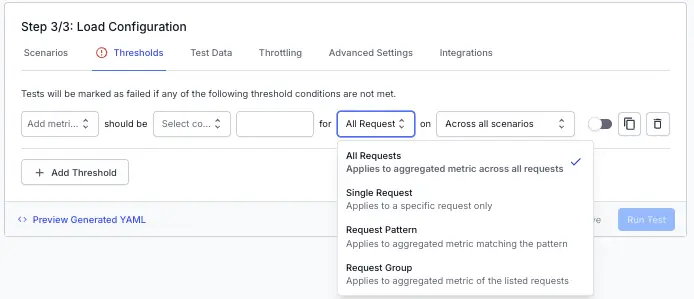
Available metrics:
- Total requests (count)
- Error % (percentage)
- Error count (count)
- Avg request rate (req/s)
- Avg response time (ms)
- p90 response time (ms)
- p75 LCP (s)
- p75 INP (ms)
- p75 FCP (s)
- p75 TTFB (ms)
- p75 CLS
We're sorry to hear that. Please share your feedback so we can do better
Contact our Support team for immediate help while we work on improving our docs.
We're continuously improving our docs. We'd love to know what you liked
We're sorry to hear that. Please share your feedback so we can do better
Contact our Support team for immediate help while we work on improving our docs.
We're continuously improving our docs. We'd love to know what you liked
Thank you for your valuable feedback!