
 Join our Discord
Migrate NeoLoad projects to BrowserStack Load Testing
Export a NeoLoad project as a zip and convert it into runnable BrowserStack Load Testing tests with Migrate with AI.
Move your existing NeoLoad work into BrowserStack Load Testing by exporting a project as a zip and uploading it through Migrate with AI. BrowserStack converts the project into runnable Load Testing tests for you: protocol traffic becomes a JMeter test, RealBrowser flows become a Playwright test, and hybrid projects produce both.
This guide is for performance and QA engineers who own NeoLoad projects. Before you start, review the support matrix below so you know what carries over.
Migrate with AI is in beta. If you don’t see it in your account, ask your BrowserStack contact to enable it.
What you’ll get
When you upload a NeoLoad project zip, BrowserStack produces one runnable Load Testing test for each combination of scenario, population, and user path in the project:
| In your NeoLoad project | Becomes in Load Testing |
|---|---|
| A protocol user path (HTTP/HTTPS traffic) | A JMeter test. |
| A RealBrowser user path (Chromium browser flow) | A Playwright test. |
| A Hybrid scenario (protocol and browser in one) | Both a JMeter test and a Playwright test. |
Each converted test arrives with its load profile, think times, data files, and assertions already translated. Where a project uses advanced scripting, such as custom JavaScript actions, custom extractors, or computed variables, BrowserStack uses AI to translate it into the target framework.
Prerequisites
- A NeoLoad project you can export. You need NeoLoad Designer, the desktop client, to produce the project zip, or a NeoLoad-as-Code (NLAC) YAML or JSON project.
- A BrowserStack Load Testing account with a project to migrate into, and Migrate with AI enabled (see the beta note above).
-
A supported NeoLoad version. Projects from NeoLoad 8.x through the 2025.x releases are supported. Very old projects whose format predates the current
.nlpstructure are rejected with a clear message. - A project within the size limit. The uploaded zip must be 500 MB or smaller. BrowserStack rejects larger exports before conversion starts.
- Mostly HTTP and/or RealBrowser traffic. Migration is feasible when your project is built on HTTP/HTTPS protocol VUs and/or RealBrowser VUs. Specialized protocols (SAP, Citrix, mainframe terminal, MQTT, and others) do not migrate. See What doesn’t migrate before you invest time.
Run a migration
To migrate your NeoLoad project into BrowserStack Load Testing, complete the following steps:
Export your project from NeoLoad
- Open your project in NeoLoad Designer.
- Use the Export project option to export the full project as a single zip. NeoLoad packages everything the migration needs, so you don’t have to assemble files by hand.
- If your team authors projects as NeoLoad-as-Code (NLAC), a YAML or JSON project, optionally zipped, also works.
Export the whole project, not a single user path. BrowserStack discovers every scenario, population, and user path from the project and creates a test for each one, so a complete export gives you a complete migration.
At the end of this step, you have a single .zip file on your machine, 500 MB or smaller.
Upload to BrowserStack
- In BrowserStack Load Testing, open the project you want to migrate into and start Migrate with AI.
- Choose NeoLoad as the source tool.
- Drag in or browse to the project
.zipyou exported in the previous step. - Start the migration. You see the upload confirm, and then a conversion in progress state.
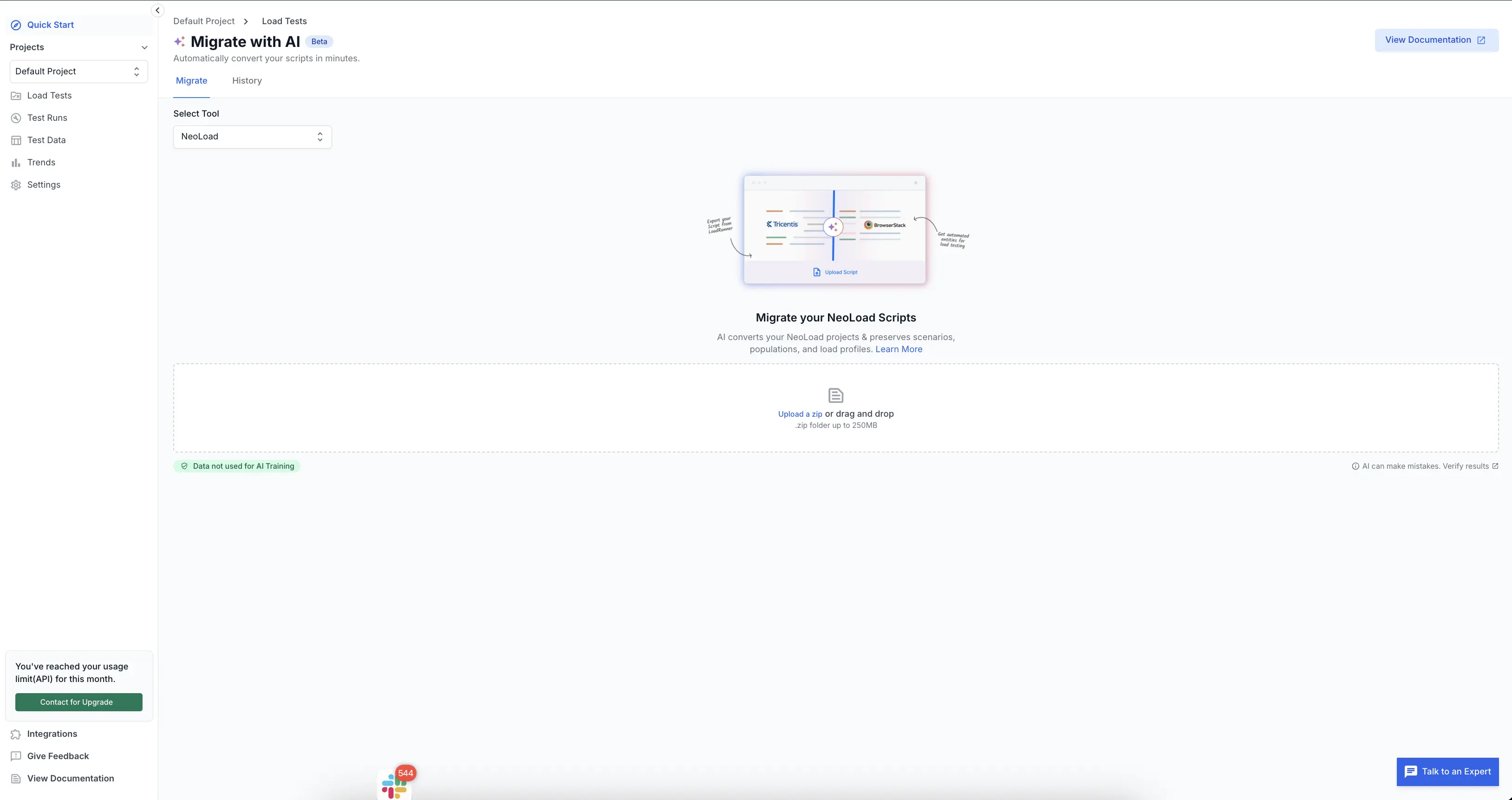
BrowserStack discovers every scenario in your project and converts each one into a JMeter or Playwright test, carrying over the load profile, think times, data files, and assertions. Conversion runs on its own, so you don’t have to keep the page open. Larger projects take longer.
Review and run the converted tests
When conversion finishes, open the migration from your History view. You see one row per converted test, each with a status:
| Status | What it means | What to do |
|---|---|---|
| Converted | The test was translated successfully. | If the configuration was applied, click View load test. Otherwise, click Create load test to set it up. |
| Unsupported | The test relies on a NeoLoad capability that Load Testing has no equivalent for, for example a non-web protocol. No runnable test is produced for it. | See What doesn’t migrate. |
| Failed | The test couldn’t be processed, for example a malformed or non-NeoLoad zip, or an unsupported protocol. | See Common issues. |
Where BrowserStack could apply the test configuration, it creates the load test for you. Click View load test to open and run it. Where the configuration could not be applied, isn’t supported, or wasn’t present, click Create load test to set it up yourself. Either way, the translated load profile, thresholds, and data files come across.
A migration can finish partially: some tests convert successfully while others fail. Each test’s status is independent, so the successful tests are ready to use even if others need attention.
What gets migrated
The tables below are a feature-by-feature cross-walk. The Migrates column reads as follows:
- Yes: carries over directly.
- Partial: carries over with some loss or reshaping.
- No: has no Load Testing equivalent and is dropped.
Protocols and test types
| NeoLoad feature | Migrates | Notes |
|---|---|---|
| HTTP / HTTPS | Yes | The core happy path. Becomes a JMeter test. |
| RealBrowser (Chromium full-browser flows) | Yes | Becomes a Playwright test. Load Testing browser metrics cover Web Vitals (LCP, INP, CLS). |
| Hybrid scenarios (protocol and browser together) | Yes | Produces both a JMeter test and a Playwright test from the one scenario. |
| WebSocket | No | No equivalent in the migration target today. |
| SAP GUI, Citrix, RTE / mainframe terminal, MQTT, custom-protocol plugins | No | Not migratable. See What doesn’t migrate. |
Load modeling
| NeoLoad feature | Migrates | Notes |
|---|---|---|
| Constant load | Yes | Maps to the Load Testing Constant load profile. |
| Ramp-up load | Yes | Maps to the Load Testing Ramping load profile. |
| Peaks / spike load | Partial | Maps to the Load Testing Spike profile for protocol tests. RealBrowser tests don’t support spike load, so a spike scenario with browser VUs is approximated with ramping. |
| Custom multi-step load curves | Partial | Translated into multi-stage ramping. Very fine-grained step curves may flatten. |
| Iterations, pacing, and think time | Partial | Preserved and translated to the target framework’s timing primitives. The shape is kept, and exact mechanics depend on the framework. |
| Multiple populations in one scenario | Yes | Each population becomes its own Load Testing test with its own load shape. |
| Rendezvous (VU synchronization barriers) | Partial | No built-in Load Testing equivalent. Flagged during conversion and approximated where possible (JMeter), but not guaranteed. |
Data handling
| NeoLoad feature | Migrates | Notes |
|---|---|---|
| CSV / data-source parameterization | Yes | Your data files come across and stay wired to the test. |
| Variable extractors (regex, XPath, JSONPath, custom JS) | Yes | Translated to the target framework’s extraction. Custom-JS extractors are AI-rewritten and validated. |
| Dynamic data (random strings, numbers, UUIDs, counters, dates) | Yes | Mapped to framework primitives. |
| Automatic correlation | Yes | NeoLoad bakes correlation into the project at design time, so the correlated requests are preserved as-is. |
| SQL-backed variables (query a database per iteration) | Partial | Lossy. You need to supply database connection details on the Load Testing side. |
| SharedQueue (cross-VU shared values) | Partial | No direct equivalent. May need a manual workaround. |
Assertions, SLAs, and reporting
| NeoLoad feature | Migrates | Notes |
|---|---|---|
| Content validators (substring or regex) | Yes | Become framework-level assertions. |
| SLA profiles and thresholds | Yes | Map to Load Testing thresholds (global, per-request, per-group). |
| Custom JavaScript validators | Yes | AI-rewritten into the target framework and validated. |
| Real-time dashboards, per-transaction stats, comparison and baseline reports | Yes | Available in Load Testing after you run the converted test. |
| Web Vitals (LCP, INP, CLS) | Yes | Collected by the Load Testing browser instrumentation. |
| AI anomaly detection | No | No Load Testing equivalent today. |
What doesn’t migrate
Some NeoLoad capabilities have no counterpart in Load Testing. If your project depends on these, plan for it before you migrate.
The following capabilities make a user path, or the whole project, non-migratable:
- SAP GUI, Citrix, and RTE / mainframe (TN5250 / TN3270) protocols. There is no protocol-level equivalent. User paths built on these are marked Unsupported.
- Push frameworks (auto-rewritten streaming or polling paths). No equivalent, and flagged at conversion.
- MQTT, custom-protocol plugins, and WebSocket. Not covered by the migration target.
When a project contains one of these, the affected parts come back as Unsupported, or the migration Fails with a message that names the protocol. The HTTP and RealBrowser parts of a hybrid project still convert.
The following items are intentionally dropped, and that’s expected:
- Browser telemetry sidebands. NeoLoad records a lot of automatic Web Vitals and per-request telemetry during browser recording. These don’t drive your test logic, so they’re left out. Load Testing collects its own browser performance metrics when the converted test runs.
- Customer-stack monitoring connectors (WebLogic, WebSphere, database monitors, and the rest of NeoLoad’s roughly 25 connectors). Load Testing doesn’t ingest these, so APM and monitoring stays on your own stack after migration.
A note on NeoLoad-as-Code overlays: teams sometimes use NLAC as an override layer on top of a GUI .nlp project rather than as a complete project on its own. Export the full project so that the migration has the complete picture.
Common issues
- “This isn’t a NeoLoad project” or the migration fails immediately. The zip didn’t contain a recognizable NeoLoad project. Re-export the project from NeoLoad and upload the generated zip.
- Upload rejected before conversion. The zip is over 500 MB. Trim recordings or large embedded assets and re-export.
- A test came back Unsupported. The test uses a protocol or capability that Load Testing can’t run (see What doesn’t migrate). The other tests in the project are unaffected.
- Old-version project rejected. A project whose format predates the supported NeoLoad versions can’t be read. Open and re-save it in a supported NeoLoad version, and then re-export.
What’s next
After you migrate your project, explore the following:
- Run a load test in BrowserStack Load Testing: take a converted test and run it.
- Understand projects and test types: see how JMeter, Playwright, and Hybrid tests fit together in Load Testing.
- Set load profiles and thresholds: review and tune the profiles your migration brought over.
We're sorry to hear that. Please share your feedback so we can do better
Contact our Support team for immediate help while we work on improving our docs.
We're continuously improving our docs. We'd love to know what you liked
We're sorry to hear that. Please share your feedback so we can do better
Contact our Support team for immediate help while we work on improving our docs.
We're continuously improving our docs. We'd love to know what you liked
Thank you for your valuable feedback!