
 Join our Discord
Rename a load test
Rename a load test at any time after you create it, without affecting its run history, saved links, or scheduled runs.
A load test’s name is a display label. The test keeps its own identity, so renaming changes what you see in the dashboard without moving, duplicating, or deleting anything attached to the test.
Rename a load test when you want to:
- Correct a placeholder name, such as
load test, after you finish setting up a test. - Align a test name with a renamed feature, service, or release.
- Adopt a naming convention across a project, such as
checkout-baselineandcheckout-peak.
What renaming affects
After you rename a test, the new name appears in the Load Tests list, on the load test details page, and in the breadcrumb. Notifications and reports that you receive from then on use the new name.
Renaming doesn’t change your:
- Past runs, with the run count carrying on from where it left off.
- Saved links and bookmarks to the test.
- Scheduled runs and integrations.
The name you moved away from is free to use again on another test.
Rename from the load test details page
Rename a test directly from its details page.
Open the load test that you want to rename.
Select the test name at the top of the page to make it editable, and then enter the new name.
Confirm the change. A confirmation message shows the new name and the previous name.
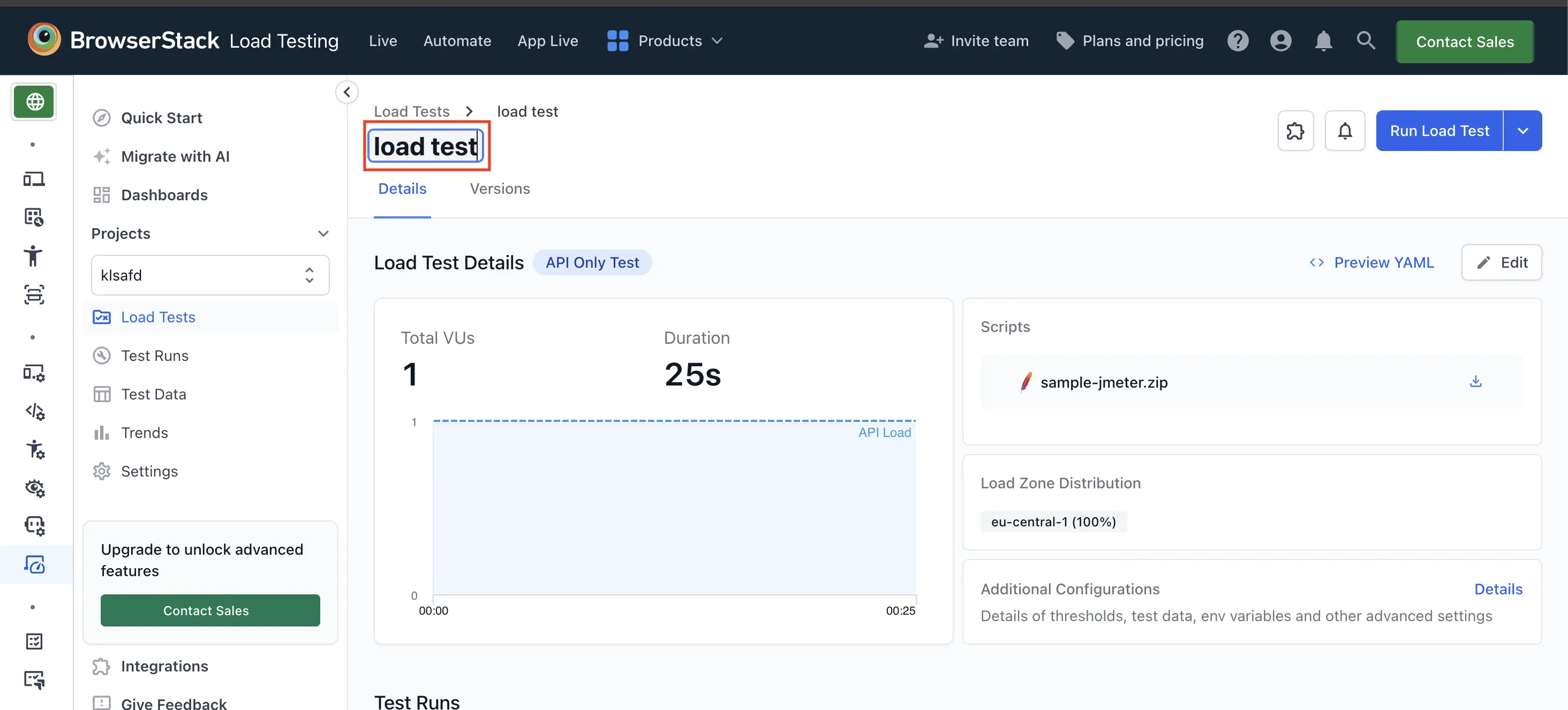
The breadcrumb and the page title both update to the new name.
Rename from the Load Tests list
You can also rename a test from the Load Tests list, without opening it.
In the left sidebar, select Load Tests to open the list of load tests in your project.
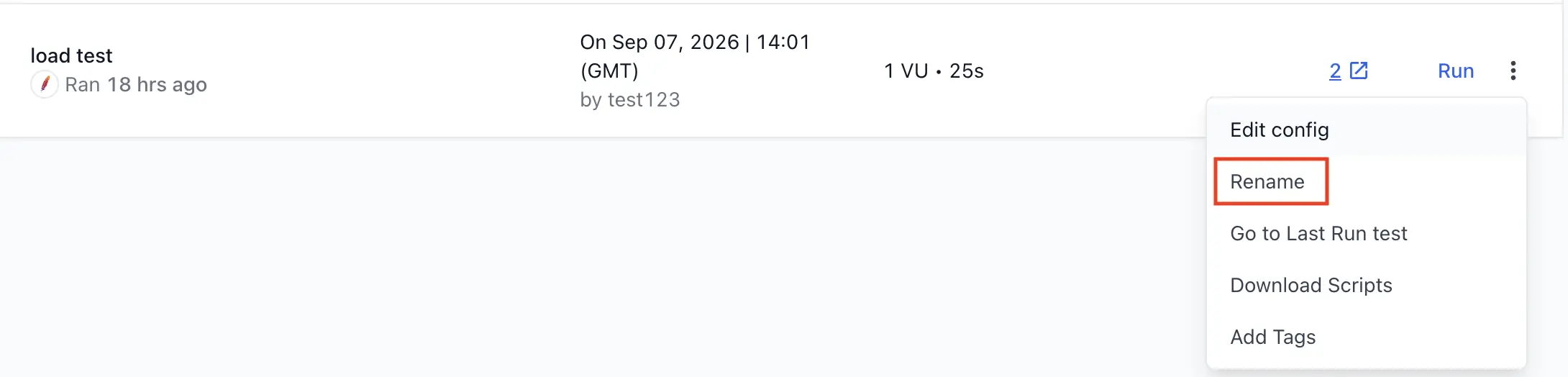
In the row for the target load test, select the more actions icon, and then select Rename.
In Test name, enter the new name. The same name requirements apply.
Select Save. A confirmation message shows the new name and the previous name.
Name requirements
A load test name must meet the following requirements:
| Requirement | Details |
|---|---|
| Length | Up to 255 characters. |
| Allowed characters | Letters A to Z and a to z, digits 0 to 9, spaces, and these characters: : . _ ' @ ( ) [ ] -
|
| Spaces | A literal space only. Tabs and newlines are not allowed. |
| Not empty | A load test must have a name. |
| Unique in the project | Another load test in the same project cannot already use the name. |
Track renames in configuration history
Every rename is recorded as a Renamed entry on the Versions tab of the load test, alongside configuration changes. The entry shows the previous name, the new name, who made the change, and when, so a test’s naming history stays auditable.
For more information about the Versions tab, see Configuration history.
Reuse a name after renaming
When you rename a test, its previous name becomes available again. You or a teammate can create a new test with that name, or rename another test to it.
Reusing a name does not affect the original test:
- Saved links to the original test still open the original test.
- The test that now holds the reused name opens from the Load Tests list and from its own link.
Update your CLI configuration after renaming
If you trigger a load test from the CLI with a browserstack-load.yaml file that references the test by name, update the name field to the new name after you rename the test. Otherwise, your CI runs might report into a different test than you expect.
The CLI warns you when a name in your configuration no longer matches:
If a new load test is created under the previous name, a CLI run that still references the previous name reports into that new test instead of the renamed one. Update the name field in browserstack-load.yaml to keep reporting into the renamed test.
When you cannot rename a test
| Situation | What to do |
|---|---|
| A run of the test is queued or running. | Wait for the run to finish, or stop it, and then rename the test. |
| Another load test in the project already uses the name. | Choose a different name. |
| The name is empty or contains unsupported characters. | Update the name to meet the name requirements. |
Related topics
- Configuration history - Review, restore, and compare saved versions of a load test’s configuration.
- Add tags - Label load tests and runs to organize and filter them.
- Configure load parameters - Overview of all available load configuration options.
We're sorry to hear that. Please share your feedback so we can do better
Contact our Support team for immediate help while we work on improving our docs.
We're continuously improving our docs. We'd love to know what you liked
We're sorry to hear that. Please share your feedback so we can do better
Contact our Support team for immediate help while we work on improving our docs.
We're continuously improving our docs. We'd love to know what you liked
Thank you for your valuable feedback!