
 Join our Discord
Copy entities
Copy tests, datasets, modules, and test suites in BrowserStack Low Code Automation instead of rebuilding them from scratch.
Copy tests, datasets, and modules, along with their dependent entities, within the same project or to another project to reuse them instead of rebuilding from scratch. You can also copy a test suite within a project.
You can copy the following entities:
| Entity | Copy within a project | Copy to another project |
|---|---|---|
| Tests | Yes | Yes |
| Test datasets | Yes | Yes |
| Modules | Yes | Yes |
| Test suites | Yes | No |
Copy tests
You can copy one or more tests, along with their dependent entities, within the same project or to another project. You can select up to a maximum of 50 tests at a time.
Copy a single test
Copy one test within the same project, or to a destination project and folder of your choice.
Copy multiple tests
Select multiple tests at once and copy them to the destination project in a single operation.
For details on how BrowserStack handles a test’s dependent entities, see Dependent entity behavior.
Copy test datasets
You can copy a dataset independently of a test:
- Copy one or more datasets from one project to another, or within the same project.
- If the dataset is derived from a database connection, BrowserStack also copies the connection.
Copy a single dataset
Copy one dataset within the same project, or to a destination project of your choice.
Copy multiple datasets
Select multiple datasets at once and copy them to the destination project.
Copy modules
You can copy a module independently of a test:
- Copy one or more modules from one project to another, or within the same project.
- Copying a module creates a clone. BrowserStack doesn’t automatically map the copy to any existing tests, in the same project or a different one.
- If the module contains local, global, dataset, or secret variables, BrowserStack handles them the same way as described in Dependent entity behavior.
If a module you’re copying contains a shared variable, BrowserStack blocks the copy and shows an error. This occurs because the shared variable depends on its parent test. Copy the parent test to bring the module and its shared variable across.
Copy a single module
Copy one module within the same project, or to a destination project of your choice.
Copy multiple modules
Select multiple modules at once and copy them to the destination project in a single operation, up to a maximum limit. The default limit is 50 modules.
Copy test suites
Copy a test suite to create an independent suite that runs the same tests, then change only what’s different, such as the execution browsers, environment, or schedule. You can copy a test suite only within the same project.
To copy a test suite:
In Low Code Automation, go to Test Suites.
In the row of the test suite you want to copy, click the three-dot menu and select Copy.
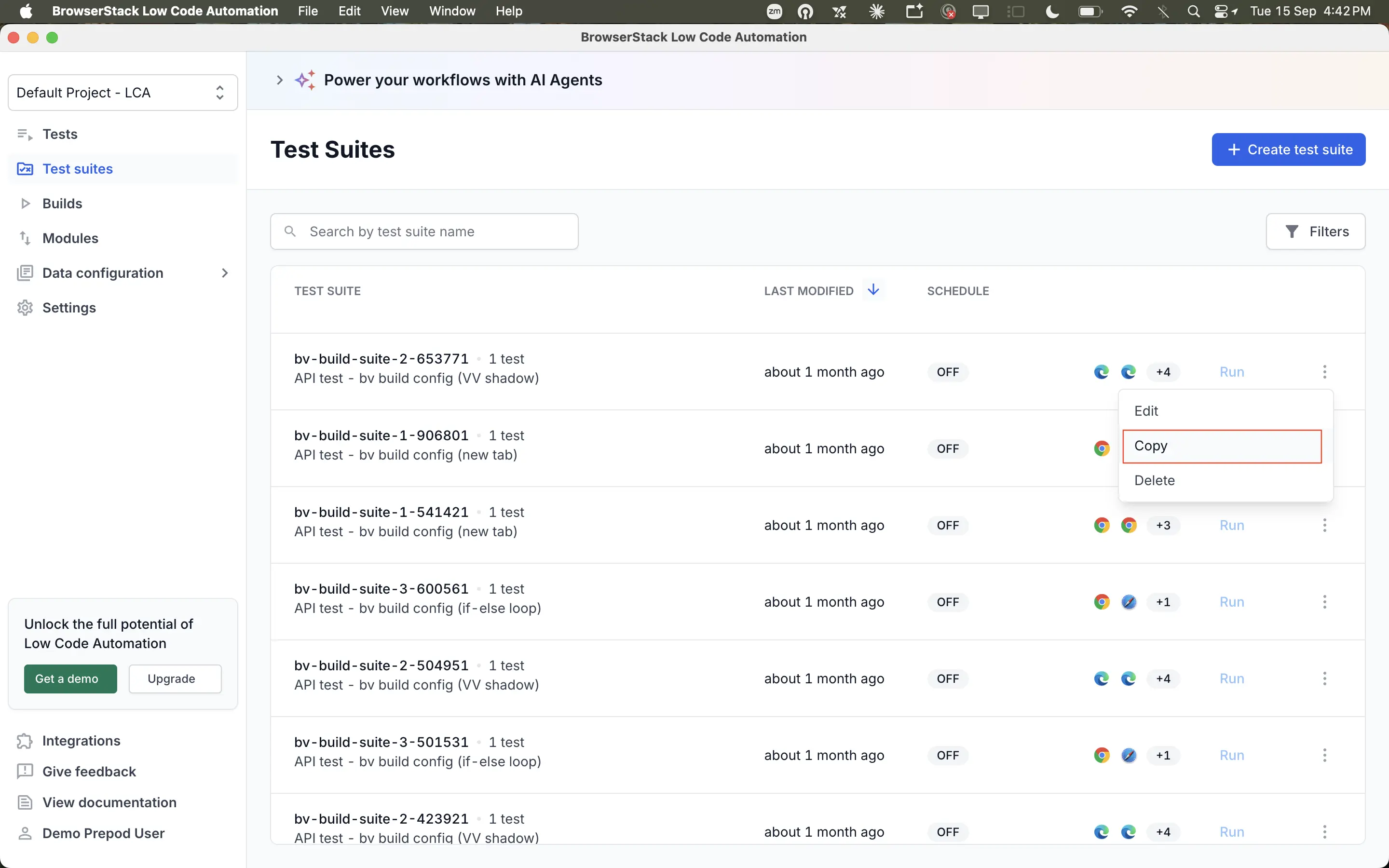
In the Copy test suite dialog, BrowserStack pre-fills the name as Copy of <source suite name>. Enter a name in Test suite name.
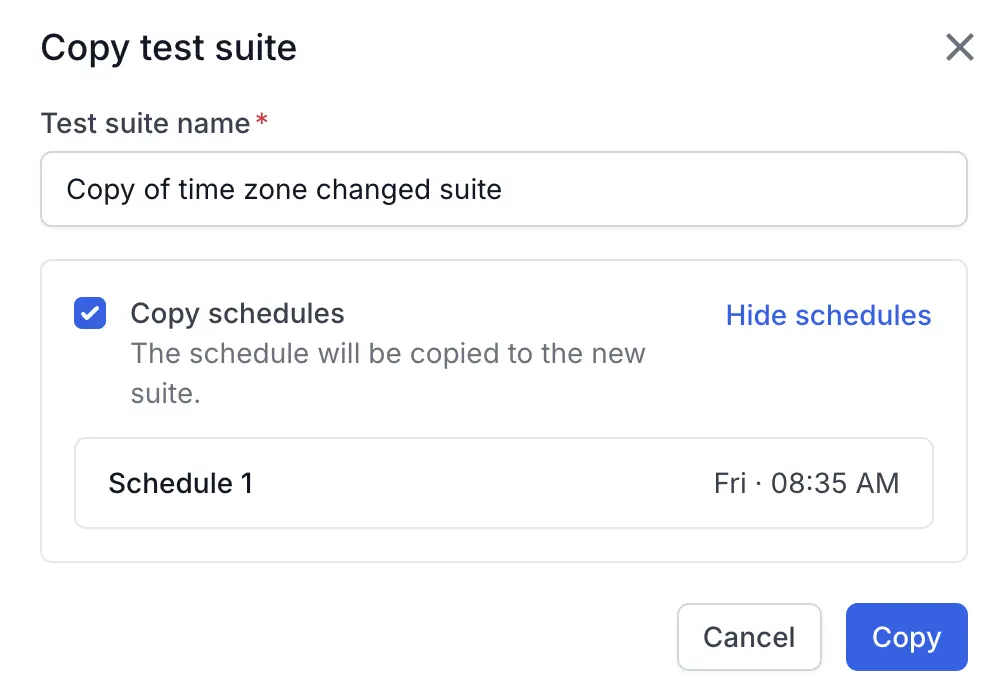
If the source suite has schedules, select Copy schedules to carry them over. Click Show schedules to list the schedules that are copied, with the day and time each one runs.
Copied schedules run at the same times as the source, so both suites compete for the same parallel slots. To avoid this, clear Copy schedules and add a schedule after you edit the copy.
Click Copy.
The copy references the same tests as the source suite instead of duplicating them. Editing a test changes it in both suites, so the two suites can’t drift apart. This is different from copying a test, which is described in Dependent entity behavior.
What is included in a test suite copy
The test suite copy includes the following:
- The suite’s tests and their execution order
- Description, device profile, execution browsers and pinned versions, and emulated or real device selection
- Parallel or sequential execution mode, and execution blocks
- Environment profile or host URL override
- Local Testing toggle and tunnel identifier
- IP geolocation, accessibility testing settings, and rerun failed tests
- Email and Slack notification settings
The test suite copy does not include the following:
- Build or run history, results, or version history
- Empty status and last run, with the build count starting from one
- The Created by and Updated by fields set to you
Dependent entity behavior
The following sections apply when you copy a test, dataset, or module. They don’t apply to test suites, which share their tests instead of duplicating them.
When you copy an entity, BrowserStack also copies or maps its dependent entities. The following sections describe how each type of entity behaves.
Steps and configurations
BrowserStack copies all test steps, including validations, along with their configurations, such as timeout, override locators, configured attributes, failure logic, visual testing, input, and step images, to the new test as is.
Visual testing
BrowserStack copies all visual validation steps, along with their difference thresholds and visual testing configuration, to the new test as is. It copies only the source test’s initial baseline, and warns you if that baseline is too old.
Variables and secrets
BrowserStack handles variables and secrets based on whether they already exist in the destination project:
| Entity | Behavior when copied |
|---|---|
| Local variables | Copied with their names and values as is, including shared variables from another test and email variables. |
| Global variables and secrets | If one doesn’t exist in the destination project, BrowserStack creates it with the same name, applied across all environments. If one with the same name already exists, the test uses it. |
Datasets, connections, and modules
If a matching entity already exists in the destination project, the test uses it. Otherwise, BrowserStack creates a copy.
| Entity | Match criteria |
|---|---|
| Dataset | Same name, column names, and row combinations. |
| Database connection | Same name and connection details. |
| Module | Same name and step definitions, including variables. |
Copies follow two more rules:
- If a test, dataset, or module name is already taken, BrowserStack appends a numeric suffix, such as
_1or_2, using the last active number for that entity type plus one. - If multiple selected tests share one module, BrowserStack creates a single copy and links all those tests to it.
Test organization and metadata
BrowserStack updates the following organizational and metadata entities in the destination project:
| Entity | Behavior when copied |
|---|---|
| Version history | BrowserStack creates a new version of the test in the destination project, without carrying over older versions from the source project. |
| Mapped test cases | Mapped test cases aren’t copied. |
| Tags | Tags are copied. Tags are a group-level entity, so they exist across all projects. |
| Group and project level configurations | Group-level configurations persist across projects, so copying has no impact on them. BrowserStack doesn’t copy project-level configurations automatically. You set these up manually, one time, in the destination project. |
| Metadata | BrowserStack sets the Created by and Updated by fields to the user who copied the test from the source project. |
| Sample tests | Sample tests can’t be copied. |
Points to remember
- You can run only one copy operation at a time. If you start another copy while one is in progress, BrowserStack queues it and starts it after the current copy completes.
- Multiple users can copy entities in the same project at the same time.
- You can copy a test suite only within the same project. To reuse a suite in another project, copy its tests to that project and create a suite there.
Related topics
We're sorry to hear that. Please share your feedback so we can do better
Contact our Support team for immediate help while we work on improving our docs.
We're continuously improving our docs. We'd love to know what you liked
We're sorry to hear that. Please share your feedback so we can do better
Contact our Support team for immediate help while we work on improving our docs.
We're continuously improving our docs. We'd love to know what you liked
Thank you for your valuable feedback!