
 Join our Discord
Test pages behind login
Add login credentials to scan web pages that require authentication.
Web pages with sensitive or restricted content require users to log in before access. Add a login configuration to your scan, so Website Scanner can authenticate and reach these pages.
Choose your authentication type
When you add a login configuration, select the authentication type that matches your website’s login flow:
| Authentication type to use | Login flow |
|---|---|
| Form authentication | A single login form with username and password fields. The server validates credentials against an authorized user list. Access to the requested resource is granted or denied based on the validity of the credentials. |
| Basic authentication | A browser popup requesting credentials (HTTP Basic), which are sent to the server in plaintext, encoded with Base64. This is not supported on Safari. |
| Multipage authentication | Users enter their username and password on separate screens. |
There can only be one authentication type per project. All pages in the scan share the same credentials and authentication method. Having multiple authentication types on the same page, or having the same authentication type with different credentials, could cause inconsistencies.
Optional authentication settings
You can layer these options on top of form authentication or multipage authentication:
| Add-on | When to use |
|---|---|
| Multifactor authentication (MFA) | Your login requires an email-based one-time password (OTP) after entering credentials. |
| Dynamic login URL | Your login page URL changes every session (for example, URLs with session tokens or CSRF parameters). |
Both add-ons are configured within the form authentication or multipage authentication setup. Basic authentication does not support these add-ons.
Verify a login configuration before you save
The Add a new configuration dialog has a Verify login configuration button. When you click it, Website Scanner opens your login page in a browser, fills the fields with the values you entered, and clicks the submit button. The check takes less than a minute.
Verify every configuration before you save it. A wrong selector or password then surfaces here instead of in a scan that fails on authentication later.
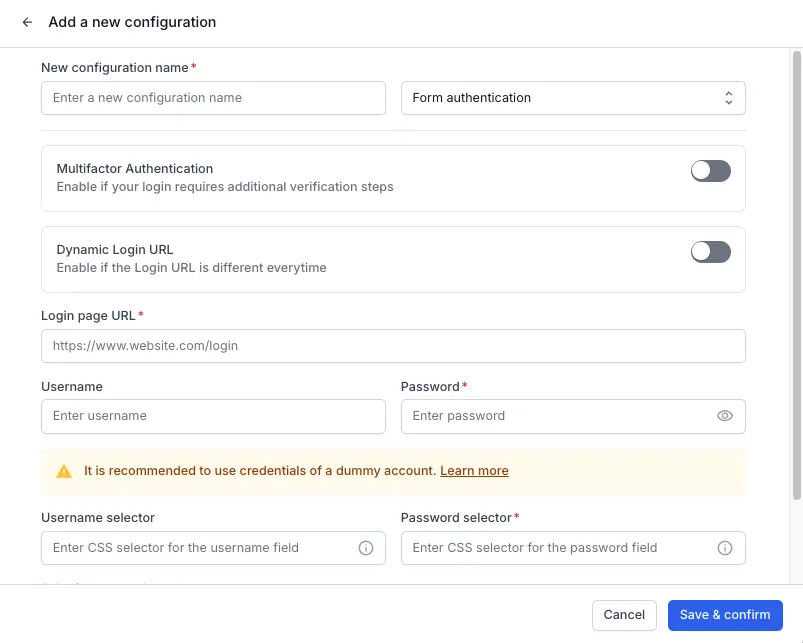
The dialog shows Add required configurations to verify. until you fill every required field.
For basic authentication, the dialog also asks for a URL to verify against, because there is no login page to open. Website Scanner opens that URL with your credentials for this check only. The URL is not saved to the scan.
While the check runs, the footer shows Verifying your login configuration… and a Cancel button. The result then appears in the dialog with a Snapshot after verification of the page Website Scanner reached:
| Result | Meaning |
|---|---|
| No errors found. Please check the snapshot to verify. | Every step ran. The URL after login line shows where the browser ended up. Confirm from the snapshot that this is the page you expect after signing in. |
| Selectors not found. Please check the snapshot below | One or more selectors did not match an element on the page. The message starts with the count of failed selectors. The Settings to check list names each one with the value you entered. |
| The Page didn’t change after Sign-in | The browser stayed on the login page URL after the submit click. The credentials are wrong, or the submit button did not submit the form. |
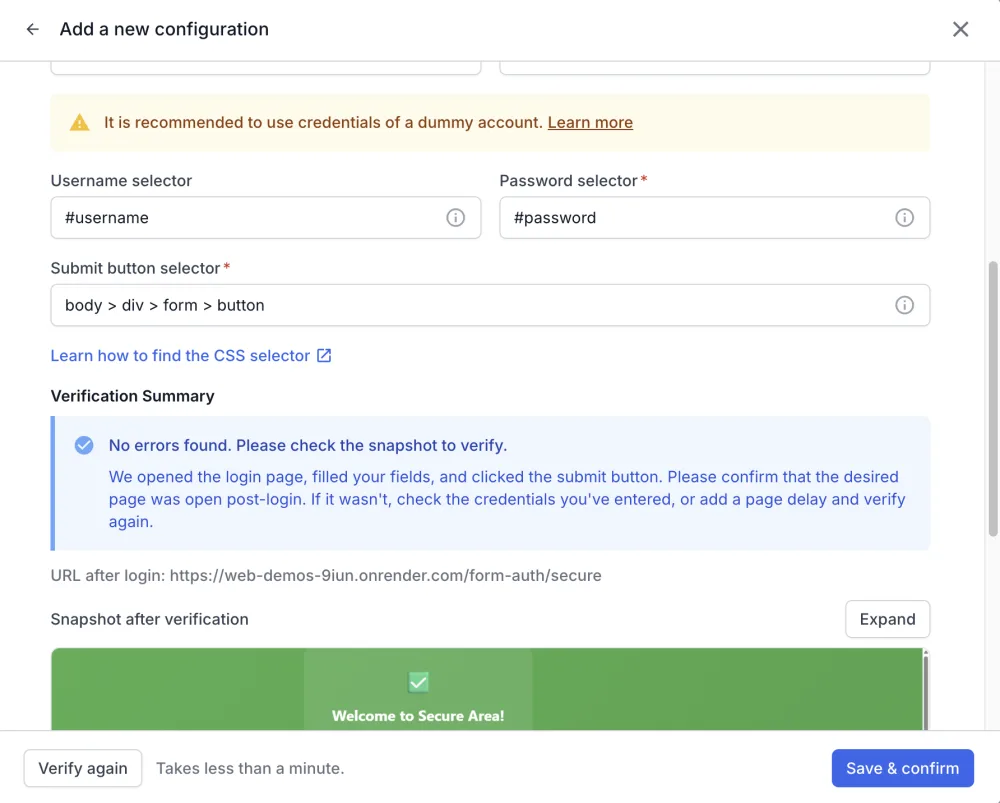
Website Scanner cannot tell a successful sign-in from a failed one, so compare the snapshot with the page you expect after signing in. Click Expand to view the snapshot at full size.
After you change a value, click Verify again. Each result has a fix in Troubleshoot authentication errors.
Add a delay for pages that load fields late
Some login pages render the username field first and the password field a few seconds later. When Website Scanner looks for the password field before it exists, the result is Selectors not found, although the selector is correct.
Choose a wait time in Add delay at the bottom of the dialog to give the page time to finish. You can add up to 30 seconds. The default is 0 seconds.
Verification limit
You can run the verification 10 times in 30 minutes. The limit applies to your account, across every login configuration you edit in that window.
Constraints
There can only be one authentication type per project. All pages in the scan share the same credentials and authentication method.
Always use sample accounts for testing purposes to protect production credentials.
Next steps
- Configure form authentication for standard login forms.
- Configure basic authentication for HTTP Basic auth popups.
- Configure multipage authentication for login flows spread across multiple screens.
- Troubleshoot authentication errors when a verification fails or a scan cannot sign in.
We're sorry to hear that. Please share your feedback so we can do better
Contact our Support team for immediate help while we work on improving our docs.
We're continuously improving our docs. We'd love to know what you liked
We're sorry to hear that. Please share your feedback so we can do better
Contact our Support team for immediate help while we work on improving our docs.
We're continuously improving our docs. We'd love to know what you liked
Thank you for your valuable feedback!