
 Join our Discord
BrowserStack App Live with the MCP server
Use natural language prompts in your AI assistant to launch App Live sessions for manual app testing on real devices with the BrowserStack MCP server.
Use the BrowserStack MCP server to launch App Live sessions for manual app testing from your coding assistant, such as GitHub Copilot, Claude, Cursor, or ChatGPT.
To set up the server, see get started with the BrowserStack MCP server.
To use App Live tools on the MCP server, you need an App Live license. Contact BrowserStack support to enable a license for your account.
Workflows and tools
Your assistant picks the right tool for each request. You don’t need to name a tool in your prompt. Describe the outcome, and the assistant picks the tool. The MCP server logs every tool call, so you can confirm which tool a prompt used.
Uploading an app from your machine needs the local MCP server, with MCP_UPLOAD_BASE_DIR set to the folder that holds the app. For the full list of devices, see BrowserStack App Live supported devices and browsers.
Sessions
| Workflow | What it does | Tool |
|---|---|---|
| Debug an app crash or slowdown | Opens your app on the device and OS version where the problem happens, so you can reproduce and debug crashes and performance issues. | runAppLiveSession |
| Test an app on a real device | Uploads your app and opens it in an interactive App Live session on a real iOS or Android device in the cloud. | runAppLiveSession |
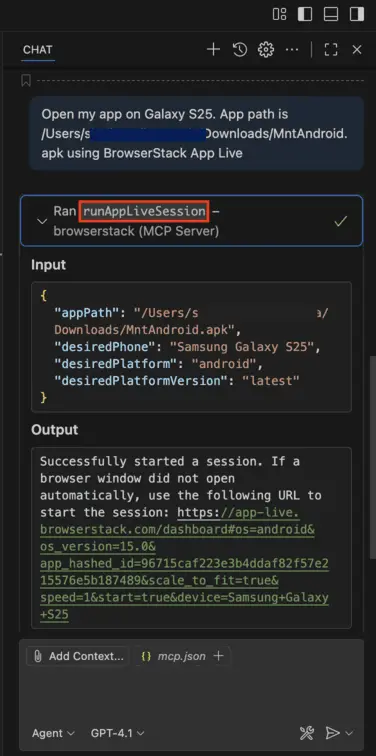
The following example shows GitHub Copilot in VS Code calling the runAppLiveSession tool:
Test your app step by step with your own MCP server
Your AI assistant can also open your app on a BrowserStack real device and test it step by step for you, through Appium MCP or WebdriverIO MCP.
You need an App Automate license. For setup steps, see Use Appium MCP or WebdriverIO MCP with BrowserStack.
Related topics
For more help, see the following pages:
We're sorry to hear that. Please share your feedback so we can do better
Contact our Support team for immediate help while we work on improving our docs.
We're continuously improving our docs. We'd love to know what you liked
We're sorry to hear that. Please share your feedback so we can do better
Contact our Support team for immediate help while we work on improving our docs.
We're continuously improving our docs. We'd love to know what you liked
Thank you for your valuable feedback!