
 Join our Discord
Run a load test using your script’s own configuration and thresholds
Run your k6, JMeter, or Locust script on BrowserStack using its own load configuration and thresholds, just like a local run.
The test behaves and passes or fails the same way as a local run. This guide is for performance and QA engineers who author their own scripts.
What BrowserStack reads from your script
Depending on your script type, BrowserStack honors different fields for load and for pass or fail thresholds:
k6 declares its load shape and its pass or fail criteria in the same place: the options object.
| What BrowserStack reads | Source | Examples |
|---|---|---|
| Load shape | options |
vus, duration, stages, scenarios, iterations
|
| Pass or fail thresholds | options.thresholds |
http_req_duration: ['p(95)<500'], http_req_failed: ['rate<0.01'], checks: ['rate>0.95']
|
A threshold BrowserStack can’t grade, for example a k6 threshold scoped to a specific tag or sub-metric, still appears in the grid, grayed out, with a warning. It runs inside your script, but it doesn’t decide the BrowserStack pass or fail verdict. Hover over the warning for the reason.
Prerequisites
To use this feature, you need:
- A BrowserStack Load Testing project.
- One of the following:
- A k6 script that sets
options, such asvus,duration,stages, orscenarios. To gate the run on your own criteria, also setoptions.thresholds. - A JMeter
.jmxplan whose thread groups define the load. To gate the run using thresholds, add Duration or Response assertions. - A Locust script with a
LoadTestShapeclass, or a configuration file that setsusers,spawn-rate, andrun-time.
- A k6 script that sets
If your script doesn’t declare a load or thresholds, BrowserStack uses the values you set in the UI Builder or pass via the CLI.
How BrowserStack reads your script
Your script takes priority wherever it declares a value. BrowserStack parses the script, uses the load shape and thresholds it finds, and fills in anything the script leaves unset.
Plan limits always apply. If your script requires more virtual users than your plan allows, the run fails immediately with a clear error instead of being silently capped.
Steps
Follow these steps:
On the Load Testing dashboard, click Create Load Test.
Enter a test name, for example checkout-flow-stress, and select API Only as the test type.
Click Upload scripts and add your script:
- k6: a single
.jsor.tsfile, or a.zipfile, up to 100 MB. For a multi-file test, set Main script to your entry file, for exampletests/k6/checkout.js. - JMeter: a
.jmxfile, up to 50 MB. - Locust: a single
.pyfile, or a.zipfile up to 100 MB. For a.zipfile, set Select Main Locust script to your entry file, and optionally select a Configuration File.
Click Configure Load to open Step 3: Load Configuration.
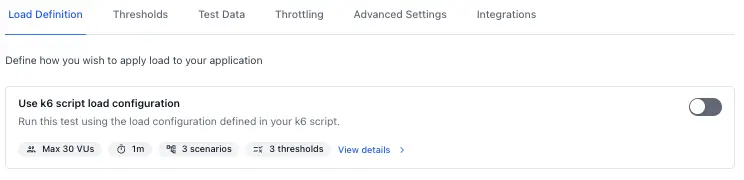
On Load Definition, find the Script load configuration card. It shows what BrowserStack read from your script: peak virtual users, duration, and the number of scenarios (k6) or thread groups (JMeter).
Here’s what the Load Definition tab looks like with the script configuration card:
Click View details to see the complete breakdown across all configuration fields:
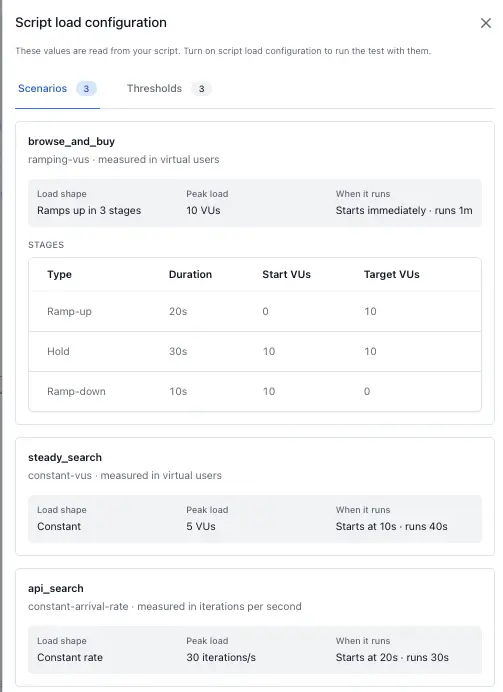
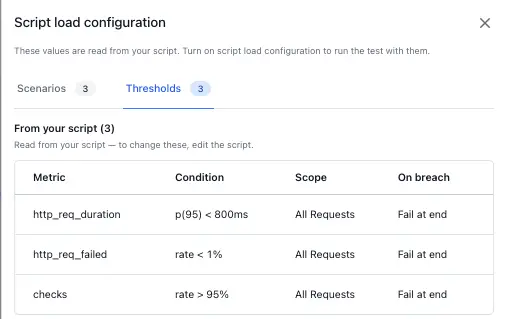
Turn on the toggle that runs the test using your script’s own configuration. When it’s on, the manual load fields are replaced by your script’s values.
Open the Thresholds tab. Under From your script, each threshold your script declares appears in a grid with the following columns:
| Column | Description |
|---|---|
| Metric | The metric the threshold is on, for example http_req_duration or checks. |
| Condition | The pass condition, for example p(95) < 500ms or rate < 1%. |
| Scope | The traffic the threshold applies to, for example all requests. |
| On breach | What happens if the threshold fails: fail at the end of the run, or abort the run. |
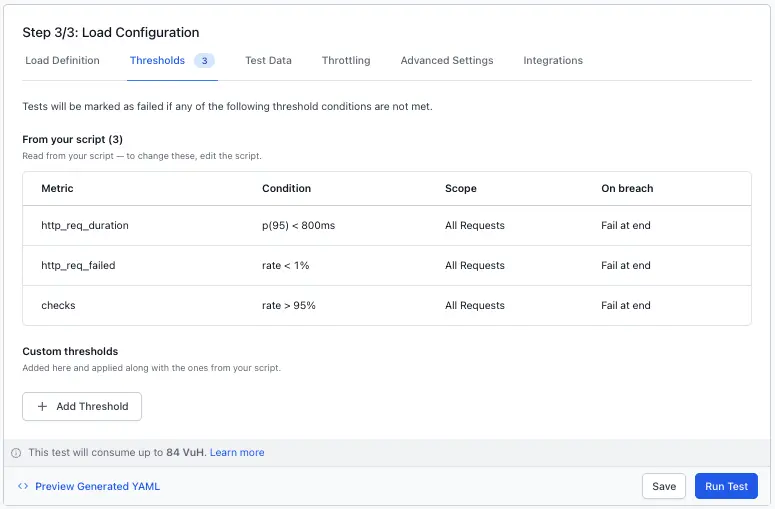
You can also add custom thresholds in the UI in addition to the thresholds defined in your test script. Use the Custom thresholds section on the Thresholds tab to add more pass or fail criteria that apply alongside your script’s thresholds.
Click Run Test.
Verify it worked
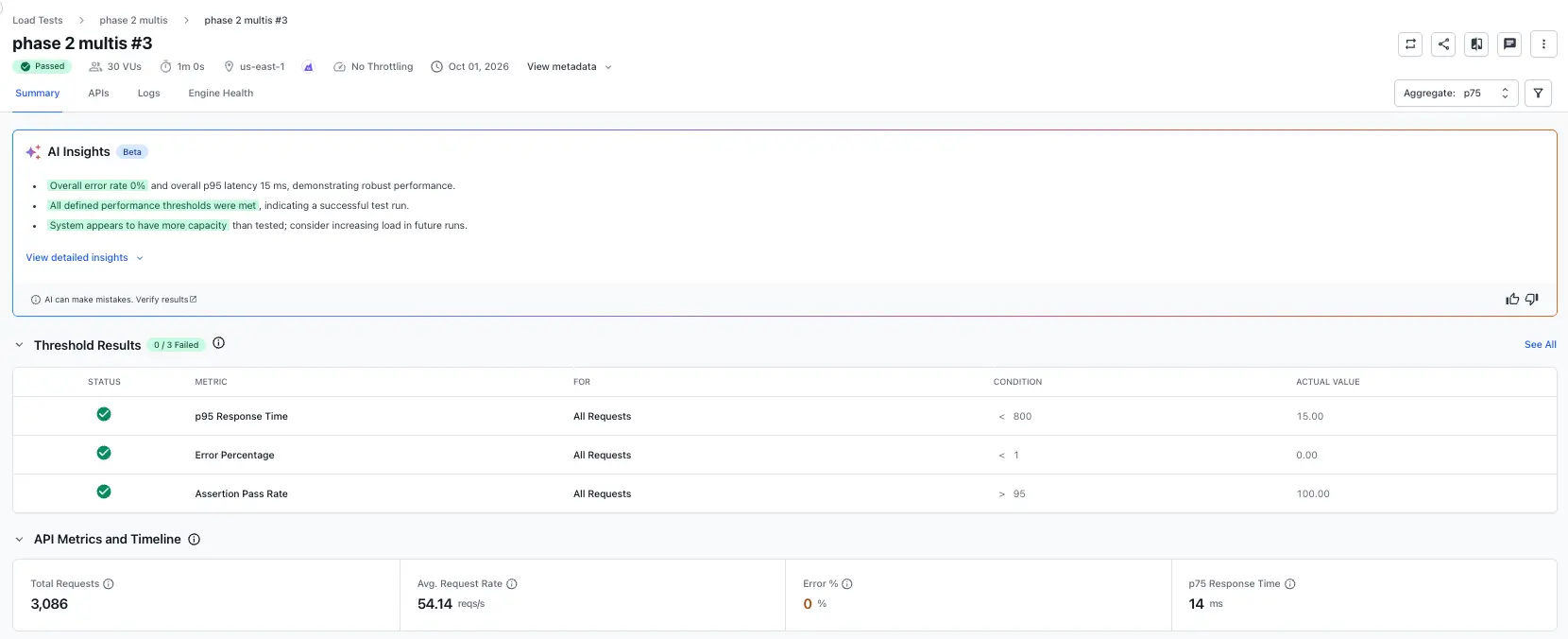
The run report lists each threshold from your script with its own pass or fail result, and shows the effective configuration with each value attributed to your script or to the platform:
Troubleshooting
A threshold is grayed out and marked not graded
BrowserStack can’t map it to a metric it grades, for example a tag-scoped k6 threshold. It still runs inside your script, but it doesn’t decide the BrowserStack verdict. Hover the warning for the specific reason.
VU limit exceeded when you start the run
Your script requests more virtual users than your plan allows. Lower the count in the script, or check your plan limit. BrowserStack doesn’t silently reduce it.
Nothing appears under From your script
Either run-as-authored mode is off, or your script declares no thresholds. Turn the toggle on, or add options.thresholds for k6 or assertions for JMeter.
The Locust test runs longer than expected
Your LoadTestShape class doesn’t end on its own, or your configuration file doesn’t set run-time. In both cases, the test runs until your plan’s maximum test duration. Return None from tick() when the test should stop, or set run-time in your configuration file.
What’s next
- Protocol load testing using k6: Get started with a k6 script on BrowserStack.
- Protocol load testing using JMeter: Get started with a JMeter script on BrowserStack.
- Protocol load testing using Locust: Get started with a Locust script on BrowserStack.
- Set thresholds: Define pass or fail criteria from the builder instead of your script.
We're sorry to hear that. Please share your feedback so we can do better
Contact our Support team for immediate help while we work on improving our docs.
We're continuously improving our docs. We'd love to know what you liked
We're sorry to hear that. Please share your feedback so we can do better
Contact our Support team for immediate help while we work on improving our docs.
We're continuously improving our docs. We'd love to know what you liked
Thank you for your valuable feedback!