
 Join our Discord
Network requirements and internal architecture
Understand the network rules your proxy needs to allow, and how the BrowserStack Local agent is built internally.
Once you understand how a Local Testing connection is set up, used, and torn down, the next things to check are the network rules your proxy and firewall need to allow, and how the BrowserStack Local agent is built internally.
Recommended network setup
BrowserStack Local can establish a Local Testing connection through most enterprise proxy servers and firewalls. It makes two types of outgoing connections, which may require dedicated rules in your proxy and firewall configuration.

| Connection type | Destination | Port | Purpose |
|---|---|---|---|
| HTTP(S) | local.browserstack.com |
80 and 443 | Web requests when your website opens in the remote browser, and AJAX calls that set up the Local Testing connection. |
| Secure WebSocket (WSS) | Repeater (*.browserstack.com) |
443 | The persistent, encrypted tunnel that carries test traffic between the repeater and your machine. |
Your proxy server must also support WebSockets and the CONNECT method to allow TLS/SSL connections through.
If your network uses SSL inspection, see Running Local with SSL inspection. For networks that need inbound rules instead, see Inbound IP whitelisting.
Internal architecture of BrowserStack Local
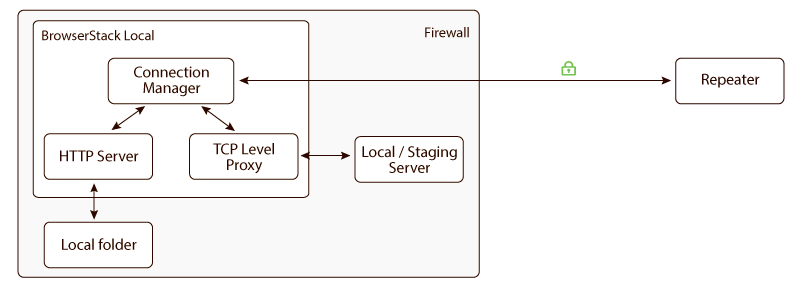
BrowserStack Local is built from three modules.
Connection manager
Authenticates you using your access key and establishes the secure connection to the repeater. It keeps the connection from dropping while you are testing and closes it when you disconnect.
TCP-level proxy
The Local Testing connection is designed to be a transparent communication channel between remote browsers on BrowserStack’s infrastructure and your local servers. Unlike traditional HTTP proxies, BrowserStack does not inspect request headers or any user data. Instead, BrowserStack Local establishes a TCP-level connection between the remote browser and your local server, which makes it possible to test HTTPS websites and technologies such as WebSockets.
HTTP server
This module applies to local folder testing only. When you test local HTML design files, BrowserStack Local starts a small HTTP server within the app on a random unprivileged port above 40000. The server has read-only access to the folder you specify, loads a file from disk only when it is requested, and does not cache file data. It shuts down when the Local Testing connection is disconnected.
This HTTP server is then treated as a local server, and the data flow described in how Local Testing works takes over.
Next steps
- Flags for Local to configure the agent for your network.
- Local App Troubleshooting Guide to resolve connection failures.
- IPsec site-to-site VPN setup guide if you prefer a network-level tunnel over a per-machine agent.
We're sorry to hear that. Please share your feedback so we can do better
Contact our Support team for immediate help while we work on improving our docs.
We're continuously improving our docs. We'd love to know what you liked
We're sorry to hear that. Please share your feedback so we can do better
Contact our Support team for immediate help while we work on improving our docs.
We're continuously improving our docs. We'd love to know what you liked
Thank you for your valuable feedback!