
 Join our Discord
How load test execution works
Learn how virtual users (VUs), engines, and load zones work together when you run a load test, and what happens at each stage of the run.
BrowserStack Load Testing runs your existing test scripts at scale in the cloud to simulate real user traffic on your website or API. When you start a test, BrowserStack turns your script and load configuration into VUs, runs them on cloud engines in the load zones you select, and combines the results into a single report.
The following diagram shows what you provide, what BrowserStack runs, where the load goes, and how the results come back to you:
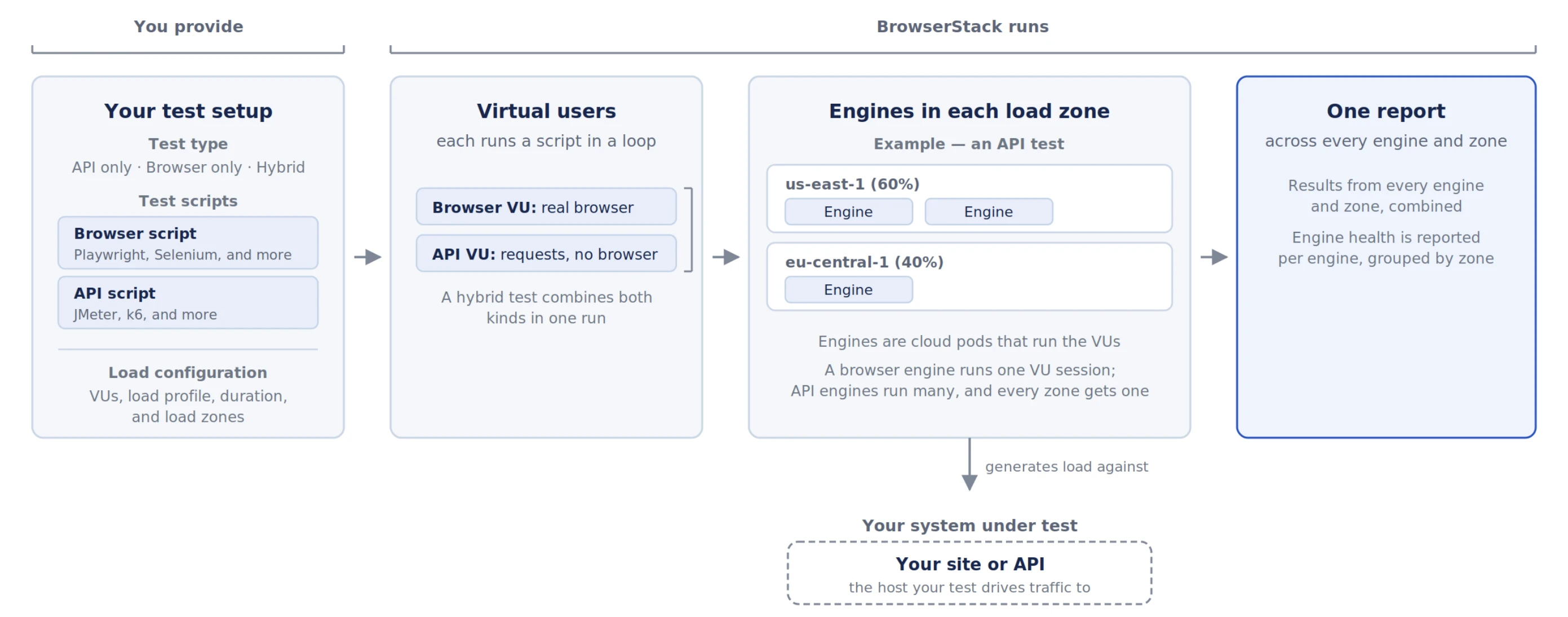
The following sections explain each part of this flow: VUs, engines, load zones, and the test report. The last section shows the stages a test goes through from start to finish.
Virtual users
A VU is one simulated user. Each VU runs your test script in a loop for the length of the test, at the same time as the other VUs.
How a VU generates load depends on the test type:
| Test type | What each VU does |
|---|---|
| Browser | Opens a real browser and runs your UI test script, like a user who loads pages and interacts with them. |
| API | Sends requests directly to your backend endpoints, without a browser. |
| Hybrid | Runs as a browser VU or an API VU. You choose how to split the VUs between the two. |
You also choose a load profile, which controls how the number of VUs changes during the test. You can choose from the following load profiles:
| Load profile | How VUs change over time |
|---|---|
| Constant VUs | The same number of VUs runs for the whole test. |
| Ramping VUs | VUs increase, hold, and decrease in stages. |
| Spike VUs | VUs burst to a peak, then return to a steady level. |
| Per VU iterations | Each VU runs your script a set number of times, then stops. |
| Throughput | BrowserStack adjusts the number of VUs to hold a target request rate. |
Some load profiles are available only for certain test types. For details, see Load profiles.
Engines
An engine is a cloud pod that runs your VUs and sends their traffic to your website or API. BrowserStack creates new engines for each test and removes them when the test ends, so you don’t need to set up any infrastructure. An API engine runs up to 1,000 VUs, while each browser VU runs in its own pod.
Load zones
A load zone is the location that your VUs send traffic from. You can run a test from one load zone or split it across several to simulate users in different locations.
For each load zone, you set a percentage of the total load. For example, a 50/50 split across two load zones sends half of your VUs from each one. Each load zone runs its share on its own engines, with at least one engine per load zone. For the list of available load zones, see Load zones.
If your website or API is behind a firewall, see Test private websites and APIs.
Test report
BrowserStack combines the results from every engine and load zone into one test report. You can follow the metrics while the test runs and review the full report after it ends.
The metrics in the report depend on the test type:
- Browser tests show what users experience, such as page load time and Web Vitals.
- API tests show how your backend performs, such as response times, throughput, and error rates.
- Hybrid tests show both.
The report also shows the health of each engine, grouped by load zone. For details on each part of the report, see browser test results, API test results, and hybrid test results.
Test run lifecycle
After you start a test, BrowserStack runs it through the following stages:
| Stage | What happens |
|---|---|
| Estimate | BrowserStack checks your plan limits, including whether you have enough VU Hours left to run the test. |
| Provision | BrowserStack creates engines in each load zone you selected. Each engine downloads your test script and installs its dependencies. |
| Execute | VUs run your script against your website or API, following your load profile. Metrics appear in your test report while the test runs. |
| Shut down | BrowserStack removes the engines and completes your report. |
What’s next
- Get started with browser load testing
- Get started with API load testing
- Get started with hybrid load testing
- Learn how VU Hours are calculated
We're sorry to hear that. Please share your feedback so we can do better
Contact our Support team for immediate help while we work on improving our docs.
We're continuously improving our docs. We'd love to know what you liked
We're sorry to hear that. Please share your feedback so we can do better
Contact our Support team for immediate help while we work on improving our docs.
We're continuously improving our docs. We'd love to know what you liked
Thank you for your valuable feedback!