
 Join our Discord
Exploratory testing
Explore how to create, manage, and close exploratory sessions in BrowserStack Test Management.
Run unscripted, time-boxed testing sessions and capture every finding in a single auditable log, without writing test cases first.
The problem Exploratory Sessions solve
Structured test runs in Test Management require you to define test cases before you can execute anything. That workflow is ideal for regression testing, but it creates friction when you need to test a new feature quickly, run a bug bash, or investigate an unstable area of your product.
Before the Exploratory Sessions, you had to use workarounds:
- Creating generic test cases like
TC1: Exploratory test for Homepageand dumping all findings into comments - Testing entirely outside Test Management in spreadsheets or Slack, or linking Jira issues to a test run as a stand-in for a test charter.
These workarounds produce no auditable coverage data and break the single-source-of-truth promise of a test management platform.
Exploratory Sessions solve this by introducing a first-class entity purpose-built for unstructured testing. You define a mission, start a timer, and log your findings as you go. No test cases required.
Exploratory Sessions vs Test Runs
Test Runs and Exploratory Sessions serve different testing needs. Understanding the distinction helps you pick the right tool for the job.
| Test Runs | Exploratory Sessions | |
|---|---|---|
| Test design | Requires pre-written test cases with defined steps and expected results. | No test cases needed. You log findings on the fly. |
| Structure | Each test case is executed and marked with a result. | A sequential timeline of log entries, each with its own status. |
| Time model | No built-in time constraint. | Time-boxed with a visible elapsed-time counter. |
| Best for | Regression testing, compliance verification, repeatable execution. | Feature discovery, bug bashes, ad-hoc investigation, smoke testing. |
| Output | Test case results (pass/fail per case). | A session log: a timestamped record of observations, bugs, and test outcomes. |
| Reports | Included in Test Run Reports, Test Plan Reports, and Dashboard widgets. | Not included in existing reports. |
Think of a Test Run as a checklist you work through. Think of an Exploratory Session as a flight log you build as you fly.
Session logging and bug bashing
The feature supports two distinct testing styles. You do not need to choose one. You can run a single session that includes both styles, or run separate sessions for each style.
-
Session logging works well when you need a complete audit trail of everything you tested. You log every action, marking entries as Pass, Fail, Note*, or other statuses. The session log itself is your deliverable. This approach is common in regulated environments or when stakeholders need proof of coverage.
-
Bug bashing works well when you want to find as many defects as possible in a focused timebox. You skip logging successful actions and focus on capturing bugs and linking them to your issue tracker. The list of defects you filed is your deliverable. This approach is common during pre-release testing or when a specific feature area is known to be unstable.
Exploratory sessions repository
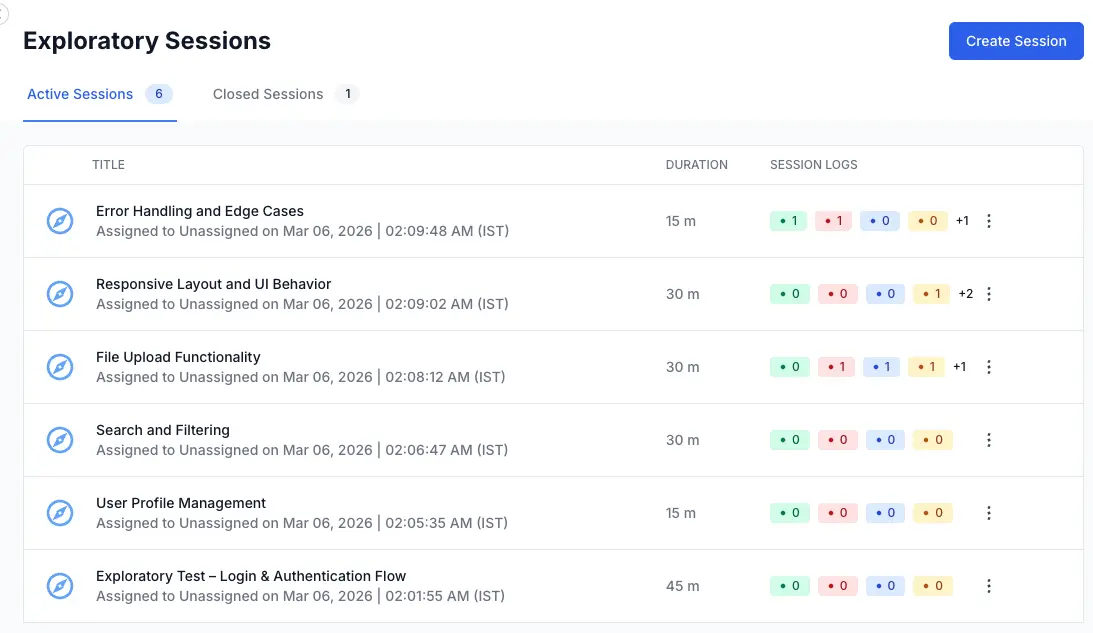
Exploratory Sessions live in the left navigation panel of your project, alongside Test Cases, Test Runs, and Test Plans. Click Exploratory Sessions to open the list view.
Key concepts
-
Session is the core entity. It represents a single time-boxed exploratory testing effort. A session has a title, a mission (description), a timebox duration, an assignee, and optional metadata like tags and configurations.
-
Session Log is the timeline of entries you create during a session. Each entry has rich text content, a status (Pass, Fail, Bug, Note, Blocked, or Retest), and a timestamp. The log is the primary output of an exploratory session.
-
Timebox is the planned duration for the session, set in minutes during creation. A visible elapsed-time counter on the session page helps you track adherence to the timebox. The counter does not auto-stop or lock the session when time runs out. It is a guide, not a gate.
-
Mission (also called Description) is the charter for the session. It defines the scope and goals of your testing. A good mission is specific enough to focus your testing but broad enough to allow discovery.
Example: Verify the new checkout flow handles edge cases in payment method selection.
Next steps
The pages that follow walk you through each part of the workflow:
-
Create an Exploratory Session covers setting up a new session with a title, timebox, mission, configurations, tags, and assignee.
-
Run an Exploratory Session covers the execution UI: adding log entries, setting statuses, using the timer, and working with the rich text editor.
-
Link issues to an Exploratory Session covers connecting your session to requirements (before testing) and defects (during testing) via Jira, Azure DevOps, and other supported integrations.
-
Edit, close, and delete Exploratory Sessions covers modifying session metadata, finalizing sessions, and permanently removing sessions.
-
Manage Exploratory Sessions covers the list view, session states, and session log counts.
We're sorry to hear that. Please share your feedback so we can do better
Contact our Support team for immediate help while we work on improving our docs.
We're continuously improving our docs. We'd love to know what you liked
We're sorry to hear that. Please share your feedback so we can do better
Contact our Support team for immediate help while we work on improving our docs.
We're continuously improving our docs. We'd love to know what you liked
Thank you for your valuable feedback!