What's in this edition
Featured Content | Product Updates | Community Updates | BrowserStack Testimonials
Featured Content
Website Scanner Just Got Smarter: Meet Your New AI Agents
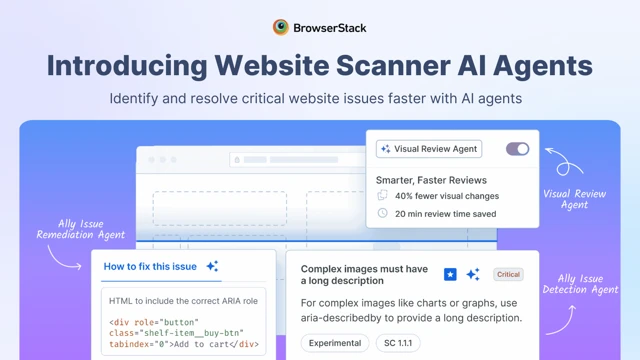
[PRODUCT UPDATE] Three new AI Agents are now live in Website Scanner. The Visual Review Agent cuts review time by 3x, the A11y Issue Detection Agent catches accessibility issues traditional tools miss, and the Remediation Agent helps you fix them fast. Smarter scans, fewer manual reviews.
Start scanning now!
Back to Top
Accessibility DevTools: Catch A11y Issues While Coding
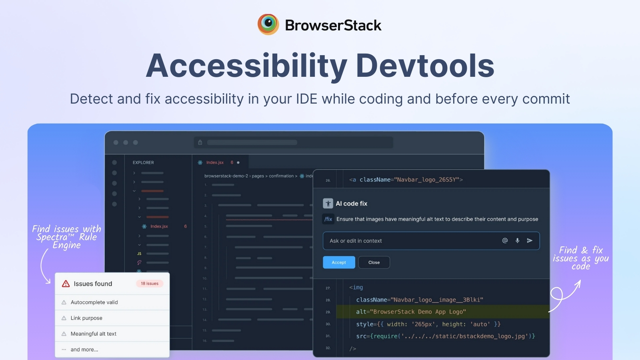
[NEW LAUNCH] Fixing accessibility bugs post-release costs 25x more than catching them during development. BrowserStack's Accessibility DevTools scans your code in real-time across 15 IDEs including VS Code, JetBrains, Xcode, and Cursor. It integrates with your AI coding assistant and blocks violations in CI/CD before they ship.
Install the extension for free!
Back to Top
Product Updates
Percy & App Percy| Website Scanner| App Accessibility| Design Accessibility| Dev Accessibility| Test Reporting & Analytics | Test Management | Low Code Automation
Percy & App Percy
- Enhanced Storybook support: You can now leverage advanced Storybook features with new support for MDX, Autodocs, and Shadow DOM, giving you even more flexibility in how you build and visually test your modern UI components.
Back to Top | Product Updates
Website Scanner
- Mobile browser support: You can now run Visual and Responsive Scans directly on mobile browsers, ensuring your website looks and performs beautifully across all screen sizes and devices.
- Customized spell checking: Tailor the Spell Scanner to your brand's unique vocabulary with custom dictionary support, allowing you to easily ignore specific terms or permanently add them to your approved word list.
- Streamlined reporting experience: We've updated our report navigation, establishing the Performance report as the default landing page so you can immediately see how fast your site loads before diving into deeper accessibility insights.
- More control over your scans: Enjoy a more deliberate scanning setup with our refreshed interface. You can now explicitly select and order the specific scan types you need, giving you total control over what gets checked on your site.
Back to Top | Product Updates
App Accessibility
- Workflow Analyzer Report APIs: Easily export your Workflow Analyzer data directly into your custom internal dashboards using our newly launched Report APIs.
- WCAG 2.2 AA compliance: Our App Accessibility product is now fully WCAG 2.2 AA compliant, ensuring your accessibility testing aligns with the latest and most rigorous global standards.
Back to Top | Product Updates
Design Accessibility
- Advanced text contrast checking: Drastically reduce false positives with our improved contrast checker, which now intelligently evaluates text readability against complex backgrounds like images and gradients.
Back to Top | Product Updates
Dev Accessibility
- Jetpack Compose support: You can now run accessibility linting directly within the Jetpack Compose framework, helping you catch and fix accessibility issues early in your Android development process.
- AI-powered component linting: We've launched v2 of our Custom Component Linting feature, now seamlessly integrated with AI to provide even smarter, more accurate accessibility checks for your custom UI components.
Back to Top | Product Updates
Test Reporting & Analytics
- Enterprise subdomain support: Meet your strict security and IP whitelisting requirements with new support for Enterprise subdomains, giving your team secure, compliant access to your test reports.
- Plan-specific feature alignment: We've streamlined access to Pro-tier reporting features, ensuring your dashboard experience and toolset accurately reflect the capabilities included in your specific Automate or App Automate plan.
- Build-level session view: Easily navigate your test results with a dedicated view that lists all sessions associated with a specific build, bringing the familiar, intuitive experience of the Automate and App Automate dashboards directly into your analytics.
- Automated failure categorization: Triage issues faster by defining custom rules and patterns that automatically categorize your test failures, giving your team clearer insights into what broke and why.
Back to Top | Product Updates
Test Management
- Customizable PDF reports: Export Test Run PDFs that perfectly mirror your custom dashboard views ("My Fields"), ensuring complete readability and reporting consistency for every QA lead.
- Unified test run groups: Flexibly switch between list and grouped views across both parent and sub-test plans. This new view provides a clear hierarchy and easy public sharing options to keep your entire team aligned.
- Enhanced security for test data: Administrators can now disable public link sharing for sensitive test data at the workspace level, providing strict control over who can view and share your proprietary testing information.
Back to Top | Product Updates
Low Code Automation
- Dynamic environment variables: Global variables now support environment-specific values. You can easily define custom environments and associate them directly with your test suites for much more flexible and scalable test execution.
- Expanded device coverage: We've added 17 new mobile devices to the platform, expanding your testing coverage to ensure your low-code automated tests run flawlessly across the latest hardware.
- Smarter hidden element handling: Our enhanced algorithm now intelligently distinguishes between active UI elements and their hidden structural duplicates. This prevents frustrating locator failures on complex sites while accurately diagnosing when a target element is present but not interactable.
- More resilient UI testing: We've upgraded our element-finding logic with smarter tie-breaking and dynamic attribute matching. Your automated UI tests will remain highly stable and reliable, even as your application's underlying code and page structure constantly evolve.
Back to Top | Product Updates
Love BrowserStack? Tell us about it!
Community Updates
[Case study] TUI automates compliance and shifts left with BrowserStack Accessibility suite
In this episode of BrowserStack Talks, host David Burns sits down with Simon Stewart—creator of WebDriver and a driving force behind Selenium.
They unpack:
- How real-world testing challenges led to the creation of WebDriver
- The evolution of the WebDriver API and its path to W3C standardization
- Why “perceived safety” matters more than exhaustive testing
- How TDD helps teams focus on risk and build better software
A must-watch for QA leaders shaping modern testing strategies.
Tune in: Web testing in 2026 |Webdriver founding story | BrowserStack Talks
We're looking for speakers for our upcoming BrowserStack QA Meetups in your city! If you have valuable insights, experiences, or innovative ideas to share, we want to hear from you. Fill out the form to volunteer as a speaker and help us bring engaging and educational content to our meetups. Join us in making a positive impact on the QA community!
Apply to Speak Now

