What's in this edition
Featured Content | Product Updates | Community Updates | BrowserStack Testimonials
Featured Content
Presenting #Stacked2025: The BrowserStack Year in Review
[COMMUNITY] 408 million late-night sessions. 97 million Friday-after-5 PM deploys. 765,000 tests on Internet Explorer. We crunched the numbers on how developers and QAs broke—and fixed—the internet in 2025. Equal parts impressive, relatable, and a little chaotic. Check out the #Stacked2025 carousel for a snapshot of the year every QA and developer lived through.
View the recap on LinkedIn!
Test Failure Analysis Agent: Debug Test Failures upto 95% Faster
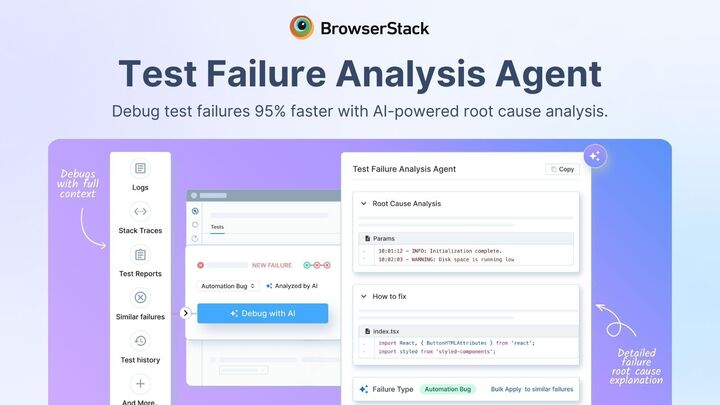
[NEW PRODUCT] BrowserStack's Test Failure Analysis Agent is now live in Test Reporting & Analytics. The agent automatically analyzes test reports, logs, stack traces, and execution history to identify root causes when tests fail. Get instant failure categorization (production bug, automation error, or environment issue) and actionable next steps for remediation.
Try now!
Back to Top
Product Updates
App Automate | Percy & App Percy| Website Scanner| Dev Accessibility| Test Reporting & Analytics | Low Code Automation
App Automate
- Enhanced certificate management: You can now upload
.mobileconfigcertificates and utilize multiple certificates within a single App Automate session, allowing for more complex and secure testing environments. - Expanded app resigning capabilities: In addition to your primary application, you can now choose to resign secondary apps (
otherApps) during a session, ensuring seamless authorization across your entire app ecosystem.
Percy & App Percy
- Streamlined visual testing for Tosca: Introducing Percy Web support for Tricentis Tosca, allowing teams to seamlessly integrate automated visual reviews into their existing Tosca workflows.
- Automated Figma-to-Production comparisons: You can now auto-refresh designs from Figma for baseline creation, enabling faster, more accurate comparisons between your design files and production/staging environments.
- Enhanced Android testing for App Percy: We now support the Appium Espresso Driver for App Percy sessions, providing faster and more reliable visual testing for native Android applications.
- Precision visual coverage in Nightwatch.js: You can now launch code-based regions within Nightwatch.js, giving you granular control over which parts of your UI are captured or ignored during visual scans.
- Faster Root Cause Analysis (RCA): New UI enhancements now display the element class immediately upon hover within the review UI, significantly speeding up the debugging process.
Website Scanner
- Real-time collaboration via Slack: You can now receive instant notifications on Slack (and other integrated tools) as soon as a scan is completed, ensuring your team can act on results immediately.
- Actionable performance insights: The Performance Scanner now provides specific suggestions to fix identified issues, helping you optimize page speed and user experience with less manual investigation.
- Configurable scan delays: You can now add a custom delay before a scan begins, ensuring heavy pages are fully loaded and all dynamic elements are captured accurately.
- Improved scan transparency: We’ve added visibility into failed or duplicated URLs, allowing you to quickly identify which pages were excluded from a scan and why.
Back to Top | Product Updates
Dev Accessibility
- Integrated SwiftUI Linting for Xcode: You can now leverage native linting support for the SwiftUI framework during iOS development, enabling you to enforce coding standards and catch potential errors directly within the Xcode IDE.
Back to Top | Product Updates
Test Reporting & Analytics
- Expanded framework support for CAD: TRA now supports Maestro and Flutter. New users on these frameworks can now skip legacy setups and start directly with it.
- Automated test unmuting configuration: A new auto-unmuting configuration has been added to the test muting flow, allowing you to better manage test lifecycles by automatically re-enabling tests once specific conditions are met.
Back to Top | Product Updates
Low Code Automation
- Visual testing for low-code automation: You can now enable visual testing on recorded test steps, allowing you to perform visual and functional testing simultaneously without any additional effort.
- Private database support: Establish secure connections to internal databases for comprehensive end-to-end testing, allowing you to validate data-driven scenarios without exposing internal systems.
- Chrome flags support: You can now record and run tests with specific browser flags—such as microphone, location, and more—to expand coverage for advanced hardware and edge-case scenarios.
Back to Top | Product Updates
Love BrowserStack? Tell us about it!
Community Updates
[Case study] Clari achieves 95% test stability with AI-powered Test Reporting & Analytics
Connect with fellow professionals, resolve product queries, and share knowledge in our vibrant online community.
Join Now
Community Voices: Testing Stories from Our Community
Meet the lucky winners from our recent Discord contest! From enterprise SDETs to students, discover how our community leverages BrowserStack App Automate and learn their pro tips for effective testing.
Discover Community Stories
We're looking for speakers for our upcoming BrowserStack QA Meetups in your city! If you have valuable insights, experiences, or innovative ideas to share, we want to hear from you. Fill out the form to volunteer as a speaker and help us bring engaging and educational content to our meetups. Join us in making a positive impact on the QA community!
Apply to Speak Now

